SourceOne Email Management: Unable to upgrade or uninstall SourceOne console
Summary: Unable to upgrade or uninstall SourceOne console. Error: Error 1316.The specified account already exists
This article applies to
This article does not apply to
This article is not tied to any specific product.
Not all product versions are identified in this article.
Symptoms
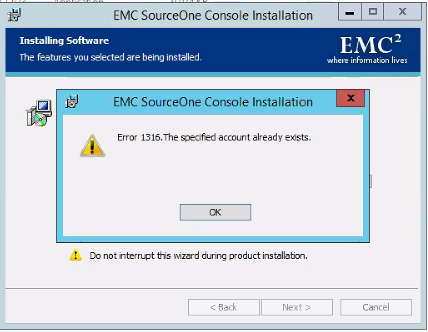
Unable to upgrade or uninstall SourceOne console. When, you try to perform SourceOne Console upgrade or Uninstall your see the following error message:
"Error 1316.The specified account already exists."
Cause
The issue is caused by a damaged or altered image of the installed package.
Resolution
In order, to properly uninstall use the Microsoft tool to remove/uninstall software.
You can download the tool from following link: https://support.microsoft.com/en-au/help/17588/windows-fix-problems-that-block-programs-being-installed-or-removed
After uninstall old SourceOne Console version, you can install the new version.
You can download the tool from following link: https://support.microsoft.com/en-au/help/17588/windows-fix-problems-that-block-programs-being-installed-or-removed
After uninstall old SourceOne Console version, you can install the new version.
Affected Products
SourceOneProducts
SourceOne, SourceOne Email ManagementArticle Properties
Article Number: 000063452
Article Type: Solution
Last Modified: 18 Apr 2026
Version: 5
Find answers to your questions from other Dell users
Support Services
Check if your device is covered by Support Services.