Manual Mobile Broadband Activation Assistance
Summary: This article provides information about how to obtain the mobile broadband card International Mobile Equipment Identity (IMEI) number for activation.
This article applies to
This article does not apply to
This article is not tied to any specific product.
Not all product versions are identified in this article.
Symptoms
Cause
No cause information is available.
Resolution
IMEI Number
To manually activate, Mobile Broadband (MMB) or Wireless Wide Area Network (WWAN) cards you must obtain the International Mobile Equipment Identity (IMEI) number for the card. Below are instructions to obtain the IMEI number with the use of the Command Prompt.
- For Windows 10, press the Windows + X keys. Click Command Prompt (Admin) to open in Administrator mode.
Command Prompt Options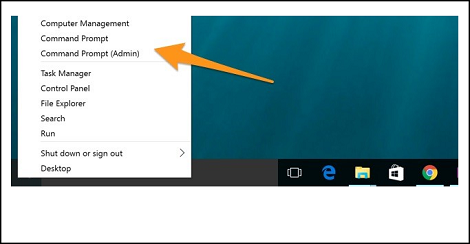
- To find the device information for a device on your local system, use the following command in the Command Prompt:
netsh mbn show interface
Press the Enter key.
netsh mbn show interface Command.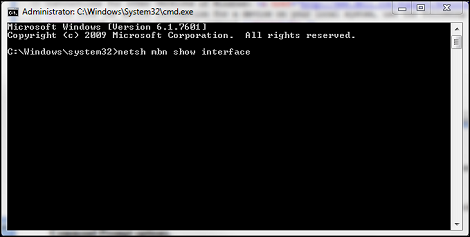
- The device id is the IMEI number.
Command Prompt Device ID.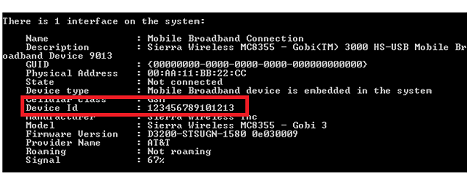
If the WWAN Service is disabled, a message displays in the Command Prompt: "Mobile Broadband Service (wwansvc) is not running."
(wwansvc) Not Running
Option 1 to start the service:
- Activate the service with a Command Prompt command.
- Open Command Prompt again and type:
net start wwanSvc
Press the Enter key.
Option 2 to start the service:
- Activate the service in the Services menu.
- Open Command Prompt again and type:
services.msc
Press the Enter key. - Find "WWAN AutoConfig."
WWAN AutoConfig Service
- Double-click the WWAN Service entry and it should open the WWAN Service general tab.
WWAN Service General Tab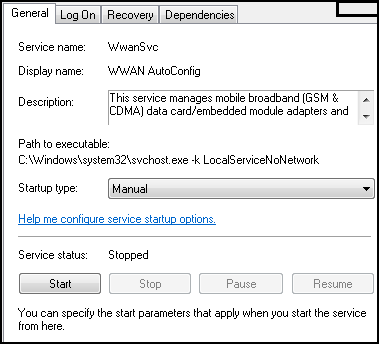
- Change the Startup Type to: Automatic.
- Click the Start Button.
- Once the service successfully starts, retry the "
netsh mbn show interface" from the command prompt to capture the IMEI number.
Note: Without the IMEI number, the activation cannot occur. The next option (not recommended as it may introduce further complications) is to open the battery and system cover to find the IMEI number sticker.
You can now contact your carrier (Verizon, T-Mobile, AT&T, so forth) to activate the card.
Affected Products
Dell Wireless 5505-Vodafone Mobile Broadband (3G HSDPA) Mini-Card, Dell Wireless 55XX-Cingular Mobile Broadband (3G HSDPA) Mini-Card, Dell Wireless 57XX-Sprint Mobile Broadband (CDMA EV-DO) Mini-Card
, Dell Wireless 57XX-TELUS Mobile Broadband (CDMA EV-DO) Mini-Card, Dell Wireless 57XX-Verizon Mobile Broadband (CDMA EV-DO) Mini-Card
...
Article Properties
Article Number: 000130127
Article Type: Solution
Last Modified: 11 Nov 2025
Version: 7
Find answers to your questions from other Dell users
Support Services
Check if your device is covered by Support Services.