PowerStore:无法通过 GUI 将身份验证从简单修改为 Kerberos(错误0xE08010050005)
Summary: 在未配置 SMB 服务器时,将 NAS 服务器 LDAP 身份验证从简单修改为 Kerberos 可能会失败,并0xE08010050005错误。
This article applies to
This article does not apply to
This article is not tied to any specific product.
Not all product versions are identified in this article.
Symptoms
情景步骤:
1.创建仅启用 NFS 的 NAS 服务器。
2.在上述创建的 NFS 服务器上配置了具有简单身份验证的 LDAP。
2.在 NFS 服务器上创建了独立 Kerberos。
3.尝试将身份验证从简单修改为 Kerberos,修改失败,并显示错误消息:由于 [ 需要加入域的 SMB 服务器才能完成此操作] 修改文件 LDAP 失败
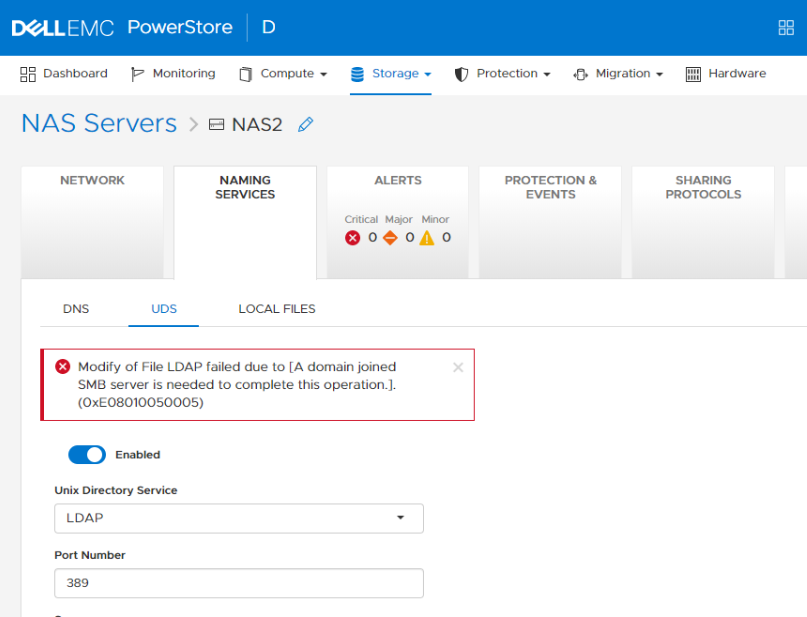
1.创建仅启用 NFS 的 NAS 服务器。
2.在上述创建的 NFS 服务器上配置了具有简单身份验证的 LDAP。
2.在 NFS 服务器上创建了独立 Kerberos。
3.尝试将身份验证从简单修改为 Kerberos,修改失败,并显示错误消息:由于 [ 需要加入域的 SMB 服务器才能完成此操作] 修改文件 LDAP 失败
Cause
如果未配置 SMB 服务器详细信息,并且用户尝试将 LDAP 从简单修改为 Kerberos,则由于此转移中的软件问题,更新将失败。
Resolution
通过 REST API 创建 SMB 服务器。
curl -X POST "http://[ClusterIP]:3085/api/types/smbServer/instances" "Content-Type: application/json" -d "

{ \"nasServer\": \"string\", \"isStandalone\": true, \"computerName\": \"string\", \"domain\": \"string\", \"netbiosName\": \"string\", \"workgroup\": \"string\", \"description\": \"string\", \"localAdminPassword\": \"string\"}
Affected Products
PowerStoreArticle Properties
Article Number: 000202157
Article Type: Solution
Last Modified: 10 Aug 2022
Version: 1
Find answers to your questions from other Dell users
Support Services
Check if your device is covered by Support Services.