PowerProtect: Montagefout voor bestandssysteem tijdens herstel op bestandsniveau op Linux
Summary: Herstel op bestandsniveau van PowerProtect Data Manager File System mislukt tijdens de koppelingsfase.
This article applies to
This article does not apply to
This article is not tied to any specific product.
Not all product versions are identified in this article.
Symptoms
Bestandssysteem herstel op bestandsniveau kan niet worden gekoppeld op Linux.
Mogelijke foutcode:
ARA0002Mislukking: Kan FILE_SYSTEM asset /home niet herstellen vanwege een agentprobleem.
Opmerking: De bovenstaande activa veranderen afhankelijk van de selectie
van activaLees verder:
Algemene fout tijdens koppelingsbewerking: fout bij het ophalen van kopie-updates

Mogelijke foutcode:
ARA0002Mislukking: Kan FILE_SYSTEM asset /home niet herstellen vanwege een agentprobleem.
Opmerking: De bovenstaande activa veranderen afhankelijk van de selectie
van activaLees verder:
Algemene fout tijdens koppelingsbewerking: fout bij het ophalen van kopie-updates
Cause
Op een vanilla machine-implementatie voor Linux is ::1 standaard aanwezig in het /etc/hosts-bestand .
Als IPV6 is ingeschakeld, retourneert pingen localhost niet de vereiste 127.0.0.1 wanneer PowerProtect Data Manager agent communiceert met een lokale REST-server.
Als IPV6 is ingeschakeld, retourneert pingen localhost niet de vereiste 127.0.0.1 wanneer PowerProtect Data Manager agent communiceert met een lokale REST-server.
Een huidige vereiste van het product is dat het antwoord op ping localhost 127.0.0.1 moet zijn.
In dit geval stuurde het ::1
Voorbeeld:
# ping localhost
PING localhost(localhost (::1)) 56 data bytes
64 bytes from localhost (::1): icmp_seq=1 ttl=64 time=0.053 ms
64 bytes from localhost (::1): icmp_seq=2 ttl=64 time=0.042 ms
64 bytes from localhost (::1): icmp_seq=3 ttl=64 time=0.039 ms
Resolution
1. Bewerk met VI/VIM het bestand /etc/hosts op de doel-VM voor het herstel.
# vi /etc/hosts
2. Reageer op het ::1-item en sla het gewijzigde bestand op.
Voor:

Na:
3. Voer de ping localhost opnieuw uit en je zou 127.0.0.1 moeten zien terugkeren en niet ::1.
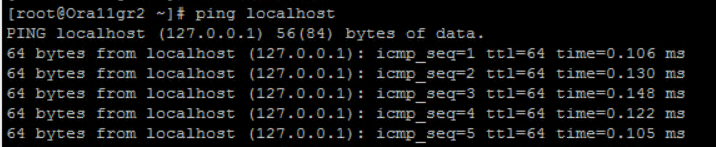
# vi /etc/hosts
2. Reageer op het ::1-item en sla het gewijzigde bestand op.
Voor:
Na:
3. Voer de ping localhost opnieuw uit en je zou 127.0.0.1 moeten zien terugkeren en niet ::1.
Article Properties
Article Number: 000219300
Article Type: Solution
Last Modified: 26 Feb 2024
Version: 2
Find answers to your questions from other Dell users
Support Services
Check if your device is covered by Support Services.