Dell EMC Unity: How to disable or enable ESRS? (User Correctable)
Summary: Customer can self disable enable integrated eSRS service in Unity over Unisphere or Uemcli.
This article applies to
This article does not apply to
This article is not tied to any specific product.
Not all product versions are identified in this article.
Instructions
How to disable and enable the ESRS?
Either use uemcli or Unisphere interface to perform a service restart.
A) UEMCLI :
If you use integrated ESRS:
1. Run uemcli commands from a host where you have installed uemcli , disable the esrs using the below command:
uemcli -u local/admin -p [password] /or -securepassword /sys/support/esrsi set -enable no
2.Then refresh the unisphere and enable it through the below command then refresh the unishpere again.
uemcli -u local/admin -p [password] /or -securepassword /sys/support/esrsi set -enable yes
If you use centralized ESRS:
1. uemcli can be executed from host installed client or otherwise from shs console interface:
uemcli [-d unity-ip] -u local/admin -p [password] /or -securepassword /sys/support/esrsc set -enable no
2. Please wait 10 seconds and re-enable ESRSI .
uemcli [-d unity-ip] -u local/admin -p [password] /or -securepassword /sys/support/esrsc set -enable yes
Unisphere:
1. To disable the esrs , in Unisphere, go to
System > Service > Overview > EMC Secure Remote Services > disabled > Finish

2. To enable the esrs , in Unisphere, go to
System > Service > Overview > EMC Secure Remote Services > Then choose integrated or centralized and click Next
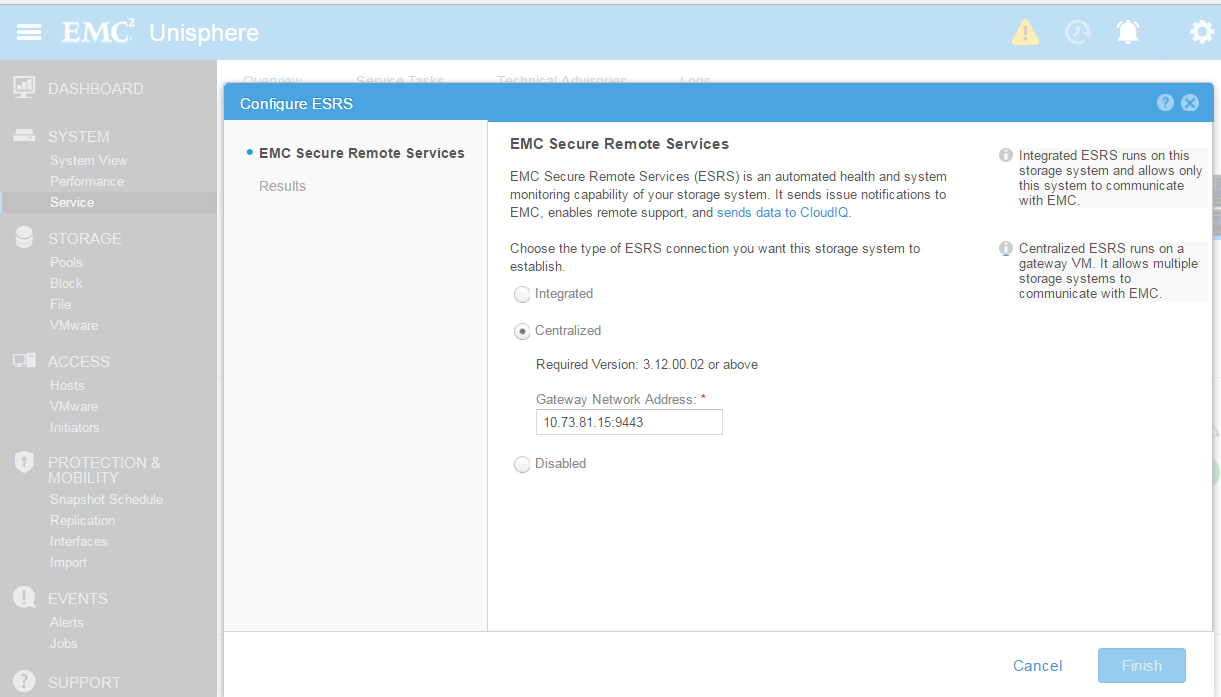
Either use uemcli or Unisphere interface to perform a service restart.
A) UEMCLI :
If you use integrated ESRS:
1. Run uemcli commands from a host where you have installed uemcli , disable the esrs using the below command:
uemcli -u local/admin -p [password] /or -securepassword /sys/support/esrsi set -enable no
2.Then refresh the unisphere and enable it through the below command then refresh the unishpere again.
uemcli -u local/admin -p [password] /or -securepassword /sys/support/esrsi set -enable yes
If you use centralized ESRS:
1. uemcli can be executed from host installed client or otherwise from shs console interface:
uemcli [-d unity-ip] -u local/admin -p [password] /or -securepassword /sys/support/esrsc set -enable no
2. Please wait 10 seconds and re-enable ESRSI .
uemcli [-d unity-ip] -u local/admin -p [password] /or -securepassword /sys/support/esrsc set -enable yes
Unisphere:
1. To disable the esrs , in Unisphere, go to
System > Service > Overview > EMC Secure Remote Services > disabled > Finish
2. To enable the esrs , in Unisphere, go to
System > Service > Overview > EMC Secure Remote Services > Then choose integrated or centralized and click Next
Additional Information
Unity version 4.1 and above allows a service restart over servicibility console (login as service over ssh and perform):
Usage: svc_esrs_ve [OPTION]
Maintain the ESRS service, configuration and connection. This command should be run on the primary storage processor (SP).
NOTE that integrated ESRS only commands are not supported on UnitySA.
Options:
-s, --status Display current ESRS configuration and status.
-r, --restart Restart the integrated ESRS services.
--reenable Re-enable integrated or centralized ESRS if current enabled ESRS doesn't work normally.
--forcedisable Force disable centralized ESRS.
--syncmgmt Synchronize management IP address to ESRS servers in case management IP address changes.
--networkcheck Check network connetivity for integrated ESRS.
--mtu [value] Modify MTU for integrated ESRS and management interface.
Maximum value is 1500 and default is 1300 if not specified.
--cleanup Clean up the integrated ESRS configuration.
-h, --help Display help and exit.
Usage: svc_esrs_ve [OPTION]
Maintain the ESRS service, configuration and connection. This command should be run on the primary storage processor (SP).
NOTE that integrated ESRS only commands are not supported on UnitySA.
Options:
-s, --status Display current ESRS configuration and status.
-r, --restart Restart the integrated ESRS services.
--reenable Re-enable integrated or centralized ESRS if current enabled ESRS doesn't work normally.
--forcedisable Force disable centralized ESRS.
--syncmgmt Synchronize management IP address to ESRS servers in case management IP address changes.
--networkcheck Check network connetivity for integrated ESRS.
--mtu [value] Modify MTU for integrated ESRS and management interface.
Maximum value is 1500 and default is 1300 if not specified.
--cleanup Clean up the integrated ESRS configuration.
-h, --help Display help and exit.
Affected Products
Dell EMC Unity FamilyProducts
Dell EMC Unity FamilyArticle Properties
Article Number: 000022632
Article Type: How To
Last Modified: 17 Oct 2025
Version: 3
Find answers to your questions from other Dell users
Support Services
Check if your device is covered by Support Services.