Dell EMC XC/XC Core: Booting to a Phoenix image fails with "error: file '/boot/kernel' not found"
Summary: Phoenix is an ISO-based installer that can be used to perform installation tasks. This article describes the "error: file '/boot/kernel' not found" and the resolution.
This article applies to
This article does not apply to
This article is not tied to any specific product.
Not all product versions are identified in this article.
Symptoms
Description
The Dell EMC XC Family of HCI products combines our PowerEdge servers with Nutanix software to provide enterprise-class solutions for all virtualized workloads. XC Series solutions have been deployed across almost every major vertical industry. Processor, memory and storage configurations can be tailored to meet the requirements of specific use cases.Phoenix is an ISO-based installer that can be used to perform installation tasks on bare-metal hardware one node at a time. When booting to a Phoenix image, you may encounter the following error:
error : file '/boot/kernel' not found.
error : you need to load the kernel first.
Press any key to continue...
Failed to boot both default and fallback entries.
Press any key to continue...
error : you need to load the kernel first.
Press any key to continue...
Failed to boot both default and fallback entries.
Press any key to continue...
The screenshot below shows how the error will appear to the user.
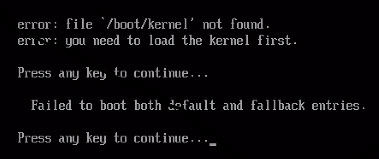
Figure 1: Screenshot of "error : file '/boot/kernel' not found."
Cause
-
Resolution
Solution
This issue occurs because Nutanix software only supports BIOS mode. To resolve the issue please follow the instructions below:- Verify in the BIOS, that the Boot Settings are set to "BIOS Mode" and not "UEFI".
- If the hypervisor has already been installed, the hypervisor will need to be reinstalled after changing to BIOS mode.
- Re-run Phoenix again.
Affected Products
Dell XC720XD Hyper-converged Appliance, Dell XC430 Hyper-converged Appliance, Dell XC430 Xpress Hyper-converged Appliance, Dell XC630 Hyper-converged Appliance, Dell XC6320 Hyper-converged Appliance, Dell EMC XC Series XC640 Appliance
, Dell EMC XC Series XC6420 Appliance, Dell XC730 Hyper-converged Appliance, Dell XC730XD Hyper-converged Appliance, Dell EMC XC Series XC740xd Appliance, Dell EMC XC Series XC940 Appliance
...
Article Properties
Article Number: 000137850
Article Type: Solution
Last Modified: 28 Sept 2021
Version: 4
Find answers to your questions from other Dell users
Support Services
Check if your device is covered by Support Services.