Slow Wired Internet Speed or Packet Loss on a Dell Pro Laptop
Summary: Learn how to resolve slow wired network connection or packet loss observed on a Dell Pro laptop.
This article applies to
This article does not apply to
This article is not tied to any specific product.
Not all product versions are identified in this article.
Symptoms
Packet loss or slow network speed may be observed. The issue occurs when integrated RJ45 Ethernet interface is used to ping any website address or server IP address with Command Prompt.
One of the following symptoms may also occur:
- Slow Ethernet Connection
- Slow Ethernet Performance
- Poor Internet Speed
- Packet Loss on Ethernet Port
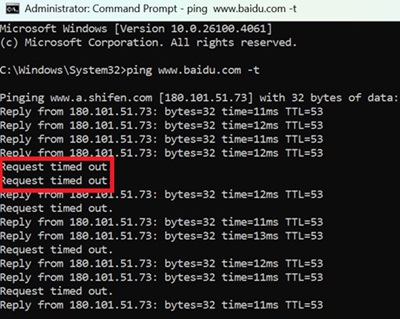
Affected Platforms:
- Dell Pro 14 Plus PB14250
- Dell Pro 16 Plus PB16250
Cause
The cause is related to the Intel LAN driver.
Resolution
Note: Before starting the update, perform the following:
- Back up all personal data. For more information, refer to Back Up and Recovery.
- Connect the AC adapter.
Updating the Intel PCIe Ethernet Controller Driver to version 20.0.3.21, A05 or later on the computer resolves the issue. To download and install the driver, refer to the Driver Update Guide.
Affected Products
Dell Pro 14 Plus PB14250, Dell Pro 16 Plus PB16250Article Properties
Article Number: 000382741
Article Type: Solution
Last Modified: 01 Dec 2025
Version: 4
Find answers to your questions from other Dell users
Support Services
Check if your device is covered by Support Services.