Dell Pro 笔记本电脑上的有线互联网速度缓慢或数据包丢失
Summary: 了解如何解决在 Dell Pro 笔记本电脑上观察到的有线网络连接缓慢或数据包丢失问题。
This article applies to
This article does not apply to
This article is not tied to any specific product.
Not all product versions are identified in this article.
Symptoms
可能会观察到数据包丢失或网络速度缓慢。当集成 RJ45 以太网接口用于通过命令提示符对任何网站地址或服务器 IP 地址执行 ping作时,会出现此问题。
还可能会出现以下症状之一:
- 以太网连接速度缓慢
- 以太网性能下降
- 网速不佳
- 以太网端口上的数据包丢失
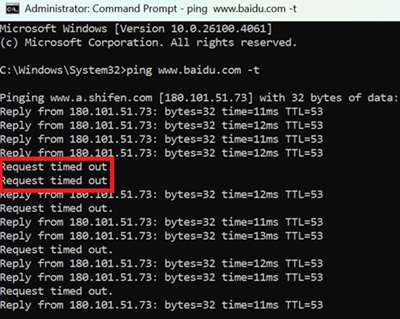
受影响的平台:
- 戴尔 Pro 14 Plus PB14250
- 戴尔 Pro 16 Plus PB16250
Cause
原因与英特尔 LAN 驱动程序有关。
Resolution
提醒:开始更新之前,请执行以下作:
- 备份所有个人数据。有关详细信息,请参阅 备份和恢复。
- 连接交流适配器。
将计算机上的英特尔 PCIe 以太网控制器驱动程序更新到版本 20.0.3.21、A05 或更高版本可解决此问题。要下载并安装驱动程序,请参阅 驱动程序更新指南。
Affected Products
Dell Pro 14 Plus PB14250, Dell Pro 16 Plus PB16250Article Properties
Article Number: 000382741
Article Type: Solution
Last Modified: 01 Dec 2025
Version: 4
Find answers to your questions from other Dell users
Support Services
Check if your device is covered by Support Services.