PowerMax: What to do if the Data Reduction Ratio is less than expected
Summary: As part of the Dell Future-Proof Program, Customers can make claims against DELL TECHNOLOGIES POWERSTORE/POWERMAX DATA REDUCTION GUARANTEE TERMS AND CONDITIONS. These claims are made by submitting a support service request. This article outlines validation steps, remediation requirements, and how to submit a claim. In addition, it explains Data Reduction Ratio (DRR) and specifics about the guarantee requirements. ...
This article applies to
This article does not apply to
This article is not tied to any specific product.
Not all product versions are identified in this article.
Instructions
DELL TECHNOLOGIES POWERSTORE/POWERMAX DATA REDUCTION GUARANTEE TERMS AND CONDITIONS. This document reflects the requirements outlined in the standard guarantee and in no way supersedes any prior standard or custom data reduction guarantees. PowerMax systems installed after 01 October 2024 are generally subject to the standard terms and conditions.
Quick Check
Ensure that you are referring to the correct information when considering a claim. Click here for additional claim requirements and data reduction information.
- Identify the current Reducible Data Reduction Ratio (DRR)—this is the guaranteed DRR value shown in the Unisphere for PowerMax dashboard. Then compare it to your expectation (depending on your system 3:1, 5:1 or the Custom DRR)
- Identify the physical capacity used shown in the Unisphere for PowerMax dashboard, and ensure that at least 50% of the physical drive space has been utilized.
Data Reduction Ratio Claims
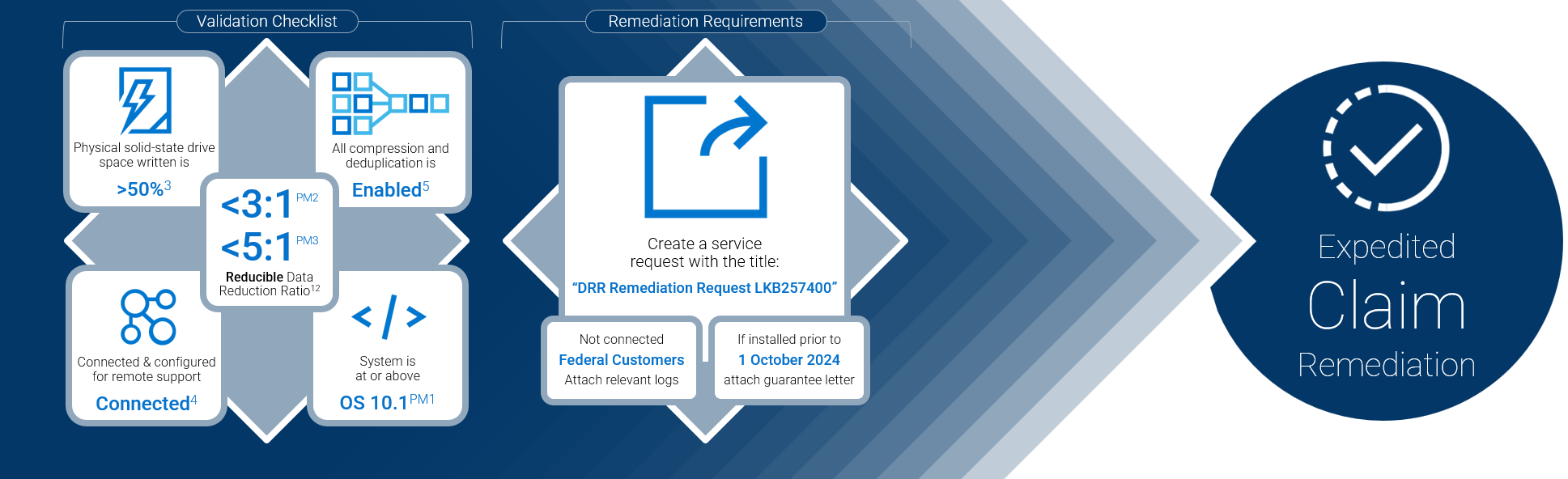
Image Reference
1The Guarantee applies only to Reducible Data; 2The Guarantee does not apply to Unreducible Data. Examples of Unreducible Data include but are not limited to host-compressed data, host-encrypted data, Audio, Image, PDF and Video files;3The Guarantee does not apply until data is written to at least 50% of the physical solid-state drive space; 4Except with respect to Federal End Users, Products should be connected to an active SRS or SCG gateway with functioning remote support for the Guarantee Period, which will enable seamless remediation; PM1The Guarantee applies to new Products initially installed and continuously running with PowerMaxOS 10.1 and above. Ref: https://www.delltechnologies.com/asset/en-ie/products/storage/legal-pricing/future-proof-dr-guarantee-tc.pdf; PM3PowerMax 2500/8500 mainframe (CKD); PM2PowerMax 2500/8500 open systems
If the Data Reduction Ratio (DRR) on your PowerMax is lower than expected as noted in your guarantee letter or DELL TECHNOLOGIES POWERSTORE/POWERMAX DATA REDUCTION GUARANTEE, review the following steps:
Eligibility
Confirm that you are eligible to submit a valid claim (the following reference the DELL TECHNOLOGIES POWERSTORE/POWERMAX DATA REDUCTION GUARANTEE. Please note that the linked guarantee or a signed and dated guarantee letter supersedes this information):
- The Guarantee applies only to Reducible Data;
- The Guarantee does not apply to Unreducible Data. Examples of Unreducible Data include but are not limited to host-compressed data, host-encrypted data, Audio, Image, PDF and Video files;
- The Guarantee does not apply until data is written to at least 50% of the physical solid-state drive space;
- Except with respect to Federal End Users, Products should be connected to an active SRS or SCG gateway with functioning remote support for the Guarantee Period, which will enable seamless remediation;
- All compression and data deduplication functionality must be enabled where supported for the Guarantee to apply; and
- “All compression and data deduplication functionality” refers to the features on PowerMax appliance. We do not recommend enabling host side compression as this can increase unreductable data stored on the PowerMax appliance.
- The Guarantee applies to new PowerMax Products initially installed and continuously running with PowerMaxOS 10.1 and above,
- Unless otherwise indicated in your agreement.
- Only one PowerMax serial number can be submitted per Service Request.
Required Information
If applicable, gather required information:
- Guarantee letter: If the system was installed before 01 October 2024 or under a custom agreement
- Manual logs or proof of circumstance and adherence to requirements: Only if the system meets federal connectivity clause in the terms and conditions document or is otherwise defined in the guarantee letter.
Submitting a claim
- Navigate to Contact Technical Support:
- Important:Ensure you use the Serial Number for the storage appliance that the claim is being made on.
- When prompted, select the issue type Storage
- When presented with contact options, select Create Service Request.
- In the Request Summary area, enter “DRR Remediation Request LKB267460”, adding any other relevant details.
- If applicable, attach the required information using the Added Attachments feature:
- For multiple claims, submit the requests separately, using the Serial Number for each PowerMax as detailed further above.
- Claim requests are acknowledged within 24 hours and typically processed within five business days.
Understanding the Data Reduction Ratio
The Data Reduction Ratio (DRR) is a metric that represents the efficiency of data reduction techniques such as compression and deduplication in a storage environment.
- Overall DRR: The measure of how effectively the Powermax is reducing the physical storage required for a given amount of data, expressed as a ratio of units of data per unit of space (e.g., 5:1). This value includes both Reducible and Unreducible Data.
- Reducible DRR: The Data Reduction Ratio of the reducible data within the Storage Group or Storage Resource Pool - This metric ignores any Unreducible Data in the calculation.
- Unreducible Data: The amount of data written within the Storage Group or Storage Resource Pool that PowerMax’s deduplication and compression logic cannot reduce.
For more detailed information, review these documents:
Determining the PowerMax Data Reduction Rate
- Reducible data rate can be found in Unisphere, select the asset by Serial Number and navigate to Storage > Storage Resource Pools
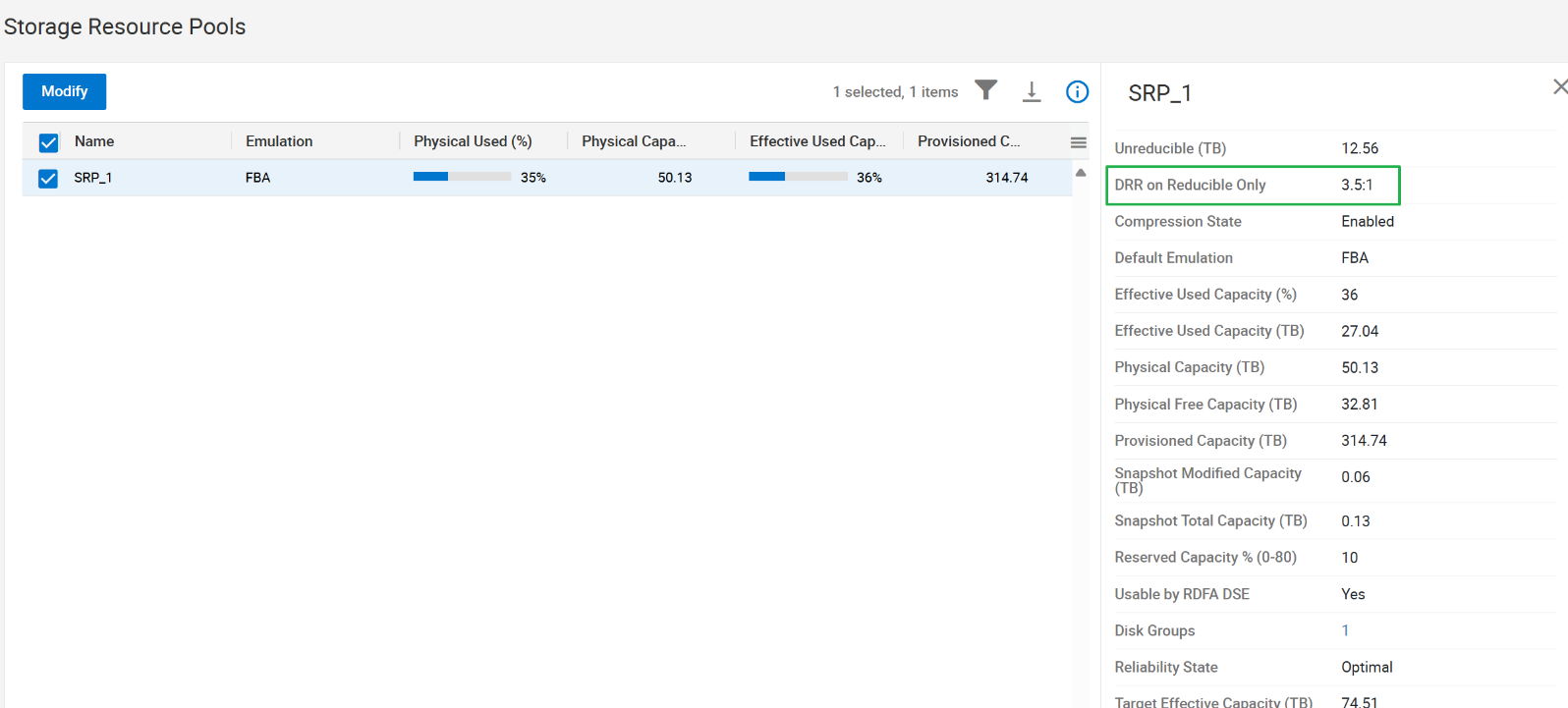
Determining Written/Utilized Space
To check written space on the solid-state drives:
- Find this in Unisphere, select the asset by Serial Number and navigate to Storage > Storage Resource Pools

Verifying Connectivity
You can verify that the PowerMax has an active connection via Secure Remote Gateway. Instructions to enable: Secure Connect Gateway 5.x — Application Edition User's Guide.
Verifying PowerMax Operating System
- Find this in Unisphere, select the asset by Serial Number and navigate to System > System Properties
- Note: Although the DRR guarantees can require 10.1 and above, Dell maintains Minimum-Supported Code requirements, but Target Code is recommended: PowerMax: PowerMaxOS Matrix
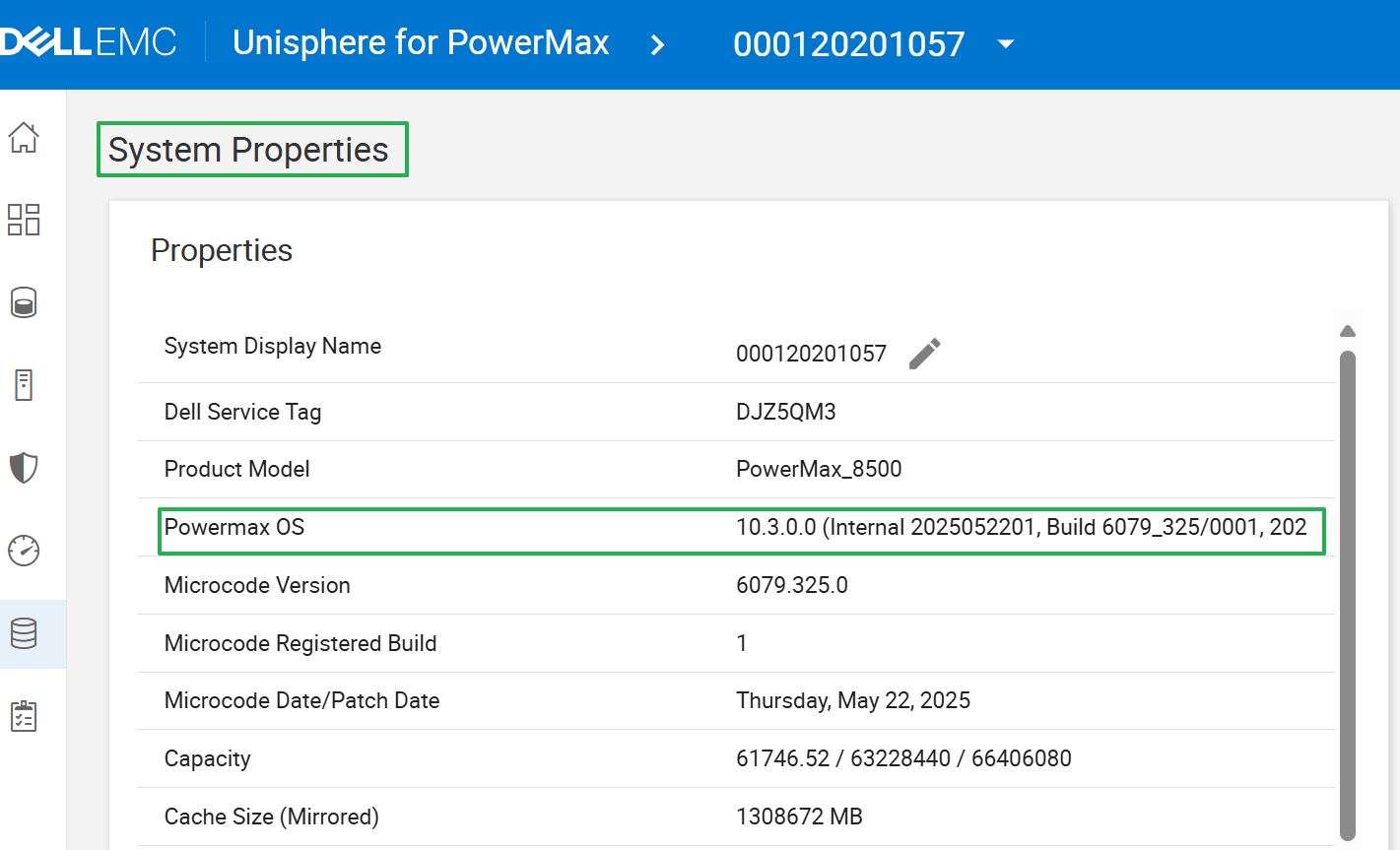
Affected Products
PowerMaxArticle Properties
Article Number: 000257400
Article Type: How To
Last Modified: 06 Jan 2026
Version: 36
Find answers to your questions from other Dell users
Support Services
Check if your device is covered by Support Services.