キープアライブ セッションのステータスがダウンすると、Dell Networking SONiC MC-LAGが影響を受ける
Summary: この文書では、SONiCでキープアライブ セッションのステータスがダウンした場合のMC-LAGの影響について説明します。
This article applies to
This article does not apply to
This article is not tied to any specific product.
Not all product versions are identified in this article.
Symptoms
SONiCでキープアライブ セッションのステータスがダウンすると、MC-LAGが影響を受けます。
キープアライブ セッションダウン時に、次のMC-LAGステータスが表示されます。
キープアライブ セッションダウン時に、次のMC-LAGステータスが表示されます。
SONIC-1# show mclag brief

Domain ID            : 1
Role                 : active
Session Status       : down
Peer Link Status     : up
Source Address       : 192.168.2.1
Peer Address         : 192.168.2.2
Peer Link            : PortChannel100
Keepalive Interval   : 1 secs
Session Timeout      : 30 secs
Delay Restore        : 300 secs
System Mac           : XX:XX:XX:XX:XX:XX
Mclag System Mac     : 00:00:00:00:00:01


Number of MLAG Interfaces:1
-----------------------------------------------------------
MLAG Interface       Local/Remote Status
-----------------------------------------------------------
PortChannel1             up/unknown
Cause
SONiCでキープアライブ セッションのステータスがダウンすると、MC-LAGが影響を受けます。SONiCのキープアライブは、OS9およびOS10のバックアップ リンクと同様のIPv4 L3通信で構成されています。これは通常、VLT-Portchannelステータスには影響しません。OS9およびOS10のピア リンク ステータスは、代わりにVLT-Portchannelステータスに影響します。ただし、SONiCでは、MC-LAGを起動するには、キープアライブ セッションのステータスがアップしている必要があります。キープアライブ リンクの場合、 はMC-LAGピア デバイス間で定期的なハートビートを伝送し、MC-LAGピア デバイス間で状態を同期するためにも使用されます。SONiCとは対照的に、OS9とOS10はピア リンクを使用して、VLTピア デバイス間で状態を同期します。
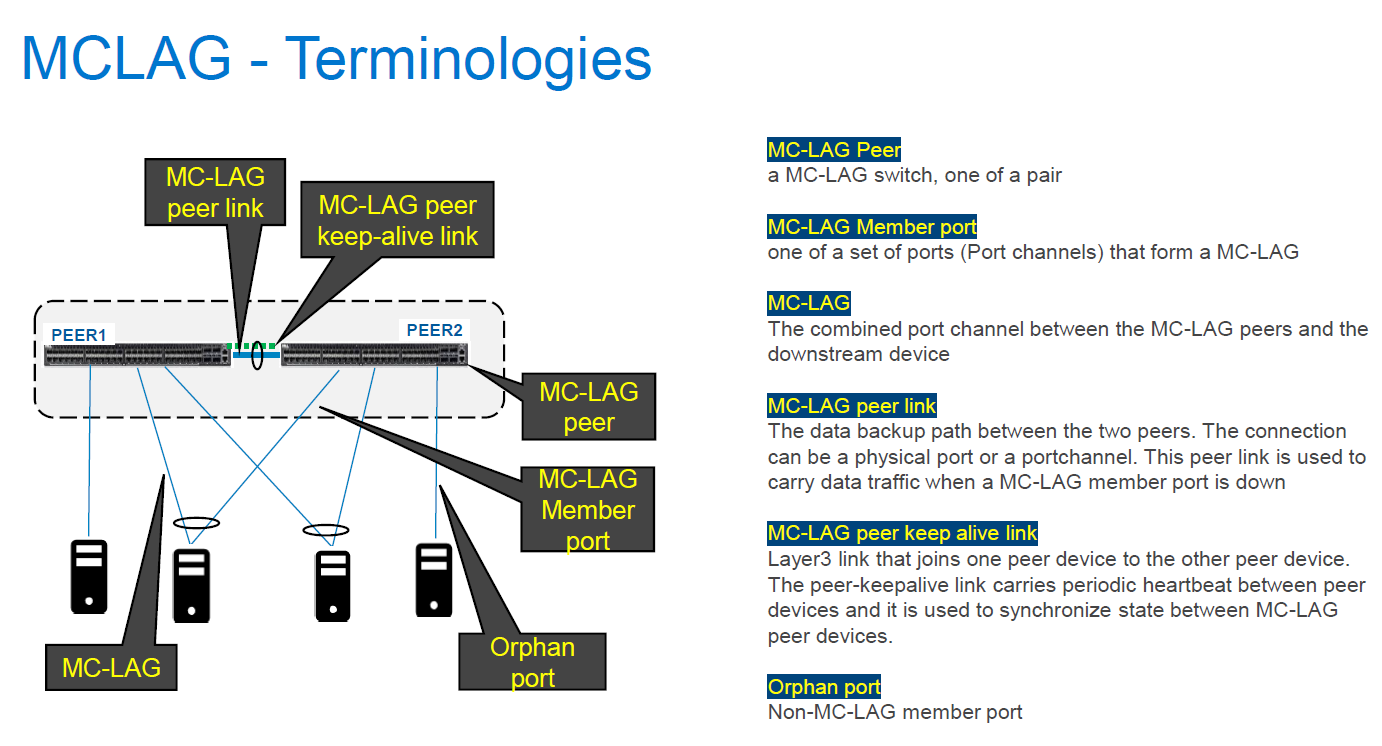
キープアライブ セッション リンクがダウンすると、両方のピア デバイス間の同期が失敗したため、両方のMC-LAGピア デバイスのMC-LAGステータスがアップ/不明になります。
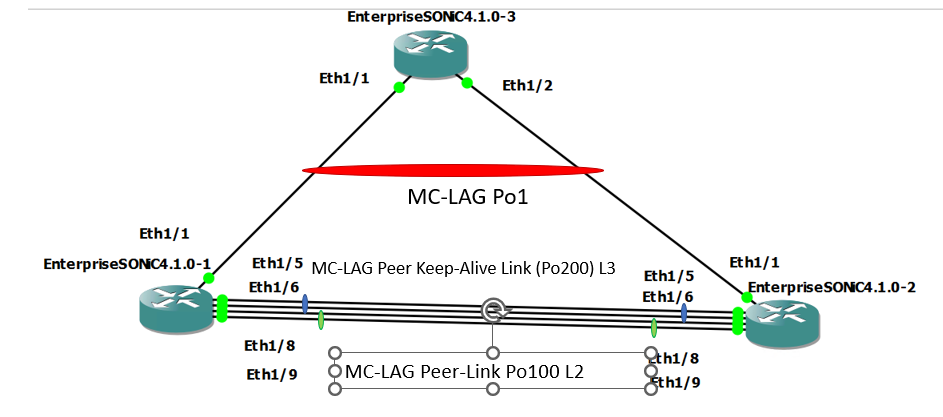
正常な状態
問題の状態(Po200メンバー ポートのシャットダウンによるキープアライブ リンク ステータスダウン)
キープアライブ セッション リンクがダウンすると、両方のピア デバイス間の同期が失敗したため、両方のMC-LAGピア デバイスのMC-LAGステータスがアップ/不明になります。
正常な状態
SONIC-1#show version

Software Version  : 4.1.0-Enterprise_Base
Product           : Enterprise SONiC Distribution by Dell Technologies
Distribution      : Debian 10.13
Kernel            : 5.10.0-8-2-amd64
Config DB Version : version_4_1_1
Build Commit      : 93589a15db
Build Date        : Tue Apr 18 17:56:48 UTC 2023
Built By          : sonicbld@sonic-lvn-csg-001
Platform          : x86_64-kvm_x86_64-r0
HwSKU             : DellEMC-S5248f-P-25G-DPB

SONIC-1# show ip interfaces
Flags: U-Unnumbered interface, A-Anycast IP
-----------------------------------------------------------------------------------------------------------------
Interface            IP address/mask                              VRF                 Admin/Oper     Flags
-----------------------------------------------------------------------------------------------------------------
PortChannel200       192.168.2.1/24                                                   up/up
Vlan636              172.16.0.1/24                                                    up/up
SONIC-1#
SONIC-1#
SONIC-1# show PortChannel summary
Flags(oper-status):  D - Down U - Up (portchannel) P - Up in portchannel (members)
----------------------------------------------------------------------------------------------------------------------------
Group               PortChannel                   Type                Protocol          Member Ports
----------------------------------------------------------------------------------------------------------------------------
1                   PortChannel1   (U)            Eth                 LACP                 Eth1/1(P)
100                 PortChannel100 (U)            Eth                 NONE                 Eth1/8(P)
                                                                                           Eth1/9(P)
200                 PortChannel200 (U)            Eth                 LACP                 Eth1/5(P)
                                                                                           Eth1/6(P)
SONIC-1#
SONIC-1#
SONIC-1# show mclag brief

Domain ID            : 1
Role                 : active
Session Status       : up
Peer Link Status     : up
Source Address       : 192.168.2.1
Peer Address         : 192.168.2.2
Peer Link            : PortChannel100
Keepalive Interval   : 1 secs
Session Timeout      : 30 secs
Delay Restore        : 300 secs
System Mac           : XX:XX:XX:XX:XX:XX
Mclag System Mac     : 00:00:00:00:00:01


Number of MLAG Interfaces:1
-----------------------------------------------------------
MLAG Interface       Local/Remote Status
-----------------------------------------------------------
PortChannel1             up/up
SONIC-1#
SONIC-1#
SONIC-1# show running-configuration interface PortChannel 1
!
interface PortChannel1 mode active
 switchport trunk allowed Vlan 636
 no shutdown
 mclag 1
SONIC-1# show running-configuration interface PortChannel 100
!
interface PortChannel100 mode on
 switchport trunk allowed Vlan 1-4094
 no shutdown
SONIC-1# show running-configuration interface PortChannel 200
!
interface PortChannel200 mode active
 no shutdown
 ip address 192.168.2.1/24
SONIC-1#
SONIC-1#
SONIC-1# ping 172.16.0.3  //IP address assigned to VLAN636 on uplink SW.
PING 172.16.0.3 (172.16.0.3) 56(84) bytes of data.
64 bytes from 172.16.0.3: icmp_seq=1 ttl=64 time=3.26 ms
64 bytes from 172.16.0.3: icmp_seq=2 ttl=64 time=3.47 ms
64 bytes from 172.16.0.3: icmp_seq=3 ttl=64 time=3.21 ms
64 bytes from 172.16.0.3: icmp_seq=4 ttl=64 time=2.84 ms
64 bytes from 172.16.0.3: icmp_seq=5 ttl=64 time=11.1 ms
^C
SONIC-1#
SONIC-2#show version

Software Version  : 4.1.0-Enterprise_Base
Product           : Enterprise SONiC Distribution by Dell Technologies
Distribution      : Debian 10.13
Kernel            : 5.10.0-8-2-amd64
Config DB Version : version_4_1_1
Build Commit      : 93589a15db
Build Date        : Tue Apr 18 17:56:48 UTC 2023
Built By          : sonicbld@sonic-lvn-csg-001
Platform          : x86_64-kvm_x86_64-r0
HwSKU             : DellEMC-S5248f-P-25G-DPB

SONIC-2# show ip interfaces
Flags: U-Unnumbered interface, A-Anycast IP
-----------------------------------------------------------------------------------------------------------------
Interface            IP address/mask                              VRF                 Admin/Oper     Flags
-----------------------------------------------------------------------------------------------------------------
PortChannel200       192.168.2.2/24                                                   up/up
Vlan636              172.16.0.2/24                                                    up/up
SONIC-2#
SONIC-2#
SONIC-2# show PortChannel summary
Flags(oper-status):  D - Down U - Up (portchannel) P - Up in portchannel (members)
----------------------------------------------------------------------------------------------------------------------------
Group               PortChannel                   Type                Protocol          Member Ports
----------------------------------------------------------------------------------------------------------------------------
1                   PortChannel1   (U)            Eth                 LACP                 Eth1/1(P)
100                 PortChannel100 (U)            Eth                 NONE                 Eth1/8(P)
                                                                                           Eth1/9(P)
200                 PortChannel200 (U)            Eth                 LACP                 Eth1/5(P)
                                                                                           Eth1/6(P)
SONIC-2#
SONIC-2#
SONIC-2# show mclag brief

Domain ID            : 1
Role                 : standby
Session Status       : up
Peer Link Status     : up
Source Address       : 192.168.2.2
Peer Address         : 192.168.2.1
Peer Link            : PortChannel100
Keepalive Interval   : 1 secs
Session Timeout      : 30 secs
Delay Restore        : 300 secs
System Mac           : XX:XX:XX:XX:XX:XX
Mclag System Mac     : 00:00:00:00:00:01


Number of MLAG Interfaces:1
-----------------------------------------------------------
MLAG Interface       Local/Remote Status
-----------------------------------------------------------
PortChannel1             up/up
SONIC-2#
SONIC-2#
SONIC-2#
SONIC-2#
SONIC-2# show running-configuration interface PortChannel 1
!
interface PortChannel1 mode active
 switchport trunk allowed Vlan 636
 no shutdown
 mclag 1
SONIC-2# show running-configuration interface PortChannel 100
!
interface PortChannel100 mode on
 switchport trunk allowed Vlan 1-4094
 no shutdown
SONIC-2# show running-configuration interface PortChannel 200
!
interface PortChannel200 mode active
 no shutdown
 ip address 192.168.2.2/24
SONIC-2#
SONIC-2#
SONIC-2# ping 172.16.0.3
PING 172.16.0.3 (172.16.0.3) 56(84) bytes of data.
64 bytes from 172.16.0.3: icmp_seq=1 ttl=64 time=3.48 ms
64 bytes from 172.16.0.3: icmp_seq=2 ttl=64 time=2.94 ms
^CSONIC-2#
問題の状態(Po200メンバー ポートのシャットダウンによるキープアライブ リンク ステータスダウン)
SONIC-1# show mclag brief

Domain ID            : 1
Role                 : active
Session Status       : down
Peer Link Status     : up
Source Address       : 192.168.2.1
Peer Address         : 192.168.2.2
Peer Link            : PortChannel100
Keepalive Interval   : 1 secs
Session Timeout      : 30 secs
Delay Restore        : 300 secs
System Mac           : XX:XX:XX:XX:XX:XX
Mclag System Mac     : 00:00:00:00:00:01


Number of MLAG Interfaces:1
-----------------------------------------------------------
MLAG Interface       Local/Remote Status
-----------------------------------------------------------
PortChannel1             up/unknown
SONIC-1#
SONIC-1#
SONIC-1# ping 172.16.0.3
PING 172.16.0.3 (172.16.0.3) 56(84) bytes of data.
64 bytes from 172.16.0.3: icmp_seq=1 ttl=64 time=8.00 ms
64 bytes from 172.16.0.3: icmp_seq=2 ttl=64 time=3.08 ms
64 bytes from 172.16.0.3: icmp_seq=3 ttl=64 time=2.99 ms
64 bytes from 172.16.0.3: icmp_seq=4 ttl=64 time=2.92 ms
64 bytes from 172.16.0.3: icmp_seq=5 ttl=64 time=3.07 ms
^C
SONIC-1#
SONIC-2# show PortChannel summary
Flags(oper-status):  D - Down U - Up (portchannel) P - Up in portchannel (members)
----------------------------------------------------------------------------------------------------------------------------
Group               PortChannel                   Type                Protocol          Member Ports
----------------------------------------------------------------------------------------------------------------------------
1                   PortChannel1   (U)            Eth                 LACP                 Eth1/1(P)
100                 PortChannel100 (U)            Eth                 NONE                 Eth1/8(P)
                                                                                           Eth1/9(P)
200                 PortChannel200 (D)            Eth                 LACP                 Eth1/5(D)
                                                                                          Eth1/6(D)
SONIC-2# show mclag brief

Domain ID            : 1
Role                 : standby
Session Status       : down
Peer Link Status     : up
Source Address       : 192.168.2.2
Peer Address         : 192.168.2.1
Peer Link            : PortChannel100
Keepalive Interval   : 1 secs
Session Timeout      : 30 secs
Delay Restore        : 300 secs
System Mac           : XX:XX:XX:XX:XX:XX
Mclag System Mac     : 00:00:00:00:00:01


Number of MLAG Interfaces:1
-----------------------------------------------------------
MLAG Interface       Local/Remote Status
-----------------------------------------------------------
PortChannel1             up/unknown
SONIC-2#
SONIC-2# ping 172.16.0.3
PING 172.16.0.3 (172.16.0.3) 56(84) bytes of data.
From 172.16.0.2 icmp_seq=1 Destination Host Unreachable
From 172.16.0.2 icmp_seq=1 Destination Host Unreachable
From 172.16.0.2 icmp_seq=1 Destination Host Unreachable
From 172.16.0.2 icmp_seq=1 Destination Host Unreachable
^C
Resolution
MC-LAGが問題なく稼働し続けるためには、キープアライブ リンクのステータスも継続して動作している必要があります。管理ポートは通常、キープアライブ リンクに使用されますが、IPアドレスが割り当てられたポート チャネルは、冗長性を確保するためにキープアライブ リンクに使用できます。このKB記事で説明されている動作(キープアライブ リンク ステータスがダウンするとMC-LAGが影響を受ける)は、SONiCバージョン4.2.0まで、少なくともすべてのバージョンで想定されています。
Affected Products
Enterprise SONiC Distribution, Dell EMC Networking N3200-ON, PowerSwitch S5212F-ON, PowerSwitch S5224F-ON, PowerSwitch S5232F-ON, PowerSwitch S5248F-ON, PowerSwitch S5296F-ON, PowerSwitch Z9100-ON, PowerSwitch Z9264F-ON, PowerSwitch Z9332F-ONArticle Properties
Article Number: 000213968
Article Type: Solution
Last Modified: 23 Jan 2024
Version: 3
Find answers to your questions from other Dell users
Support Services
Check if your device is covered by Support Services.