Dell Networking SONiC MC-LAG bliver påvirket, når status for bevaringssession falder
Summary: Denne artikel beskriver, hvordan MC-LAG påvirkes, når status for keepalive session går ned i SONiC.
This article applies to
This article does not apply to
This article is not tied to any specific product.
Not all product versions are identified in this article.
Symptoms
MC-LAG påvirkes, når status for keepalive session går ned i SONiC.
Følgende MC-LAG-status vises på tidspunktet for den bevarende session:
Følgende MC-LAG-status vises på tidspunktet for den bevarende session:
SONIC-1# show mclag brief

Domain ID            : 1
Role                 : active
Session Status       : down
Peer Link Status     : up
Source Address       : 192.168.2.1
Peer Address         : 192.168.2.2
Peer Link            : PortChannel100
Keepalive Interval   : 1 secs
Session Timeout      : 30 secs
Delay Restore        : 300 secs
System Mac           : XX:XX:XX:XX:XX:XX
Mclag System Mac     : 00:00:00:00:00:01


Number of MLAG Interfaces:1
-----------------------------------------------------------
MLAG Interface       Local/Remote Status
-----------------------------------------------------------
PortChannel1             up/unknown
Cause
MC-LAG bliver påvirket, når status for keepalive session går ned i SONiC. Den keepalive i SONiC er konfigureret med IPv4 L3-kommunikation svarende til sikkerhedskopieringslinket i OS9 og OS10, som normalt ikke påvirker VLT-Portchannel-status. Peer-link-status i OS9 og OS10 vil påvirke VLT-Portchannel-status i stedet. I SONiC skal status for den bevarende session dog være opdateret, for at MC-LAG kan være aktiv. For keepalive link har den periodiske impuls mellem MC-LAG-peer-enheder og bruges også til at synkronisere tilstanden mellem MC-LAG-peer-enheder. I modsætning til SONiC skal OS9 og OS10 bruge peer-linket til at synkronisere tilstanden mellem VLT-peer-enheder.
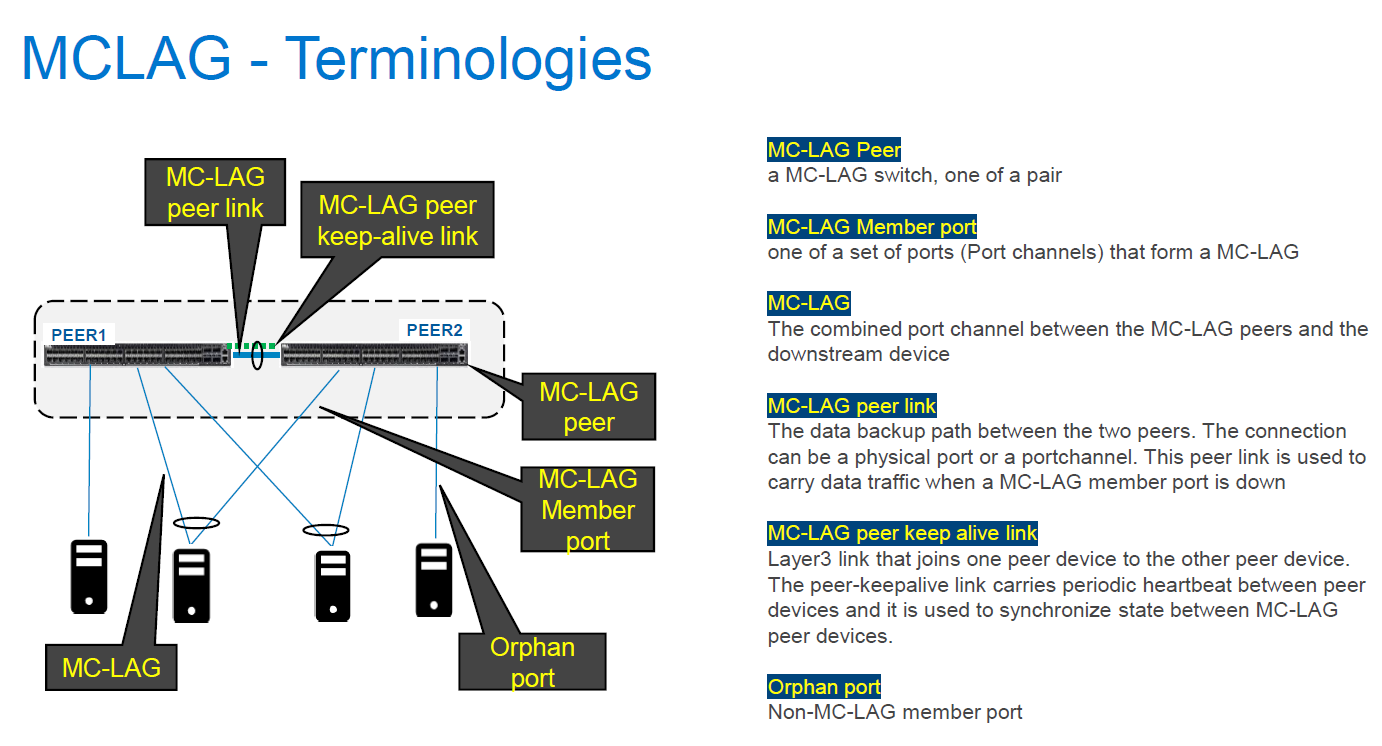
Når linket til den bevarende session er nede, bliver MC-LAG-status på begge MC-LAG-peer-enheder oppe/ukendte pga. synkroniseringsfejlen mellem begge peer-enheder.
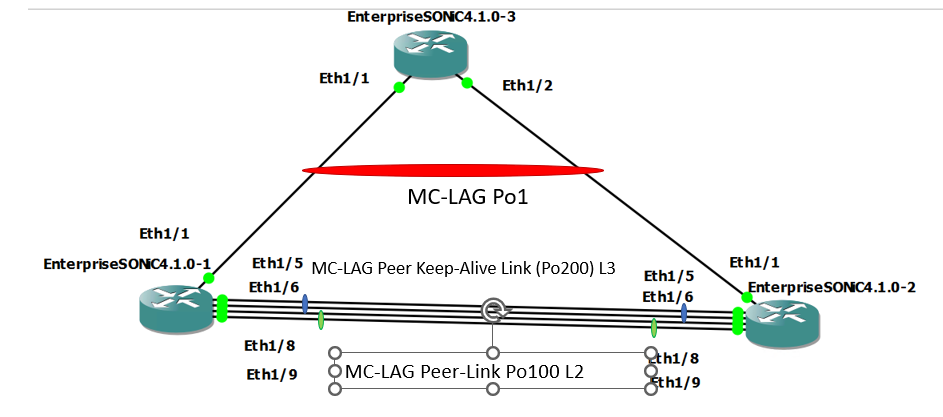
I normal tilstand
I problemtilstand (Keepalive-link-status nede ved at lukke Po200-medlemsporte)
Når linket til den bevarende session er nede, bliver MC-LAG-status på begge MC-LAG-peer-enheder oppe/ukendte pga. synkroniseringsfejlen mellem begge peer-enheder.
I normal tilstand
SONIC-1#show version

Software Version  : 4.1.0-Enterprise_Base
Product           : Enterprise SONiC Distribution by Dell Technologies
Distribution      : Debian 10.13
Kernel            : 5.10.0-8-2-amd64
Config DB Version : version_4_1_1
Build Commit      : 93589a15db
Build Date        : Tue Apr 18 17:56:48 UTC 2023
Built By          : sonicbld@sonic-lvn-csg-001
Platform          : x86_64-kvm_x86_64-r0
HwSKU             : DellEMC-S5248f-P-25G-DPB

SONIC-1# show ip interfaces
Flags: U-Unnumbered interface, A-Anycast IP
-----------------------------------------------------------------------------------------------------------------
Interface            IP address/mask                              VRF                 Admin/Oper     Flags
-----------------------------------------------------------------------------------------------------------------
PortChannel200       192.168.2.1/24                                                   up/up
Vlan636              172.16.0.1/24                                                    up/up
SONIC-1#
SONIC-1#
SONIC-1# show PortChannel summary
Flags(oper-status):  D - Down U - Up (portchannel) P - Up in portchannel (members)
----------------------------------------------------------------------------------------------------------------------------
Group               PortChannel                   Type                Protocol          Member Ports
----------------------------------------------------------------------------------------------------------------------------
1                   PortChannel1   (U)            Eth                 LACP                 Eth1/1(P)
100                 PortChannel100 (U)            Eth                 NONE                 Eth1/8(P)
                                                                                           Eth1/9(P)
200                 PortChannel200 (U)            Eth                 LACP                 Eth1/5(P)
                                                                                           Eth1/6(P)
SONIC-1#
SONIC-1#
SONIC-1# show mclag brief

Domain ID            : 1
Role                 : active
Session Status       : up
Peer Link Status     : up
Source Address       : 192.168.2.1
Peer Address         : 192.168.2.2
Peer Link            : PortChannel100
Keepalive Interval   : 1 secs
Session Timeout      : 30 secs
Delay Restore        : 300 secs
System Mac           : XX:XX:XX:XX:XX:XX
Mclag System Mac     : 00:00:00:00:00:01


Number of MLAG Interfaces:1
-----------------------------------------------------------
MLAG Interface       Local/Remote Status
-----------------------------------------------------------
PortChannel1             up/up
SONIC-1#
SONIC-1#
SONIC-1# show running-configuration interface PortChannel 1
!
interface PortChannel1 mode active
 switchport trunk allowed Vlan 636
 no shutdown
 mclag 1
SONIC-1# show running-configuration interface PortChannel 100
!
interface PortChannel100 mode on
 switchport trunk allowed Vlan 1-4094
 no shutdown
SONIC-1# show running-configuration interface PortChannel 200
!
interface PortChannel200 mode active
 no shutdown
 ip address 192.168.2.1/24
SONIC-1#
SONIC-1#
SONIC-1# ping 172.16.0.3  //IP address assigned to VLAN636 on uplink SW.
PING 172.16.0.3 (172.16.0.3) 56(84) bytes of data.
64 bytes from 172.16.0.3: icmp_seq=1 ttl=64 time=3.26 ms
64 bytes from 172.16.0.3: icmp_seq=2 ttl=64 time=3.47 ms
64 bytes from 172.16.0.3: icmp_seq=3 ttl=64 time=3.21 ms
64 bytes from 172.16.0.3: icmp_seq=4 ttl=64 time=2.84 ms
64 bytes from 172.16.0.3: icmp_seq=5 ttl=64 time=11.1 ms
^C
SONIC-1#
SONIC-2#show version

Software Version  : 4.1.0-Enterprise_Base
Product           : Enterprise SONiC Distribution by Dell Technologies
Distribution      : Debian 10.13
Kernel            : 5.10.0-8-2-amd64
Config DB Version : version_4_1_1
Build Commit      : 93589a15db
Build Date        : Tue Apr 18 17:56:48 UTC 2023
Built By          : sonicbld@sonic-lvn-csg-001
Platform          : x86_64-kvm_x86_64-r0
HwSKU             : DellEMC-S5248f-P-25G-DPB

SONIC-2# show ip interfaces
Flags: U-Unnumbered interface, A-Anycast IP
-----------------------------------------------------------------------------------------------------------------
Interface            IP address/mask                              VRF                 Admin/Oper     Flags
-----------------------------------------------------------------------------------------------------------------
PortChannel200       192.168.2.2/24                                                   up/up
Vlan636              172.16.0.2/24                                                    up/up
SONIC-2#
SONIC-2#
SONIC-2# show PortChannel summary
Flags(oper-status):  D - Down U - Up (portchannel) P - Up in portchannel (members)
----------------------------------------------------------------------------------------------------------------------------
Group               PortChannel                   Type                Protocol          Member Ports
----------------------------------------------------------------------------------------------------------------------------
1                   PortChannel1   (U)            Eth                 LACP                 Eth1/1(P)
100                 PortChannel100 (U)            Eth                 NONE                 Eth1/8(P)
                                                                                           Eth1/9(P)
200                 PortChannel200 (U)            Eth                 LACP                 Eth1/5(P)
                                                                                           Eth1/6(P)
SONIC-2#
SONIC-2#
SONIC-2# show mclag brief

Domain ID            : 1
Role                 : standby
Session Status       : up
Peer Link Status     : up
Source Address       : 192.168.2.2
Peer Address         : 192.168.2.1
Peer Link            : PortChannel100
Keepalive Interval   : 1 secs
Session Timeout      : 30 secs
Delay Restore        : 300 secs
System Mac           : XX:XX:XX:XX:XX:XX
Mclag System Mac     : 00:00:00:00:00:01


Number of MLAG Interfaces:1
-----------------------------------------------------------
MLAG Interface       Local/Remote Status
-----------------------------------------------------------
PortChannel1             up/up
SONIC-2#
SONIC-2#
SONIC-2#
SONIC-2#
SONIC-2# show running-configuration interface PortChannel 1
!
interface PortChannel1 mode active
 switchport trunk allowed Vlan 636
 no shutdown
 mclag 1
SONIC-2# show running-configuration interface PortChannel 100
!
interface PortChannel100 mode on
 switchport trunk allowed Vlan 1-4094
 no shutdown
SONIC-2# show running-configuration interface PortChannel 200
!
interface PortChannel200 mode active
 no shutdown
 ip address 192.168.2.2/24
SONIC-2#
SONIC-2#
SONIC-2# ping 172.16.0.3
PING 172.16.0.3 (172.16.0.3) 56(84) bytes of data.
64 bytes from 172.16.0.3: icmp_seq=1 ttl=64 time=3.48 ms
64 bytes from 172.16.0.3: icmp_seq=2 ttl=64 time=2.94 ms
^CSONIC-2#
I problemtilstand (Keepalive-link-status nede ved at lukke Po200-medlemsporte)
SONIC-1# show mclag brief

Domain ID            : 1
Role                 : active
Session Status       : down
Peer Link Status     : up
Source Address       : 192.168.2.1
Peer Address         : 192.168.2.2
Peer Link            : PortChannel100
Keepalive Interval   : 1 secs
Session Timeout      : 30 secs
Delay Restore        : 300 secs
System Mac           : XX:XX:XX:XX:XX:XX
Mclag System Mac     : 00:00:00:00:00:01


Number of MLAG Interfaces:1
-----------------------------------------------------------
MLAG Interface       Local/Remote Status
-----------------------------------------------------------
PortChannel1             up/unknown
SONIC-1#
SONIC-1#
SONIC-1# ping 172.16.0.3
PING 172.16.0.3 (172.16.0.3) 56(84) bytes of data.
64 bytes from 172.16.0.3: icmp_seq=1 ttl=64 time=8.00 ms
64 bytes from 172.16.0.3: icmp_seq=2 ttl=64 time=3.08 ms
64 bytes from 172.16.0.3: icmp_seq=3 ttl=64 time=2.99 ms
64 bytes from 172.16.0.3: icmp_seq=4 ttl=64 time=2.92 ms
64 bytes from 172.16.0.3: icmp_seq=5 ttl=64 time=3.07 ms
^C
SONIC-1#
SONIC-2# show PortChannel summary
Flags(oper-status):  D - Down U - Up (portchannel) P - Up in portchannel (members)
----------------------------------------------------------------------------------------------------------------------------
Group               PortChannel                   Type                Protocol          Member Ports
----------------------------------------------------------------------------------------------------------------------------
1                   PortChannel1   (U)            Eth                 LACP                 Eth1/1(P)
100                 PortChannel100 (U)            Eth                 NONE                 Eth1/8(P)
                                                                                           Eth1/9(P)
200                 PortChannel200 (D)            Eth                 LACP                 Eth1/5(D)
                                                                                          Eth1/6(D)
SONIC-2# show mclag brief

Domain ID            : 1
Role                 : standby
Session Status       : down
Peer Link Status     : up
Source Address       : 192.168.2.2
Peer Address         : 192.168.2.1
Peer Link            : PortChannel100
Keepalive Interval   : 1 secs
Session Timeout      : 30 secs
Delay Restore        : 300 secs
System Mac           : XX:XX:XX:XX:XX:XX
Mclag System Mac     : 00:00:00:00:00:01


Number of MLAG Interfaces:1
-----------------------------------------------------------
MLAG Interface       Local/Remote Status
-----------------------------------------------------------
PortChannel1             up/unknown
SONIC-2#
SONIC-2# ping 172.16.0.3
PING 172.16.0.3 (172.16.0.3) 56(84) bytes of data.
From 172.16.0.2 icmp_seq=1 Destination Host Unreachable
From 172.16.0.2 icmp_seq=1 Destination Host Unreachable
From 172.16.0.2 icmp_seq=1 Destination Host Unreachable
From 172.16.0.2 icmp_seq=1 Destination Host Unreachable
^C
Resolution
For at MC-LAG kan holde op med at fungere uden problemer, skal keepalive link-status også holde sig i gang. Administrationsporten bruges normalt til keepalive link, men portkanalen med den IP-adresse, der er tildelt den, kan bruges til keepalive link til redundansformål. Den adfærd (at MC-LAG påvirkes, når keepalive link-status går ned) beskrevet i denne KB-artikel forventes i alle versioner, mindst indtil SONiC version 4.2.0.
Affected Products
Enterprise SONiC Distribution, Dell EMC Networking N3200-ON, PowerSwitch S5212F-ON, PowerSwitch S5224F-ON, PowerSwitch S5232F-ON, PowerSwitch S5248F-ON, PowerSwitch S5296F-ON, PowerSwitch Z9100-ON, PowerSwitch Z9264F-ON, PowerSwitch Z9332F-ONArticle Properties
Article Number: 000213968
Article Type: Solution
Last Modified: 23 Jan 2024
Version: 3
Find answers to your questions from other Dell users
Support Services
Check if your device is covered by Support Services.