Dell Networking SONiC MC-LAG wird betroffen, wenn der Keepalive-Sitzungsstatus ausfällt.
Summary: In diesem Artikel wird erläutert, wie mc-LAG betroffen ist, wenn der Status der Keepalive-Sitzung in SONiC ausfällt.
This article applies to
This article does not apply to
This article is not tied to any specific product.
Not all product versions are identified in this article.
Symptoms
MC-LAG ist betroffen, wenn der Status der Keepalive-Sitzung in SONiC ausfällt.
Der folgende MC-LAG-Status wird zum Zeitpunkt der Keepalive-Sitzung angezeigt:
Der folgende MC-LAG-Status wird zum Zeitpunkt der Keepalive-Sitzung angezeigt:
SONIC-1# show mclag brief

Domain ID            : 1
Role                 : active
Session Status       : down
Peer Link Status     : up
Source Address       : 192.168.2.1
Peer Address         : 192.168.2.2
Peer Link            : PortChannel100
Keepalive Interval   : 1 secs
Session Timeout      : 30 secs
Delay Restore        : 300 secs
System Mac           : XX:XX:XX:XX:XX:XX
Mclag System Mac     : 00:00:00:00:00:01


Number of MLAG Interfaces:1
-----------------------------------------------------------
MLAG Interface       Local/Remote Status
-----------------------------------------------------------
PortChannel1             up/unknown
Cause
MC-LAG wird betroffen, wenn der Status der Keepalive-Sitzung in SONiC ausfällt. Der Keepalive in SONiC ist mit IPv4-L3-Kommunikation konfiguriert, ähnlich wie der Backuplink in OS9 und OS10, was in der Regel keinen Einfluss auf den VLT-Port-Channel-Status hat. Der Peer-Link-Status in OS9 und OS10 wirkt sich stattdessen auf den VLT-Portchannel-Status aus. In SONiC muss der Status der Keepalive-Sitzung jedoch "up" sein, damit MC-LAG aktiv ist. Für den Keepalive-Link überträgt periodischen Heartbeat zwischen MC-LAG-Peer-Geräten und wird auch verwendet, um den Status zwischen MC-LAG-Peer-Geräten zu synchronisieren. Im Gegensatz zu SONiC verwenden OS9 und OS10 den Peer-Link, um den Status zwischen VLT-Peer-Geräten zu synchronisieren.
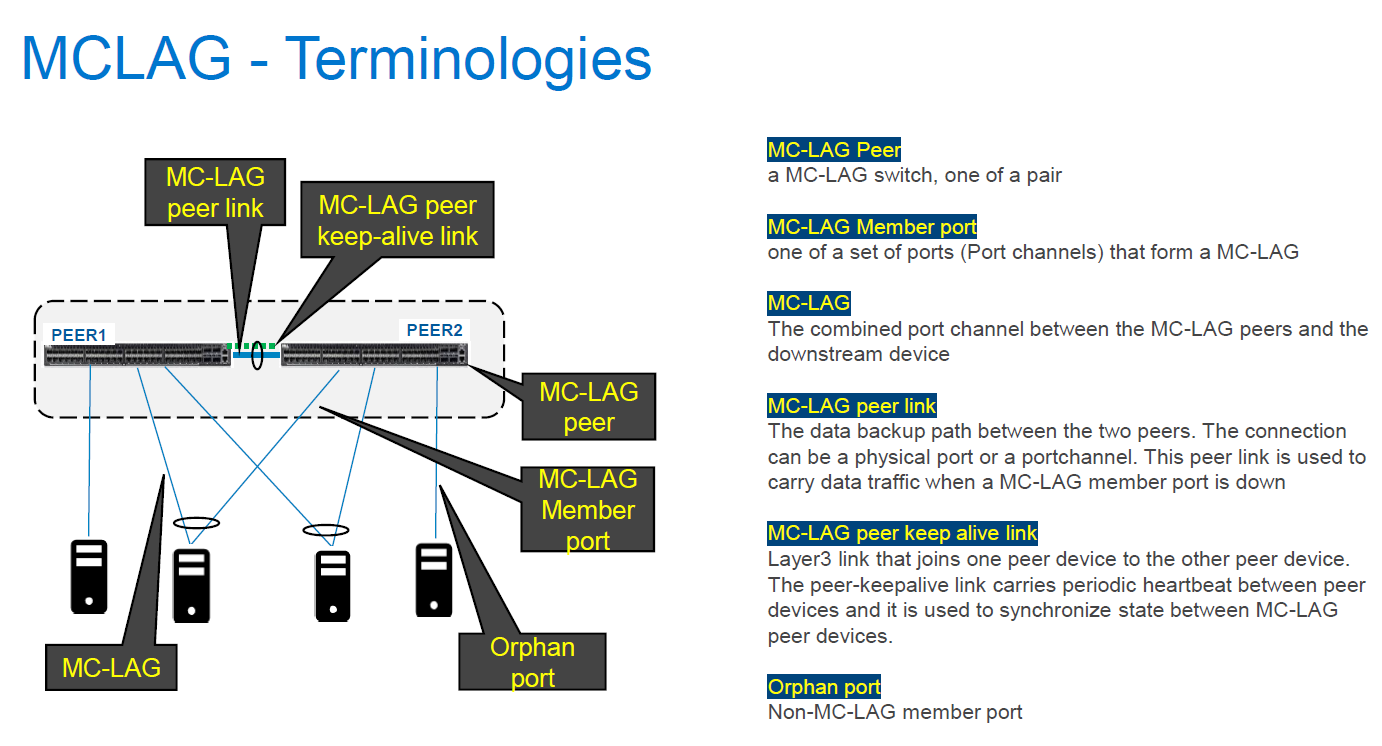
Sobald der Keepalive-Sitzungslink ausfällt, wird der MC-LAG-Status auf beiden MC-LAG-Peer-Geräten aufgrund des Synchronisationsfehlers zwischen beiden Peer-Geräten aktiv/unbekannt.
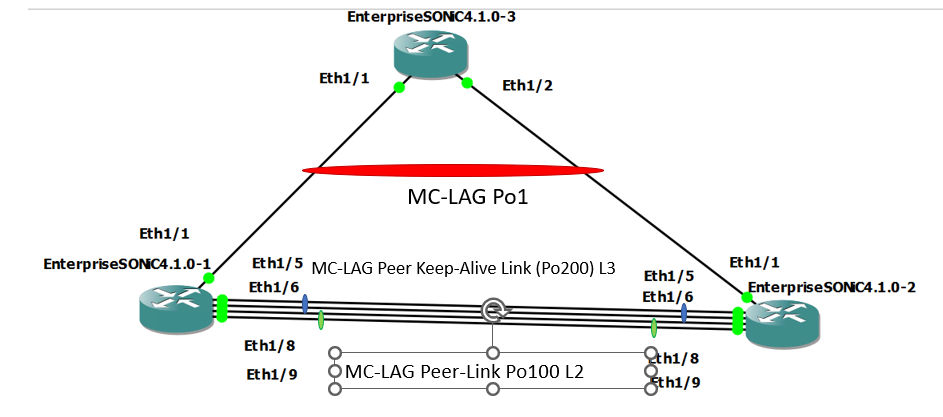
Im Normalzustand
Im Problemstatus (Keepalive-Link-Status down durch Herunterfahren von Po200-Mitgliedsports)
Sobald der Keepalive-Sitzungslink ausfällt, wird der MC-LAG-Status auf beiden MC-LAG-Peer-Geräten aufgrund des Synchronisationsfehlers zwischen beiden Peer-Geräten aktiv/unbekannt.
Im Normalzustand
SONIC-1#show version

Software Version  : 4.1.0-Enterprise_Base
Product           : Enterprise SONiC Distribution by Dell Technologies
Distribution      : Debian 10.13
Kernel            : 5.10.0-8-2-amd64
Config DB Version : version_4_1_1
Build Commit      : 93589a15db
Build Date        : Tue Apr 18 17:56:48 UTC 2023
Built By          : sonicbld@sonic-lvn-csg-001
Platform          : x86_64-kvm_x86_64-r0
HwSKU             : DellEMC-S5248f-P-25G-DPB

SONIC-1# show ip interfaces
Flags: U-Unnumbered interface, A-Anycast IP
-----------------------------------------------------------------------------------------------------------------
Interface            IP address/mask                              VRF                 Admin/Oper     Flags
-----------------------------------------------------------------------------------------------------------------
PortChannel200       192.168.2.1/24                                                   up/up
Vlan636              172.16.0.1/24                                                    up/up
SONIC-1#
SONIC-1#
SONIC-1# show PortChannel summary
Flags(oper-status):  D - Down U - Up (portchannel) P - Up in portchannel (members)
----------------------------------------------------------------------------------------------------------------------------
Group               PortChannel                   Type                Protocol          Member Ports
----------------------------------------------------------------------------------------------------------------------------
1                   PortChannel1   (U)            Eth                 LACP                 Eth1/1(P)
100                 PortChannel100 (U)            Eth                 NONE                 Eth1/8(P)
                                                                                           Eth1/9(P)
200                 PortChannel200 (U)            Eth                 LACP                 Eth1/5(P)
                                                                                           Eth1/6(P)
SONIC-1#
SONIC-1#
SONIC-1# show mclag brief

Domain ID            : 1
Role                 : active
Session Status       : up
Peer Link Status     : up
Source Address       : 192.168.2.1
Peer Address         : 192.168.2.2
Peer Link            : PortChannel100
Keepalive Interval   : 1 secs
Session Timeout      : 30 secs
Delay Restore        : 300 secs
System Mac           : XX:XX:XX:XX:XX:XX
Mclag System Mac     : 00:00:00:00:00:01


Number of MLAG Interfaces:1
-----------------------------------------------------------
MLAG Interface       Local/Remote Status
-----------------------------------------------------------
PortChannel1             up/up
SONIC-1#
SONIC-1#
SONIC-1# show running-configuration interface PortChannel 1
!
interface PortChannel1 mode active
 switchport trunk allowed Vlan 636
 no shutdown
 mclag 1
SONIC-1# show running-configuration interface PortChannel 100
!
interface PortChannel100 mode on
 switchport trunk allowed Vlan 1-4094
 no shutdown
SONIC-1# show running-configuration interface PortChannel 200
!
interface PortChannel200 mode active
 no shutdown
 ip address 192.168.2.1/24
SONIC-1#
SONIC-1#
SONIC-1# ping 172.16.0.3  //IP address assigned to VLAN636 on uplink SW.
PING 172.16.0.3 (172.16.0.3) 56(84) bytes of data.
64 bytes from 172.16.0.3: icmp_seq=1 ttl=64 time=3.26 ms
64 bytes from 172.16.0.3: icmp_seq=2 ttl=64 time=3.47 ms
64 bytes from 172.16.0.3: icmp_seq=3 ttl=64 time=3.21 ms
64 bytes from 172.16.0.3: icmp_seq=4 ttl=64 time=2.84 ms
64 bytes from 172.16.0.3: icmp_seq=5 ttl=64 time=11.1 ms
^C
SONIC-1#
SONIC-2#show version

Software Version  : 4.1.0-Enterprise_Base
Product           : Enterprise SONiC Distribution by Dell Technologies
Distribution      : Debian 10.13
Kernel            : 5.10.0-8-2-amd64
Config DB Version : version_4_1_1
Build Commit      : 93589a15db
Build Date        : Tue Apr 18 17:56:48 UTC 2023
Built By          : sonicbld@sonic-lvn-csg-001
Platform          : x86_64-kvm_x86_64-r0
HwSKU             : DellEMC-S5248f-P-25G-DPB

SONIC-2# show ip interfaces
Flags: U-Unnumbered interface, A-Anycast IP
-----------------------------------------------------------------------------------------------------------------
Interface            IP address/mask                              VRF                 Admin/Oper     Flags
-----------------------------------------------------------------------------------------------------------------
PortChannel200       192.168.2.2/24                                                   up/up
Vlan636              172.16.0.2/24                                                    up/up
SONIC-2#
SONIC-2#
SONIC-2# show PortChannel summary
Flags(oper-status):  D - Down U - Up (portchannel) P - Up in portchannel (members)
----------------------------------------------------------------------------------------------------------------------------
Group               PortChannel                   Type                Protocol          Member Ports
----------------------------------------------------------------------------------------------------------------------------
1                   PortChannel1   (U)            Eth                 LACP                 Eth1/1(P)
100                 PortChannel100 (U)            Eth                 NONE                 Eth1/8(P)
                                                                                           Eth1/9(P)
200                 PortChannel200 (U)            Eth                 LACP                 Eth1/5(P)
                                                                                           Eth1/6(P)
SONIC-2#
SONIC-2#
SONIC-2# show mclag brief

Domain ID            : 1
Role                 : standby
Session Status       : up
Peer Link Status     : up
Source Address       : 192.168.2.2
Peer Address         : 192.168.2.1
Peer Link            : PortChannel100
Keepalive Interval   : 1 secs
Session Timeout      : 30 secs
Delay Restore        : 300 secs
System Mac           : XX:XX:XX:XX:XX:XX
Mclag System Mac     : 00:00:00:00:00:01


Number of MLAG Interfaces:1
-----------------------------------------------------------
MLAG Interface       Local/Remote Status
-----------------------------------------------------------
PortChannel1             up/up
SONIC-2#
SONIC-2#
SONIC-2#
SONIC-2#
SONIC-2# show running-configuration interface PortChannel 1
!
interface PortChannel1 mode active
 switchport trunk allowed Vlan 636
 no shutdown
 mclag 1
SONIC-2# show running-configuration interface PortChannel 100
!
interface PortChannel100 mode on
 switchport trunk allowed Vlan 1-4094
 no shutdown
SONIC-2# show running-configuration interface PortChannel 200
!
interface PortChannel200 mode active
 no shutdown
 ip address 192.168.2.2/24
SONIC-2#
SONIC-2#
SONIC-2# ping 172.16.0.3
PING 172.16.0.3 (172.16.0.3) 56(84) bytes of data.
64 bytes from 172.16.0.3: icmp_seq=1 ttl=64 time=3.48 ms
64 bytes from 172.16.0.3: icmp_seq=2 ttl=64 time=2.94 ms
^CSONIC-2#
Im Problemstatus (Keepalive-Link-Status down durch Herunterfahren von Po200-Mitgliedsports)
SONIC-1# show mclag brief

Domain ID            : 1
Role                 : active
Session Status       : down
Peer Link Status     : up
Source Address       : 192.168.2.1
Peer Address         : 192.168.2.2
Peer Link            : PortChannel100
Keepalive Interval   : 1 secs
Session Timeout      : 30 secs
Delay Restore        : 300 secs
System Mac           : XX:XX:XX:XX:XX:XX
Mclag System Mac     : 00:00:00:00:00:01


Number of MLAG Interfaces:1
-----------------------------------------------------------
MLAG Interface       Local/Remote Status
-----------------------------------------------------------
PortChannel1             up/unknown
SONIC-1#
SONIC-1#
SONIC-1# ping 172.16.0.3
PING 172.16.0.3 (172.16.0.3) 56(84) bytes of data.
64 bytes from 172.16.0.3: icmp_seq=1 ttl=64 time=8.00 ms
64 bytes from 172.16.0.3: icmp_seq=2 ttl=64 time=3.08 ms
64 bytes from 172.16.0.3: icmp_seq=3 ttl=64 time=2.99 ms
64 bytes from 172.16.0.3: icmp_seq=4 ttl=64 time=2.92 ms
64 bytes from 172.16.0.3: icmp_seq=5 ttl=64 time=3.07 ms
^C
SONIC-1#
SONIC-2# show PortChannel summary
Flags(oper-status):  D - Down U - Up (portchannel) P - Up in portchannel (members)
----------------------------------------------------------------------------------------------------------------------------
Group               PortChannel                   Type                Protocol          Member Ports
----------------------------------------------------------------------------------------------------------------------------
1                   PortChannel1   (U)            Eth                 LACP                 Eth1/1(P)
100                 PortChannel100 (U)            Eth                 NONE                 Eth1/8(P)
                                                                                           Eth1/9(P)
200                 PortChannel200 (D)            Eth                 LACP                 Eth1/5(D)
                                                                                          Eth1/6(D)
SONIC-2# show mclag brief

Domain ID            : 1
Role                 : standby
Session Status       : down
Peer Link Status     : up
Source Address       : 192.168.2.2
Peer Address         : 192.168.2.1
Peer Link            : PortChannel100
Keepalive Interval   : 1 secs
Session Timeout      : 30 secs
Delay Restore        : 300 secs
System Mac           : XX:XX:XX:XX:XX:XX
Mclag System Mac     : 00:00:00:00:00:01


Number of MLAG Interfaces:1
-----------------------------------------------------------
MLAG Interface       Local/Remote Status
-----------------------------------------------------------
PortChannel1             up/unknown
SONIC-2#
SONIC-2# ping 172.16.0.3
PING 172.16.0.3 (172.16.0.3) 56(84) bytes of data.
From 172.16.0.2 icmp_seq=1 Destination Host Unreachable
From 172.16.0.2 icmp_seq=1 Destination Host Unreachable
From 172.16.0.2 icmp_seq=1 Destination Host Unreachable
From 172.16.0.2 icmp_seq=1 Destination Host Unreachable
^C
Resolution
Damit MC-LAG ohne Probleme weiter ausgeführt werden kann, muss auch der Status der Keepalive-Verbindung aktiv bleiben. Der Managementport wird normalerweise für den Keepalive-Link verwendet, aber portkanal mit zugewiesener IP-Adresse kann für die Keepalive-Verbindung zu Redundanzzwecken verwendet werden. Das in diesem KB-Artikel beschriebene Verhalten (mc-LAG wird betroffen, wenn der Keepalive-Link-Status ausfällt), wird in allen Versionen mindestens bis SONiC-Version 4.2.0 erwartet.
Affected Products
Enterprise SONiC Distribution, Dell EMC Networking N3200-ON, PowerSwitch S5212F-ON, PowerSwitch S5224F-ON, PowerSwitch S5232F-ON, PowerSwitch S5248F-ON, PowerSwitch S5296F-ON, PowerSwitch Z9100-ON, PowerSwitch Z9264F-ON, PowerSwitch Z9332F-ONArticle Properties
Article Number: 000213968
Article Type: Solution
Last Modified: 23 Jan 2024
Version: 3
Find answers to your questions from other Dell users
Support Services
Check if your device is covered by Support Services.