Dell Encryption EmAgent 安裝結果會在錯誤視窗中顯示文字「1:」
Summary: Dell Encryption EmAgent 安裝結果會在錯誤視窗中顯示文字「1:」
This article applies to
This article does not apply to
This article is not tied to any specific product.
Not all product versions are identified in this article.
Symptoms
受影響的產品:
- Dell Encryption v10.2 和 10.2.1
- Dell Endpoint Security Suite Enterprise v2.2.0 和 2.2.1
預設行為是阻止這種類型的部署,安裝時會顯示錯誤視窗 EmAgent 在已安裝原則式加密 (亦即 Shield) 的端點上。問題是錯誤視窗是非描述的(即 1:)。
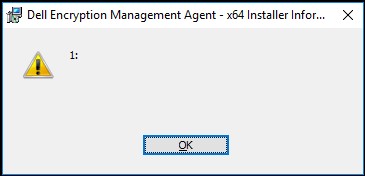
圖 1:(僅英文)Dell Encryption 錯誤視窗
安裝時,出現錯誤視窗,不顯示說明文字 EmAgent 在已啟用原則式加密的裝置上,以完整磁片加密模式。
這表示安裝程式已辨識此端點上存在原則式加密,且在已啟用原則的加密端點上安裝預設模式的阻止完整磁片加密。
Cause
不適用
Resolution
若要安裝完整的磁片加密並列原則加密,請修改命令列以包含參數:
"ENABLE_FDE_LM=1":
範例:
EmAgent_setup.exe /v"FEATURE=FDE ENABLE_FDE_LM=1"
如要聯絡支援部門,請參閱 Dell Data Security 國際支援電話號碼。
請前往 TechDirect,以線上產生技術支援要求。
如需更多深入見解與資源,請加入 Dell 安全性社群論壇。
Affected Products
Dell EncryptionArticle Properties
Article Number: 000130925
Article Type: Solution
Last Modified: 06 May 2024
Version: 8
Find answers to your questions from other Dell users
Support Services
Check if your device is covered by Support Services.