Dell Encryption EmAgent 安装导致出现错误窗口,其中包含文本“1:”
Summary: Dell Encryption EmAgent 安装导致出现错误窗口,其中包含文本“1:”
This article applies to
This article does not apply to
This article is not tied to any specific product.
Not all product versions are identified in this article.
Symptoms
受影响的产品:
- Dell Encryption v10.2 和 10.2.1
- Dell Endpoint Security Suite Enterprise v2.2.0 和 2.2.1
默认行为是阻止这种类型的部署,并在安装时显示错误窗口 EmAgent 在已安装基于策略的加密(也称为 Shield)的端点上。问题是错误窗口是非描述性的(即 1:)。
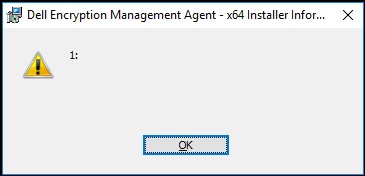
图 1:(仅限英文)Dell Encryption 错误窗口
安装时,将显示错误窗口而不显示描述性文本 EmAgent 在已启用基于策略的加密的设备上,处于全磁盘加密模式。
这表示安装程序已识别此端点上存在基于策略的加密,并且已出现阻止在启用了基于策略的加密的端点上安装全磁盘加密的默认模式。
Cause
不适用
Resolution
要在基于策略的加密的同时安装 Full Disk Encryption,请修改命令行以包含参数:
"ENABLE_FDE_LM=1":
示例:
EmAgent_setup.exe /v"FEATURE=FDE ENABLE_FDE_LM=1"
要联系支持部门,请参阅 Dell Data Security 国际支持电话号码。
转至 TechDirect,在线生成技术支持请求。
要获得更多见解和资源,请加入戴尔安全社区论坛。
Affected Products
Dell EncryptionArticle Properties
Article Number: 000130925
Article Type: Solution
Last Modified: 06 May 2024
Version: 8
Find answers to your questions from other Dell users
Support Services
Check if your device is covered by Support Services.