Dell Networking SONiC How to Configure Multi Chassis LAG MC-LAG
Summary: This article explains how to configure Multi-chassis Link Aggregation Group (MC-LAG) in Dell Networking SONiC.
Instructions
PrerequisitesWe are using standard interface naming to demonstrate the Concepts. See the article Dell Networking S-Series: Basic Interface Configuration - SONiC 4.0 for more information regarding interface naming |
Index
What is MCLAG?
Configuration Syntax
Configure a Trunk port/PortChannel for MCLAG Peer Link
Configure MCLAG Domain
Configuring MCLAG Port Channel
Sample Topology
Sample configuration
Verify the Operation
What is an MCLAG
A port channel (LAG) allows us to bundle multiple interfaces together into an aggregate group for redundancy and increased bandwidth. All links are on the same switch. A multichassis LAG (MCLAG) allows us to create a logical switch in which multiple interfaces on peer switches are bundled. The MCLAG peer switches are managed separately as independent devices. The MCLAG provides redundancy and load balancing between the MCLAG peers. A downstream switch or server connects to the MCLAG peers through a multichassis port channel.
Below is a Sample MCLAG Topology. See article Dell EMC Networking SONiC Multi-Chassis Link Aggregation Group (MCLAG) Terminology to understand more regarding MCLAG terminologies. 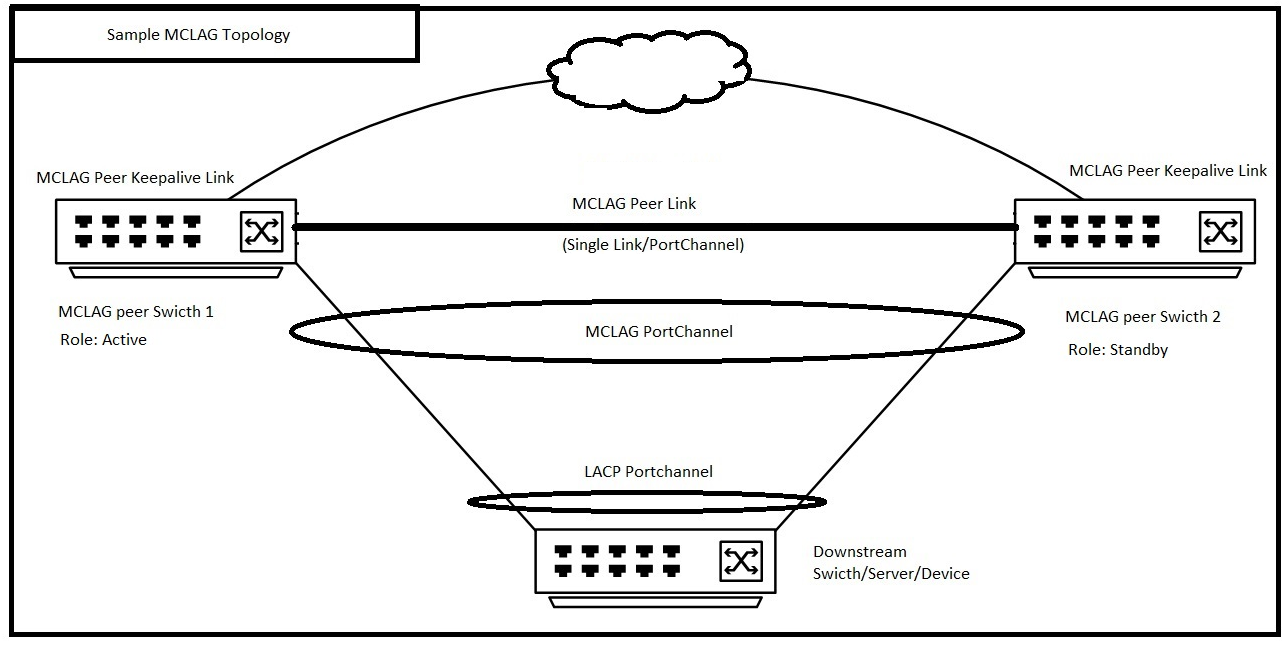 |
Configuration Syntax
Configure a Trunk port/PortChannel for MCLAG Peer Link
| Configuration | Explanation |
|---|---|
admin@DELLSONiC:~$ sonic-cli |
Log in to Dell MF-CLI |
DELLSONiC# configure |
Enter configuration mode. |
DELLSONiC(config)# interface <Portchannel/Ethernet> |
Enter Interface or Port Channel. |
DELLSONiC(conf-if-XXX)# switchport trunk allowed Vlan <Vlan-id/all> |
Configure MCLAG Peer Link as a trunk link. You may also configure the specific VLAN. |
DELLSONiC(conf-if-XXX)# no shutdown |
Bring the interface up. |
Configure MCLAG Domain
On each MCLAG peer, create an MCLAG domain and enter domain configuration mode. Only one MCLAG domain is supported on a switch.
| Configuration | Explanation |
|---|---|
DELLSONiC# configure |
Enter configuration mode. |
DELLSONiC(config)# mclag domain <Domain ID> |
Configure MCLAG domain ID. The Domain ID can be 1-4095. |
Define MCLAG Peer link An MCLAG Peer link Connects MCLAG peer switches and acts as data backup path between MCLAG peers. |
|
DELLSONiC(config-mclag-domain-<ID>)# peer-link <Interface Number> |
Configure the MCLAG Peer link interface. This can be a single interface or PortChannel. |
Configure MCLAG Peer keepalive link MCLAG Keepalive link is a Layer 3 link that connects MCLAG peer switches. It carries periodic heartbeat messages between MCLAG peers. |
|
DELLSONiC(config-mclag-domain-<ID>)# source-ip <IP address> |
Configure the MCLAG Peer keepalive link in the switch end. |
DELLSONiC(config-mclag-domain-<ID>)# peer-ip <IP address> |
Configure the MCLAG Peer keepalive link in peer switch end. |
Configure MCLAG system MAC address (Optional) Dell Technologies recommends configuring a system MAC address to prevent the MCLAG port channel flapping on the standby peer when the active peer reboots. |
|
DELLSONiC(config-mclag-domain-<ID>)# mclag-system-mac nn:nn:nn:nn:nn:nn |
Configure same MCLAG system mac address on both MCLAG peers. If we do not configure a system MAC address, the MAC address of the active peer is used as the MCLAG MAC address across both peers. |
(Optional) Configure MCLAG Gateway MAC See article How to Configure a Gateway MAC Address in Dell EMC Networking SONiC MF-CLI for more details on gateway-mac. |
|
DELLSONiC(config)# mclag gateway-mac xx:xx:xx:xx:xx:xx |
Configure the gateway mac address |
Configuring MCLAG Port Channel
| Configuration | Explanation |
|---|---|
DELLSONiC# configure |
Enter configuration mode. |
DELLSONiC(config)# interface PortChannel X |
Configure MCLAG PortChannel |
DELLSONiC(conf-if-poX)# mclag <Domain ID> |
Define the PortChannel under MCLAG Domain. |
DELLSONiC(conf-if-poX )# no shutdown |
Bring the PortChannel up. |
Configure The interfaces as part of PortChannel |
|
DELLSONiC(config)# interface range Eth 1/X-1/Y |
Configure interface/ range of interfaces in the PortChannel. |
DELLSONiC(conf-if-range-eth**)# channel-group <Portchannel number> |
Configure the PortChannel number. |
ELLSONiC(conf-if-range-eth**)# no shutdown |
Bring the interfaces up. |
Sample Topology

Sample configuration
Consider we are configuring above topology, and the MCLAG Domain ID is 1.
| MCLAG Peer switch 1 (Hostname: MCLAGSW1) | MCLAG Peer switch 2 (Hostname: MCLAGSW2) |
|---|---|
Logging to Dell MF-CLI admin@MCLAGSW1:~$ sonic-cli MCLAGSW1# |
Logging to Dell MF-CLI admin@MCLAGSW2:~$ sonic-cli MCLAGSW2# |
Configure a Trunk port/PortChannel for MCLAG Peer Link MCLAGSW1# configure MCLAGSW1(config)# interface Eth 1/1 MCLAGSW1(conf-if-Eth1/1)# switchport trunk allowed Vlan all MCLAGSW1(conf-if-Eth1/1)# no shutdown MCLAGSW1(conf-if-Eth1/1)# exit MCLAGSW1(config)# exit |
Configure a Trunk port/PortChannel for MCLAG Peer Link MCLAGSW2# configure MCLAGSW2(config)# interface Eth 1/1 MCLAGSW2(conf-if-Eth1/1)# switchport trunk allowed Vlan all MCLAGSW2(conf-if-Eth1/1)# no shutdown MCLAGSW2(conf-if-Eth1/1)# exit MCLAGSW2(config)# exit |
Configure MCLAG Domain MCLAGSW1# configure MCLAGSW1(config)# mclag domain 1 MCLAGSW1(config-mclag-domain-1)# peer-link Eth 1/1 MCLAGSW1(config-mclag-domain-1)# source-ip 192.168.1.1 MCLAGSW1(config-mclag-domain-1)# peer-ip 192.168.1.2 MCLAGSW1(config-mclag-domain-1)# mclag-system-mac 00:11:22:33:44:55 MCLAGSW1(config-mclag-domain-1)# exit MCLAGSW1(config)# exit |
Configure MCLAG Domain MCLAGSW2# configure MCLAGSW2(config)# mclag domain 1 MCLAGSW2(config-mclag-domain-1)# peer-link Eth 1/1 MCLAGSW2(config-mclag-domain-1)# source-ip 192.168.1.2 MCLAGSW2(config-mclag-domain-1)# peer-ip 192.168.1.1 MCLAGSW2(config-mclag-domain-1)# mclag-system-mac 00:11:22:33:44:55 MCLAGSW2(config-mclag-domain-1)# exit MCLAGSW2(config)# exit |
Configuring MCLAG PortChannel MCLAGSW1# configure MCLAGSW1(config)# interface PortChannel 1 MCLAGSW1(conf-if-po1)# mclag 1 MCLAGSW1(conf-if-po1)# no shutdown MCLAGSW1(conf-if-po1)# exit MCLAGSW1(config)# Configure The interface Eth 1/8 as part of PortChannel 1 MCLAGSW1(config)# interface range Eth 1/8 %Info: Configuring only existing interfaces in range MCLAGSW1(conf-if-range-eth**)# channel-group 1 MCLAGSW1(conf-if-range-eth**)# no shutdown MCLAGSW1(conf-if-range-eth**)# exit MCLAGSW1(config)# exit |
Configuring MCLAG PortChannel MCLAGSW2# configure MCLAGSW2(config)# interface PortChannel 1 MCLAGSW2(conf-if-po1)# mclag 1 MCLAGSW2(conf-if-po1)# no shutdown MCLAGSW2(conf-if-po1)# exit MCLAGSW2(config)# Configure The interface Eth 1/8 as part of PortChannel 1 MCLAGSW2(config)# interface range Eth 1/8 %Info: Configuring only existing interfaces in range MCLAGSW2(conf-if-range-eth**)# channel-group 1 MCLAGSW2(conf-if-range-eth**)# no shutdown MCLAGSW2(conf-if-range-eth**)# exit MCLAGSW2(config)# exit |
Verify the Operation
Lets Check show mclag brief from both switches
MCLAGSW1# show mclag brief Domain ID : 1 Role : active Session Status : up Peer Link Status : up Source Address : 192.168.1.1 Peer Address : 192.168.1.2 Session Vrf : default Peer Link : Eth1/1 Keepalive Interval : 1 secs Session Timeout : 30 secs Delay Restore : 300 secs System Mac : 0c:de:4c:81:00:0a Mclag System Mac : 00:11:22:33:44:55 Number of MLAG Interfaces:1 ----------------------------------------------------------- MLAG Interface Local/Remote Status ----------------------------------------------------------- PortChannel1 up/up |
MCLAGSW2# show mclag brief Domain ID : 1 Role : standby Session Status : up Peer Link Status : up Source Address : 192.168.1.2 Peer Address : 192.168.1.1 Session Vrf : default Peer Link : Eth1/1 Keepalive Interval : 1 secs Session Timeout : 30 secs Delay Restore : 300 secs System Mac : 0c:de:4c:81:00:0a Mclag System Mac : 00:11:22:33:44:55 Number of MLAG Interfaces:1 ----------------------------------------------------------- MLAG Interface Local/Remote Status ----------------------------------------------------------- PortChannel1 up/up |
Notice the Local and Remote Status in above output for PortChannel1. It is up and or up. By this we can understand the local and remote PortChannel of the MCLAG peer is up.