Precision 7960 Rack Unable to Update BIOS Using iDRAC or Lifecycle Controller
Summary: Learn how to update BIOS from 2.2.7 on the Precision 7960 Rack.
This article applies to
This article does not apply to
This article is not tied to any specific product.
Not all product versions are identified in this article.
Symptoms
Updating the BIOS on the Precision 7960 Rack from version 2.2.7 may fail. The issue occurs when updating the BIOS using iDRAC or lifecycle controller.
Affected Platform:
- Precision 7960 Rack
Cause
No cause information is available.
Resolution
Use the EFI file to update the BIOS.
- Go to the Dell Drivers & Downloads page and click Other formats next to the File Name of the BIOS version 2.3.5 or later.
Note: To download and install the BIOS, see BIOS Update Guide.
- Download the EFI BIOS on a USB drive.
- Start the computer with the USB drive installed. Press the F2 key to go to the BIOS options.
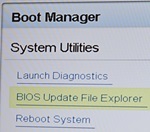
- Select BIOS Update File Explorer under System Utilities.
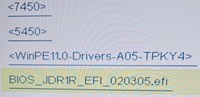
- Select the EFI file. The computer restarts to the EFI file.
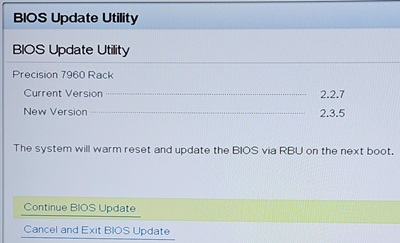
- Select Continue BIOS Update. Once the BIOS update has finished the computer can boot to any drive, or have drive imaged.
If the previous steps to get the Precision 7960 Rack to BIOS 2.3.5 are not in successful in restoring NVMe drive access, check the following incorrect settings in BIOS:
- Incorrect NVMe Settings:
- Dell Qualifies Drives is set for BIOS NVMe Driver
- Disabled is set for VMD Mode

- Correct NVMe Settings:
- All Drives is set for BIOS NVMe Driver
- Enabled is set for VMD Mode

- Incorrect PCIe Bifurcation Settings (BIOS default):
- Platform Default Bifurcation is set for Auto Discovery Bifurcation Settings
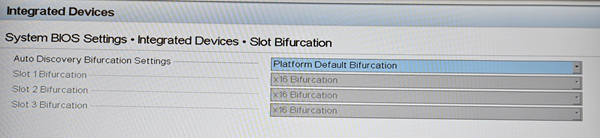
- Platform Default Bifurcation is set for Auto Discovery Bifurcation Settings
- Correct PCIe Bifurcation Settings to allow for 1x NVMe drive to run at x4 or 2x NVMe drives to run at x4 x4 x8 (Zoom card is in Slot 3):
- Auto Discovery of Bifurcation is set for Auto Discovery Bifurcation Settings
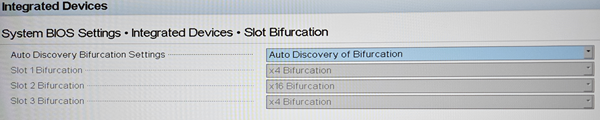
- Auto Discovery of Bifurcation is set for Auto Discovery Bifurcation Settings
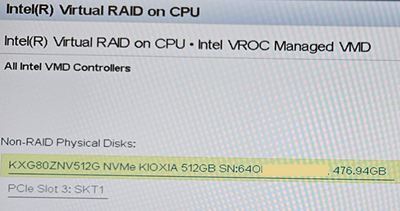
- To verify NVMe drives are visible to the computer, check Device Configuration under Intel Virtual RAID on CPU:
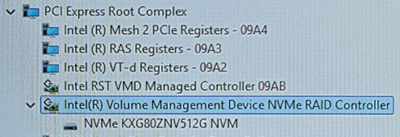
- After the OS image:
Affected Products
Precision 7960 RackArticle Properties
Article Number: 000263670
Article Type: Solution
Last Modified: 27 May 2026
Version: 5
Find answers to your questions from other Dell users
Support Services
Check if your device is covered by Support Services.