Support Assist Enterprise: Error code SAE-020410 "We could not complete this operation because our connection to the device was closed"
Summary: Unable to add or register one or more devices to the Dell SupportAssist Enterprise or to the Secure Connect Gateway because SSH is not enabled on the devices.
This article applies to
This article does not apply to
This article is not tied to any specific product.
Not all product versions are identified in this article.
Symptoms
Unable to add or register one or more devices to the Dell SupportAssist Enterprise (SAE) or to the Secure Connect Gateway (SCG).
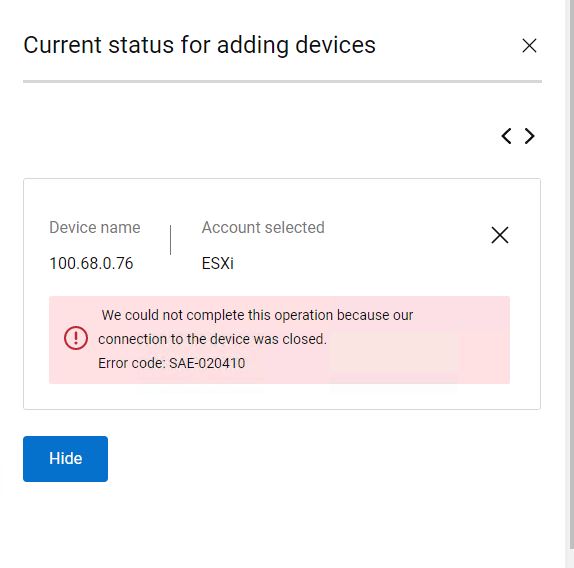
Device registration fails with the below error message:
We could not complete this operation because our connection to the device was closed. Error code: SAE-020410
Cause
Communication between the device and the SAE or SCG is blocked because SSH is not enabled on the devices.
Resolution
In our case, we were trying to register ESXi with Secure Connect Gateway(SCG) and during our troubleshooting it was found that the SSH service was disabled on the ESXi and it was blocking the connection from SCG.
Registration got succeeded after Enabling the SSH service on the ESXi.
The same workaround could be applied if you have this error message for while registering other devices as well.
Note: Consult with your team and ensure that the security aspects are met before enabling the SSH service on any device for SCG communication.
Affected Products
Secure Connect Gateway, SupportAssist Enterprise Virtual Appliance, Secure Connect Gateway - Virtual Edition, SupportAssist Enterprise Virtual Appliance 4.xProducts
SupportAssist EnterpriseArticle Properties
Article Number: 000198286
Article Type: Solution
Last Modified: 27 Aug 2024
Version: 3
Find answers to your questions from other Dell users
Support Services
Check if your device is covered by Support Services.