CyberSense: Installing a License in CyberSense 8.6 Results in an End User License Agreement Error Message
Summary: Attempting to install or reinstall a license into a CyberSense 8.6 environment results in the following error when uploading the license file: "License upload has failed. Error: licmanage: checking licensing directory: "/opt/ie/var/licenses" This license requires the End User License Agreement. ...
This article applies to
This article does not apply to
This article is not tied to any specific product.
Not all product versions are identified in this article.
Symptoms
Uploading a new license results in the following error in the CyberSense 8.6 UI:
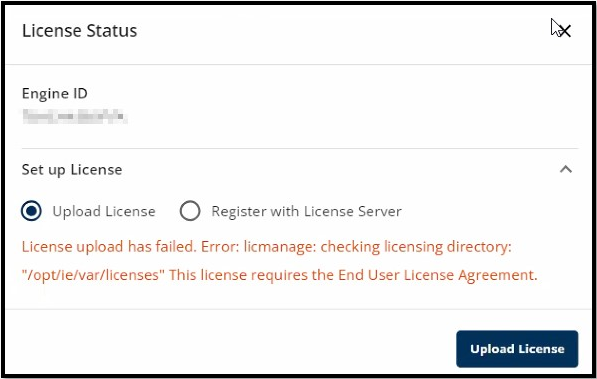
Figure 1: "License upload has failed" error dialog
Figure 1: "License upload has failed" error dialog
Cause
The release of CyberSense 8.6 brought more features and functionality to the UI for a better user experience. In the 8.6 release, there is no End User License Agreement (EULA) setting that can be accepted in this updated UI to apply this license.
Resolution
Workaround:
1. Log in to the deprecated, original CyberSense UI.
2. Navigate to Administration > System > Licenses.
3. Select the EULA option:

Figure 2: Select the EULA button under Administration > System > Licenses.
4. Scroll through the EULA and accept it:

Figure 3: The EULA has been accepted.
5. Log back in to the CyberSense 8.6 UI and install the license using the normal procedure.
Resolution:
This issue is addressed in all versions of CyberSense 8.7 and higher.
1. Log in to the deprecated, original CyberSense UI.
2. Navigate to Administration > System > Licenses.
3. Select the EULA option:
Figure 2: Select the EULA button under Administration > System > Licenses.
4. Scroll through the EULA and accept it:
Figure 3: The EULA has been accepted.
5. Log back in to the CyberSense 8.6 UI and install the license using the normal procedure.
Resolution:
This issue is addressed in all versions of CyberSense 8.7 and higher.
Article Properties
Article Number: 000227959
Article Type: Solution
Last Modified: 22 Aug 2024
Version: 1
Find answers to your questions from other Dell users
Support Services
Check if your device is covered by Support Services.