VxRail: ESXi host shows as unresponsive in vCenter and the issue reoccur after rebooting the host for several days
Summary: iSM fails with TLS error if iDRAC9 is upgraded to v3.30.30 during or after iSM 3.4 upgrade.
This article applies to
This article does not apply to
This article is not tied to any specific product.
Not all product versions are identified in this article.
Symptoms
It may happen that some ESXi hosts show as unresponsive in vCenter. Rebooting the host may resolve the issue temporarily, however, after several day, the issue reoccur. This issue only happens on Dell PowerEdge 14G servers with iDRAC9.
In the TSR log, a message like,
2019-06-04 15:26:05 ISM0049 The iDRAC Service Module (iSM) is unable to communicate to the iDRAC because the client certificate is either unavailable or invalid.
In vmkernel.log,
2019-06-04T02:05:56.920Z cpu61:2105520)WARNING: VisorFSObj: 1576: Cannot create file /etc/cim/dell/srvadmin/iSM/ini/tttttttttttttyZxIL9 for process sfcb-dcism because the inode table of its ramdisk (etc) is full.
In hostd.log,
2019-06-02T13:39:59.688Z error hostd[2105490] [Originator@6876 sub=Libs opID=e4a0107a-853b-11e9-f2a3 user=dcui:vsanmgmtd] VsanUtil: Failed to lock esx.conf /etc/vmware/esx.conf.LOCK.2104629: symlink failed: No space left on device
In iDRAC UI,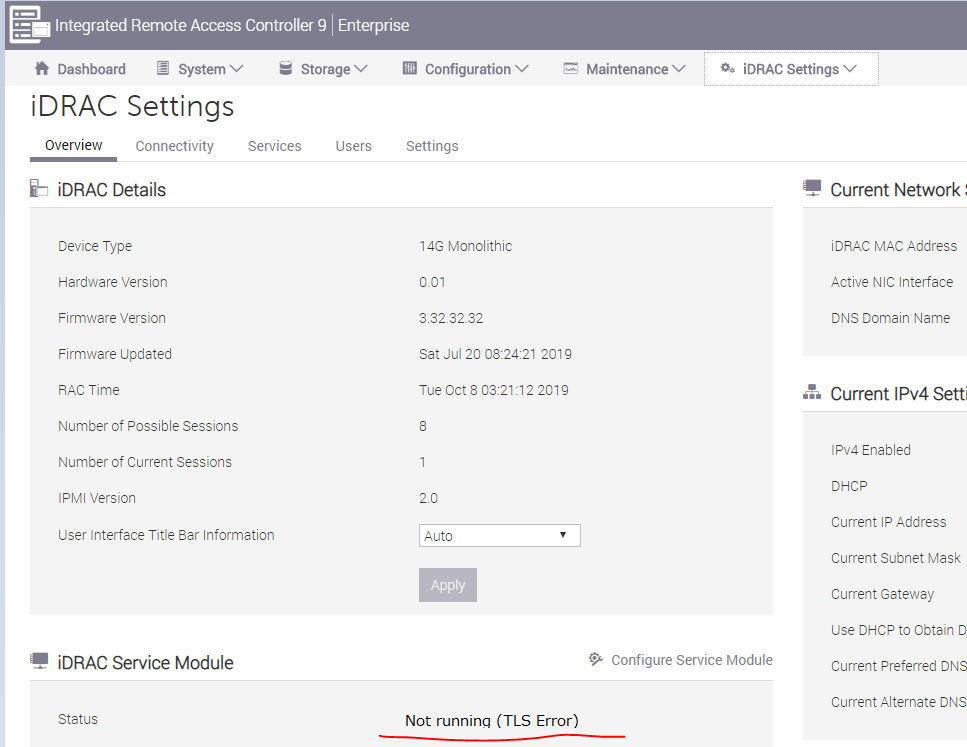
Cause
iDRAC9 v3.30.30 introduced a mandatory requirement to create a secure TLS channel with iSM v3.4.0-1471 or newer.
Dell Engineering has identified a scenario where a memory leak occurs if the iDRAC9 has not yet negotiated this secure TLS connection if iSM v3.4.0-1471 was installed or upgraded before iDRAC firmware was upgraded. The leak eventually also causes loss of kernel inode count because of a flood of temporary INI files created in /etc/dell.
VxRail SW releases 4.5.400, 4.7.200 and above integrated iSM v3.4.0-1471. A workaround to prevent this issue was added to 4.5.400 and 4.7.212. 4.7.210 is not impacted because it is a manufacturing only release so no upgrades to it. Therefore, the VxRail 4.7.200 and 4.7.211 releases are most likely to encounter this issue.
Note: It is also possible to encounter this issue if the system board has been replaced due to hardware fault. This applies to nodes running 4.7.2xx [including 4.7.212 and future code]
Resolution
Reboot the ESXi host if it already shows as unresponsive in vCenter.
Reinstalling iSM can trigger the secure TLS channel to be renegotiated with iDRAC9 and resolve the issue from happening again.
On the affected ESXi hosts, run the following commands to reinstall iSM.
esxcli software vib remove -n dcism
esxcli software vib install -d <path to iSM VIB>
If there is no inode available in the ESXi, you may remove unnecessary files first because this issue can also cause running out of inode.
ls -l /etc/cim/dell/srvadmin/iSM/ini/
rm -f /etc/cim/dell/srvadmin/iSM/ini/tttttt*
If the system board has been replaced due to hardware failure, the above resolution steps also apply.
Affected Products
VxRail Appliance SeriesProducts
VxRail Appliance SeriesArticle Properties
Article Number: 000060464
Article Type: Solution
Last Modified: 29 Nov 2024
Version: 4
Find answers to your questions from other Dell users
Support Services
Check if your device is covered by Support Services.