OpenManage Enterprise: 4.5.x Is Not Able to Display Real-time Temperature From iDRAC
Summary: After firmware upgrade of iDRAC9 & iDRAC10 to v7.20.60.50 & v1.20.70.50 respectively, the real-time temperature is not displayed in OpenManage Enterprise 4.5.x.
This article applies to
This article does not apply to
This article is not tied to any specific product.
Not all product versions are identified in this article.
Symptoms
- Device details page displays a red box message: "
Unable to complete the operation Get Realtime Temperature because the device did not respond." - Monitor metrics tab displays "no data available" for Thermal graph.
- MessageId":"CDEV6060" is registered under Tomcat\application.log.
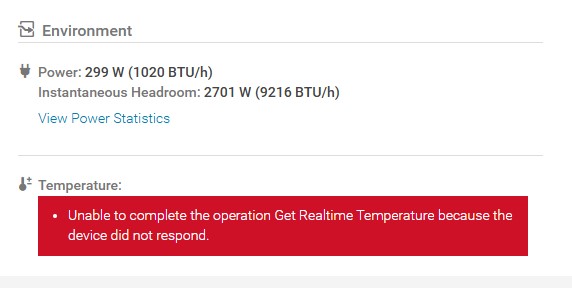
This affects all iDRAC10 firmware version >= 1.20.70.50 and idrac9 version>= 7.20.60.50
Cause
- The API used to fetch System Inlet Temperature details in iDRAC10 firmware versions less than 1.20.70.50 or iDRAC9 versions < 7.20.60.50 is
/redfish/v1/Systems/System.Embedded.1/Oem/Dell/DellNumericSensors/iDRAC.Embedded.1_0x23_SystemBoardInletTemp - This API has been changed to
/redfish/v1/Systems/System.Embedded.1/Oem/Dell/DellNumericSensors/iDRAC.Embedded.1_0x23_InletTempfrom iDRAC10 firmware version 1.20.70.50 and iDRAC9 firmware version 7.20.60.50 onwards. - OpenManage Enterprise 4.5.x has not incorporated this change in the API that it uses to fetch the data and thus it errors out.
Resolution
The fix for this issue is available in OpenManage Enterprise version 4.6.0.
Affected Products
Rack Servers, Tower Servers, Dell EMC OpenManage Enterprise, iDRAC10 - 1.20.xx Series, iDRAC9 - 7.xx SeriesArticle Properties
Article Number: 000384305
Article Type: Solution
Last Modified: 05 Nov 2025
Version: 1
Find answers to your questions from other Dell users
Support Services
Check if your device is covered by Support Services.