NVP-vProxy: How To Identify a VM Name From the UUID Presented In NetWorker
Summary: How to identify a VMware Virtual Machine's (VM) Managed Object Reference (MoRef) value, Universal Unique Identifier (UUID), and VM Name from backup logs.
This article applies to
This article does not apply to
This article is not tied to any specific product.
Not all product versions are identified in this article.
Instructions
The VM backup session logs contain detailed information about the VM:
Linux NetWorker Server:
Windows NetWorker Server:
/nsr/logs/policy/POLICY_NAME/WORKFLOW_NAME
Windows NetWorker Server:
C:\Program Files\EMC NetWorker\nsr\logs\POLICY_NAME\WORKFLOW_NAME
NOTE: POLICY_NAME and WORKFLOW_NAME correspond with the Policy and Workflow used to backup your VMs. NetWorker server policy logs are in the
jobdsb retention (default 72 hours). Anything older than the jobsdb retention is recycled.
vProxy Appliance:
/opt/emc/vproxy/runtuime/logs/recycle/vbackupd/DATE
The following options can be used to identify either the MoReF, UUID, and VM Name.
1. If you would like to know what VM corresponds to a UUID, you can run the following mminfo command:
mminfo -kot -r name,vmname,ssid
Example:
[root@nsr ~]# mminfo -kot -t yesterday -r name,vmname,ssid
 name                          vm_name   ssid
vm:503ea434-0331-8ed6-8b19-b9cd408cce7a:vcsa.amer.lan win-sql01.amer.lan 3521929707
vm:503edaab-e481-b0e7-1433-835e23dd2a5d:vcsa.amer.lan sles-client01.amer.lan 3505152494
vm:503e178f-6982-0b07-36b2-c46c6d3ec4c9:vcsa.amer.lan rhel-client01.amer.lan 3488375279
vm:503e7439-7053-9fc0-6c26-02f5f021b289:vcsa.amer.lan win-client01.amer.lan 3471598063
Using the save set ID (ssid) of a VM backup, run the following command to get the expanded save set details:
mminfo -aS -q ssid=SSID
Example:
[root@nsr ~]# mminfo -aS -q ssid=3471598063
ssid=3471598063 savetime=04/01/2025 06:00:16 PM (1743544816) vcsa.amer.lan:vm:503e7439-7053-9fc0-6c26-02f5f021b289:vcsa.amer.lan
...
  \"template\": false,
  \"moref-id\": \"vm-17020\",
  \"vcenter-name\": \"vcsa.amer.lan\",
  \"path\": \"/vSAN Datacenter/vSAN Cluster/win-client01.amer.lan\",
...
                    *vm_name: win-client01.amer.lan;
                    *vm_uuid: 503e7439-7053-9fc0-6c26-02f5f021b289;
                       group: VMware_ScheduledImageProtection;
            saveset features: CLIENT_SAVETIME;
  Clone #1: cloneid=1743544815  time=04/01/2025 06:00:15 PM    retent=04/15/2025  flags=
    frag@         0 volid=4282791827 file/rec=       0/0     rn=0 last=04/01/2025
The above output displays both the VM's MoRef and UUID values at the time of backup.
2. If the VM cannot be identified from the above, then the following can be performed.
Identify the VM's MoReF value for the matching UUID presented by NetWorker:
nsrpolicy group display -g "GROUP_NAME"
[Where GROUP_NAME is the name of the group that the VM backup belongs to]
Example:
Example:
[root@nsr ~]# nsrpolicy group display -g VMware_ManualImageProtection
...
                  work items: \
"{\"vcenter_name\":\"vcsa.amer.lan\",\"clients\":[{\"moref-id\":\"vm-17023\",\"\
uuid\":\"503e178f-6982-0b07-36b2-c46c6d3ec4c9\",\"type\":\"VirtualMachine\"},{\
\"moref-id\":\"vm-17025\",\"uuid\":\"503e3332-5195-095b-9453-26e57d29fa59\",\"\
type\":\"VirtualMachine\"},{\"moref-id\":\"vm-17026\",\"uuid\":\"503ea3fa-077f\
-b36c-fa2b-c3e4b5a8f69e\",\"type\":\"VirtualMachine\"},{\"moref-id\":\"vm-2106\
0\",\"uuid\":\"503edaab-e481-b0e7-1433-835e23dd2a5d\",\"type\":\"VirtualMachin\
e\"},{\"moref-id\":\"vm-17020\",\"uuid\":\"503e7439-7053-9fc0-6c26-02f5f021b28\
9\",\"type\":\"VirtualMachine\"},{\"moref-id\":\"vm-17021\",\"uuid\":\"503eab8\
a-0389-8955-61fa-0072b25ae06f\",\"type\":\"VirtualMachine\"},{\"moref-id\":\"v\
m-17022\",\"uuid\":\"503ee0a2-7b12-0a0e-9dbd-7171a9db37a8\",\"type\":\"Virtual\
Machine\"}]}";
         work items disabled: ;
NOTE: Only VMs that are manually selected in the group are shown. If ALL VMs under the vCenter are selected, the output only shows the vCenter info and not the MoReF/UUID values of each VM. If dynamic (rule or VMware category tag) based selection is configured, the work items field is empty. This is because the "work items" are determined at the start of each backup job using the rule defined in the protection group.
3. Search the vCenter's Managed Object Browser (MOB) for the VM:
- Open a web browser and navigate to
https://vcenter_hostname_or_ip/mob(this requires administrative access to the vCenter) - For detailed instructions on how to navigate the vCenter MOB see: NetWorker: How To Collect MoReF (Managed Object Reference) Values for VMware Virtual Machines
- The VM MoReF and name appear under the datastore in which the VM resides:
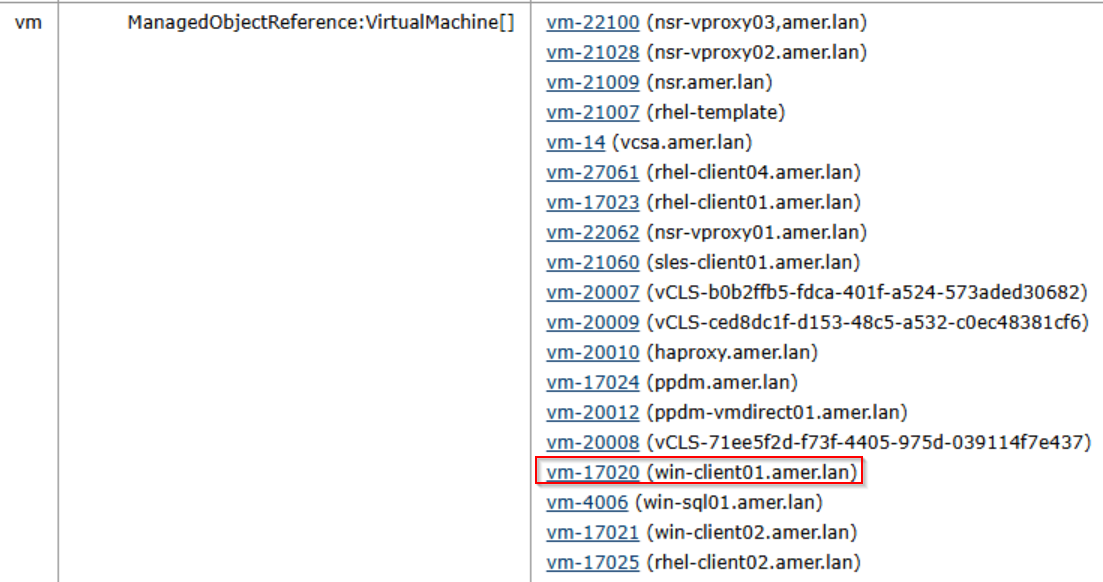
Alternatively, use the NetWorker server's nsrvim command to return information from the vCenter's inventory:
nsrvim -d VCENTER_NAME
Where VCENTER_NAME is the name of the vCenter, as it was added in NetWorker.
The above nsrvim command creates three .xml file. On Linux NetWorker server's, the .xml files can be found under /nsr/cores/nsrvim. On Windows NetWorker server's, the files are created in the same directory from which the command was run. The VCENTER_NAME.xml contains information about the VMs:

Additional Information
Affected Products
NetWorkerProducts
NetWorkerArticle Properties
Article Number: 000009748
Article Type: How To
Last Modified: 02 Apr 2025
Version: 6
Find answers to your questions from other Dell users
Support Services
Check if your device is covered by Support Services.