NetWorker: How To Collect MoReF (Managed Object Reference) Values for VMware Objects
Summary: The steps required to collect the ManagedObjectReference (MoreF) values from the vCenter ManagedObjectBrowser (MOB). These values are required when attempting to run NetWorker NVP-vProxy restores from the NetWorker server CLI, but may also be collected for other procedures. ...
This article applies to
This article does not apply to
This article is not tied to any specific product.
Not all product versions are identified in this article.
Instructions
NetWorker VMware Protection (NVP) has been configured in a NetWorker environment. Some operations, such as performing a command-line Virtual Machine (VM) recovery requires you to specify VMware Managed Object Reference values in the command syntax. For example:
nsrvproxy_recover -c vCenter [-s server] {-S ssid[/cloneid] | -N ssname [-t sstime]} [-m recovery-mode] [-f Folder-Moref] [-o option]... [-A Datacenter-Moref] [-C ComputeResource-Moref] [-L ClusterComputeResource-Moref] [-E Datastore-Moref] [-M VM-Moref] [-V VM-name] [-r ResourcePool-Moref] [-H Host-Moref] [-T datastore] [-e export-path] [-d disk] [-p vProxy] [-b pool] [-v] [-k]
There are several ways in which you can collect the data needed depending on circumstance or personal preference. The following options can be used.
Option 1 (mminfo):
The
1. Collect the save set id (SSID) of the VM backup that you want to use.
mminfo command can be used on the NetWorker server to collect detailed information about the VM backed up.
1. Collect the save set id (SSID) of the VM backup that you want to use.
A. All VM backups can be queried with:
mminfo -kot
B. One VM can be queried with the following command:
mminfo -kot -q vmname="VM_NAME"
NOTE: Replace VM_NAME with the name of the VM shown in VMware.
root@nsr:~# mminfo -kot -q vmname=win-client01
 volume        type   vm_name         date     time         size ssid      fl backup_size
...
ddve02VMwareClone.001 Data Domain win-client01 04/17/2024 11:00:13 PM 120 GB 2602601659 cr 120 GB
2. Use the SSID collected from the above command to query more details about the VM:
mminfo -aS -q ssid=SSID
root@lnx-nwserv:~# mminfo -aS -q ssid=2602601659
...
                    *vm_info: \
"{
  \"name\": \"win-client01\",
  \"host-name\": \"win-client01.amer.lan\",
  \"ip-address\": \"192.168.9.123\",
  \"template\": false,
  \"moref-id\": \"vm-1009\",
  \"vcenter-name\": \"vcsa.amer.lan\",
  \"path\": \"/Datacenter/esx01.amer.lan/win-client01\",
  \"moref-path\": \"/datacenter-3/domain-s8/vm-1009\",
  \"vm-path\": \"/Datacenter/Clients/win-client01\",
  \"moref-vm-path\": \"/datacenter-3/group-v1015/vm-1009\",
  \"datastore\": \"esx01-datastore\",
  \"datastore-moref\": \"datastore-11\",
  \"os-identifier\": \"windows2019srvNext_64Guest\",
  \"os-name\": \"Microsoft Windows Server 2022 (64-bit)\",
  \"version\": \"vmx-19\",
  \"change-version\": \"2024-04-01T13:11:28.482168Z\",
  \"esxi-moref\": \"host-10\",
  \"esxi-name\": \"esx01.amer.lan\",
  \"datacenter\": \"datacenter-3\",
  \"compute-resource\": \"domain-s8\",
  \"cluster-compute-resource\": \"\",
  \"networks\": [
    \"Production VM Network\"
  ],
...
Option 2 (nsrvim):
The NetWorker server can produce .xml files against the VMware hypervisor resource using the nsrvim command. This command runs every 15 minutes to populate VMware resources into the NetWorker database. It can also create dump files for specified hypervisor resources. This method may be useful when restoring a VM from one vCenter environment to a new vCenter, the save set details from mminfo only contains the VM MoRef values of the previous vCenter.
nsrvim --dump --names=HYPERVISOR_NAME
NOTE: Where HYPERVISOR_NAME is the name of the VMware hypervisor (vCenter or ESXi host) as it was added to NetWorker. This is visible in the NetWorker Management Console (NMC), NetWorker Web User Interface (NWUI), or from
nsradmin using print type: nsr hypervisor.
Example:
nsrvim --dump --names=vcsa.amer.lanOn Linux NetWorker servers, the .xml files are produced under: /nsr/cores/nsrvim/
On Windows NetWorker servers, the .xml files are produced in the same directory the nsrvim command was run from:

The HYPERVISOR_NAME-mapping.xml file details the VMware MoRef values:
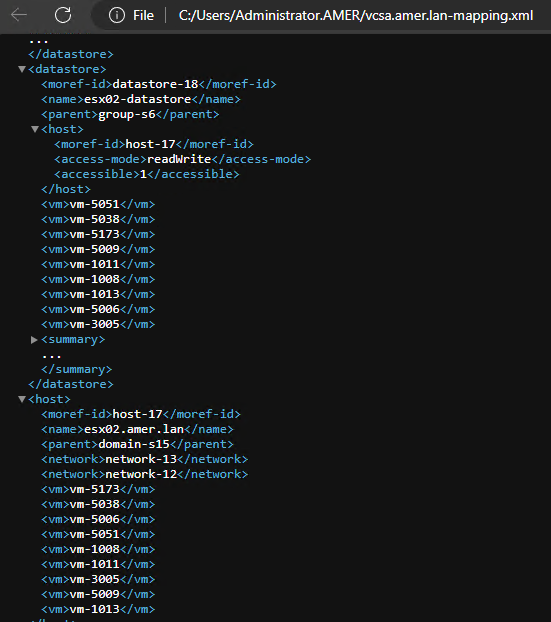
NOTE: This method retrieves specific datastore, host, and compute resource MoRef values. Other methods are required to correlate an existing VM's MoRef value with its VM name.
Option 3 (NSR Recover Resource):
Saving a recovery instance from the NMC creates a '
nsr recover' resource, displaying the NetWorker command and options used during the restore. This can be useful when you want to populate the command needed but add additional options like debugging and verbosity.
1. Start the restore that you want to perform from the NMC. You can stop the recovery, you do not need to allow it to complete. Once the recovery process has been initiated, it should save the NSR recover resource.
2. On the NetWorker server, open an Administrator or root prompt.
3. Enter the command: nsradmin
4. From the nsradmin prompt, enter: print type: nsr recover
Example:
root@lnx-nwserv:~# nsradmin
NetWorker administration program.
Use the "help" command for help, "visual" for full-screen mode.
nsradmin> print type: nsr recover

                        type: NSR recover;
                        name: Restore_Test_20240418;
                     comment: ;
                      client: vcsa.amer.lan;
          destination client: lnx-nwserv.amer.lan;
           recover requestor: \
"cn=administrator,cn=Users,dc=lnx-nwserv,dc=amer,dc=lan";
             recover command: nsrvproxy_recover;
             recover options: \
" -m I  -c vcsa.amer.lan -M vm-1008 -V 'lnx-client01_1' -A datacenter-3 -C dom\
ain-s15 -H host-17 -F 'group-v4' -d 'Hard disk 1/2000/datastore-18' -E datasto\
re-18  -S 2636156091";
               recover stdin: ;
                  start date: "Thu Apr 18 10:06:20 2024";
              hard stop date: ;
                      status: ;
            persist resource: Yes;
        restricted data zone: ;
The above output provides the necessary
nsrvproxy_recover command options used in the UI initiated restore. For Example:
nsrvproxy_recover -m I -c vcsa.amer.lan -M vm-1008 -V 'lnx-client01_1' -A datacenter-3 -C domain-s15 -H host-17 -F 'group-v4' -d 'Hard disk 1/2000/datastore-18' -E datastore-18 -S 2636156091"
Extra options such as
-v or -D [1-9] can be added after the recover command to increase verbosity and increase the debug level.
Option 4 (VMware):
You can collect the MoRef values directly from the VMware Managed Object Browser (MOB). VMware administrative access is required to access the vCenter MOB. If you do not have access to this tool, have your vCenter Administrator collect these values.
1. Go to vCenter Managed Object Browser (MOB)
Example:
2. Log in with vCenter admin credentials.
3. Select Content under "Content"
1. Go to vCenter Managed Object Browser (MOB)
Example:
https://vcenter-name-or-ip/MOB (you must use your vCenter name or IP).
2. Log in with vCenter admin credentials.
3. Select Content under "Content"
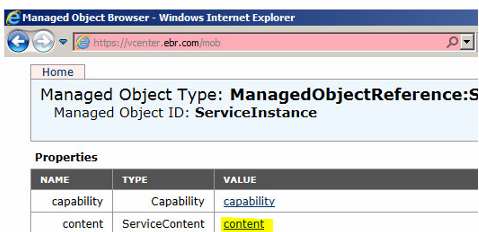
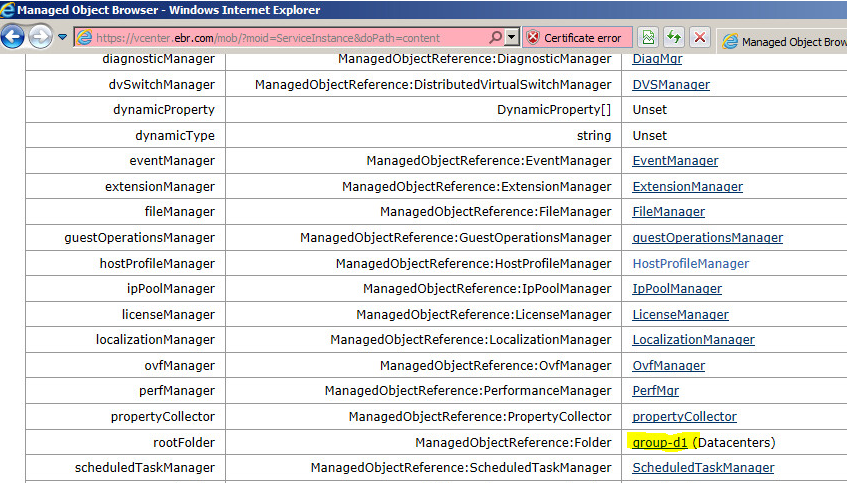
4. Select the datacenters group name under
ManagedObjetReference:Folder under "rootFolder"
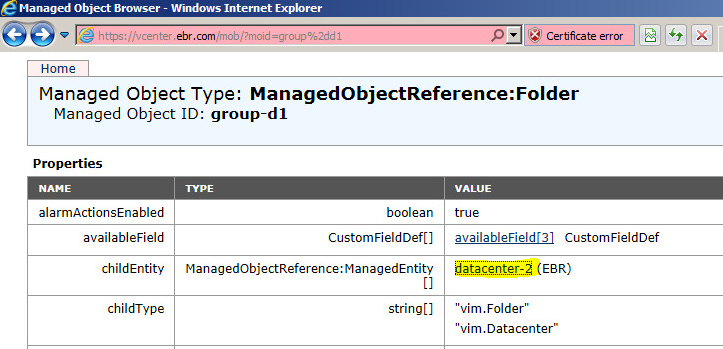
5. Select the datacenter name from
ManagedObjectReference:ManagedEntity under "childEntity"
6. Select the datastore where the VMs reside from
ManagedObjectReference:Datastore under "datastore"
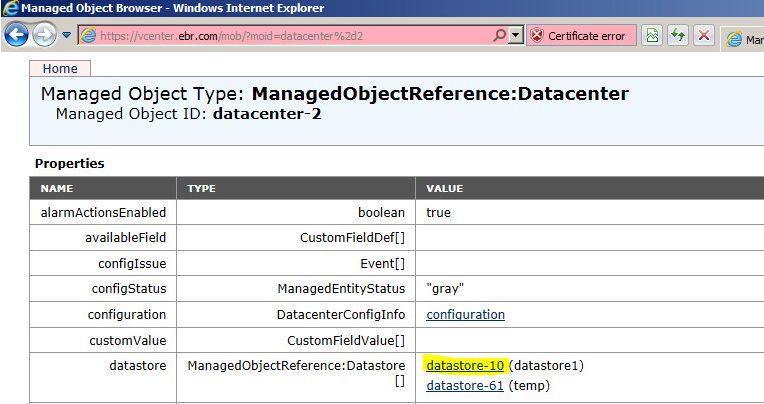
7. The VM MoReF value is listed under
ManagedObjectReference:VirtualMachine under "vm"
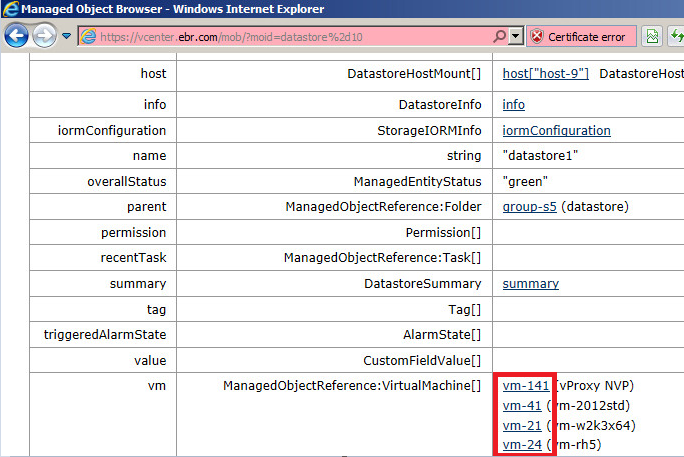
The MoReF values for datacenter, datastore, and VM are the highlighted values in each of the above examples.
Additional Information
See the NetWorker Command Reference Guide for additional documentation on command-line restore options: https://www.dell.com/support/home/product-support/product/networker/docs
Related Articles:
- NVP vProxy: Understanding VMware VM backup levels shown in NetWorker
- NVP-vProxy: How To Identify a VM Name From the UUID Presented In NetWorker
- NVP-vProxy: How to use the nsrvproxy_flr command for File Level Recovery from the NetWorker Server
- NVP vProxy: How to get the exact command syntax for running a VM recovery from CLI with debug
- NetWorker VMware Protection-vProxy: How to Enable Debug Logging
Affected Products
NetWorkerProducts
NetWorkerArticle Properties
Article Number: 000037025
Article Type: How To
Last Modified: 24 Mar 2026
Version: 7
Find answers to your questions from other Dell users
Support Services
Check if your device is covered by Support Services.