Data Domain - How to convert a directory replication context to MTree Replication using the Enterprise Manager
Summary: Explain changes required to directory replication context, and NAS shares, when converting to MTree replication from directory replication.
This article applies to
This article does not apply to
This article is not tied to any specific product.
Not all product versions are identified in this article.
Instructions
How to convert a directory replication context to MTree Replication using the Enterprise Manager
PURPOSE
Explain changes required to directory replication context, and NAS shares, when converting to MTree replication from directory replication.
APPLIES TO
- All Data Domain systems
- Software Release 5.1 and higher.
SOLUTION:
The easiest way to convert a directory replication context to a MTree replication context is with the integrated conversion found in the Enterprise Manager. The Enterprise Manager takes care of converting the context and copying the existing data in the source directory to the new MTree. It will initialize the new replication context. However it is still required for the user to change the mounting point from the old directory to the new MTree in the backup server. This is required so that new backup data is sent to the correct location.
***Note: MTree replication on release DDOS 5.1 only supports CIFS and NFS data. For VTL pools, continue to use directory replication.***
For this example we convert an existing directory replication context named "Oracle2" to a new MTree replication context also named "Oracle2"
The source Data Domain system is: dd640.chaos.local/backup/col1/backup/Oracle2
The destination Data Domain system is: dlh5.chaos.local/data/col1/Oracle2
As you can see that there is a directory replication context set up for this pair. Select the wanted replication pair:

Now go to the "More" button and select "Convert to MTree..."

This brings up the "Convert MTree" menu. Verify that the information is correct and click the "OK" button.
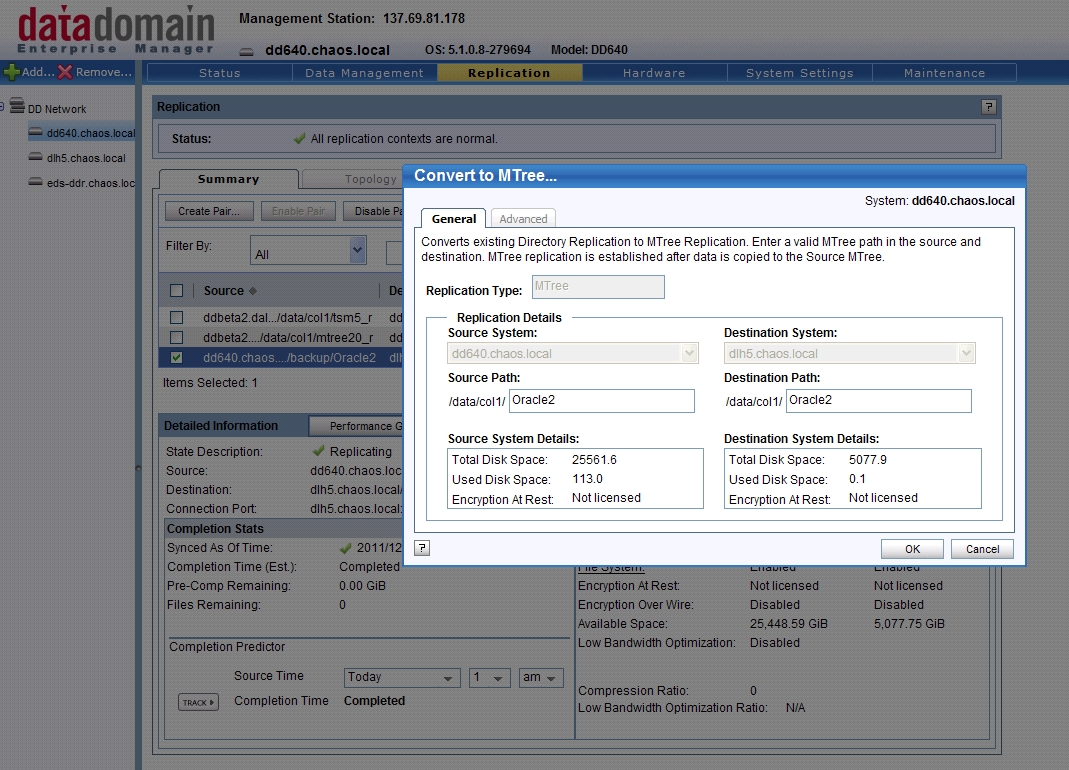
You get a "Warning" pop-up explaining what the changes that will be made and listing the additional changes the user must make to the existing share. Click the "OK button if you are ready to proceed.

At this point you get the "Convert to MTree...status" menu. You can follow the progress of each step. At the end of the process verify that the entire process was successful.

If the conversion process was successful, there is still one more task that must be performed. On the backup server, the existing shares and exports configured to the original directory (/data/col1/backup/Oracle2) need to be changed to the new MTree (/data/col1/Oracle2).
After verification that new backup data is being successfully replicated, the user can clean up the old /data/col1/backup/Oracle2 share.
Additional Information
Affected Products
Data DomainProducts
Data DomainArticle Properties
Article Number: 000010876
Article Type: How To
Last Modified: 04 Apr 2024
Version: 5
Find answers to your questions from other Dell users
Support Services
Check if your device is covered by Support Services.