Data Domain: VMware virtual hardware versions supported on Data Domain Virtual Edition (DDVE) and PowerProtect DD Management Console (DDMC)
Summary: This article outlines the supported VMWARE virtual hardware versions on Data Domain Virtual Edition (DDVE) and PowerProtect DD Management Console (DDMC).
This article applies to
This article does not apply to
This article is not tied to any specific product.
Not all product versions are identified in this article.
Instructions
DDVE and DDMC support virtual hardware versions of virtual machines up to the latest version of the ESXi in use, and minimum supported version 9.
| ESXi Version | Up to Virtual Hardware version |
|---|---|
| ESXi 6.5 | 13 |
| ESXi 6.0 | 11 |
| ESXi 5.5 | 10 |
Consult VMware's latest documentation for any virtual hardware version upgrades.
Note: A Virtual Machine cannot be powered on when an unsupported virtual hardware version is installed.
To confirm the Virtual Machine hardware version:
-
In Vcenter, highlight the VM that you want to check then go to: Inventory -> Virtual machine -> Edit settings
-
You get this, and the version is on top. In this example, it shows the one that is on version 8.
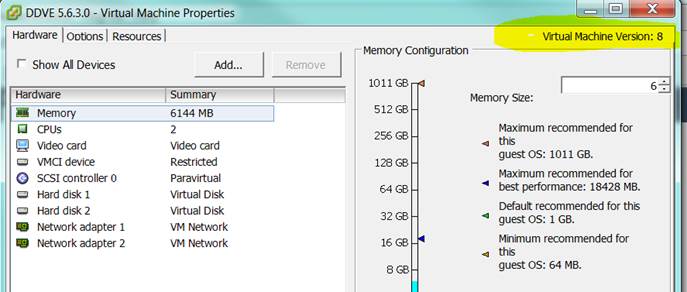
You can upgrade the Hardware version on the same menu.
-
In Recent tasks you see:

-
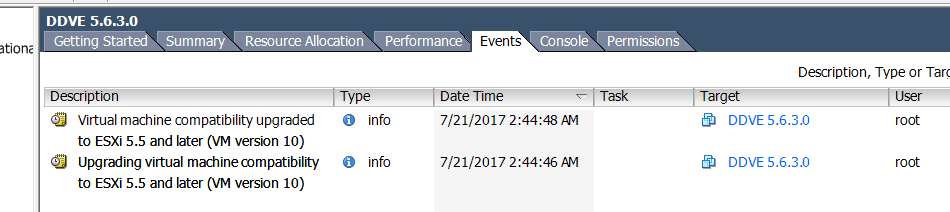
In Events, you see that it was upgraded to version 10. You do not get a choice of versions, if upgraded to the latest for the ESXi version. It upgrades the hardware version to version 10.
Additional Information
Power off the virtual machine before upgrading Virtual Hardware Version.
Affected Products
Data Domain Virtual Edition, PowerProtect Data Domain Management CenterArticle Properties
Article Number: 000019132
Article Type: How To
Last Modified: 29 Jul 2025
Version: 4
Find answers to your questions from other Dell users
Support Services
Check if your device is covered by Support Services.