Dell EMC Unity: Credentials cache retention prevent the NIS users from accessing FTP (User Correctable)
Summary: FTP users cannot access FTP shares after a password change on NIS server.
This article applies to
This article does not apply to
This article is not tied to any specific product.
Not all product versions are identified in this article.
Instructions
Configuration on Dell EMC Unity:
Sharing Protocols: CIFS / NFS / FTP Multiprotocol Enabled.
FTP on Dell EMC Unity can use the following Authentication Methods for FTP:
CIFS users username is in the format ftpuser@domain or domain\ftpuser
UNIX users using either local files or NIS
Issue:
Password was changed for a NIS user on the NIS server using similar procedure:
After Password change:
But Old password work:
The reason for the log in not completing is because of the Credential Cache Retention on the Dell EMC Unity. By default, it is set to 15 Minutes which means the UNIX user has to wait for 15 Minutes before he/she can use the new password. This can be reduced to a Minimum Value of 1 Minute.
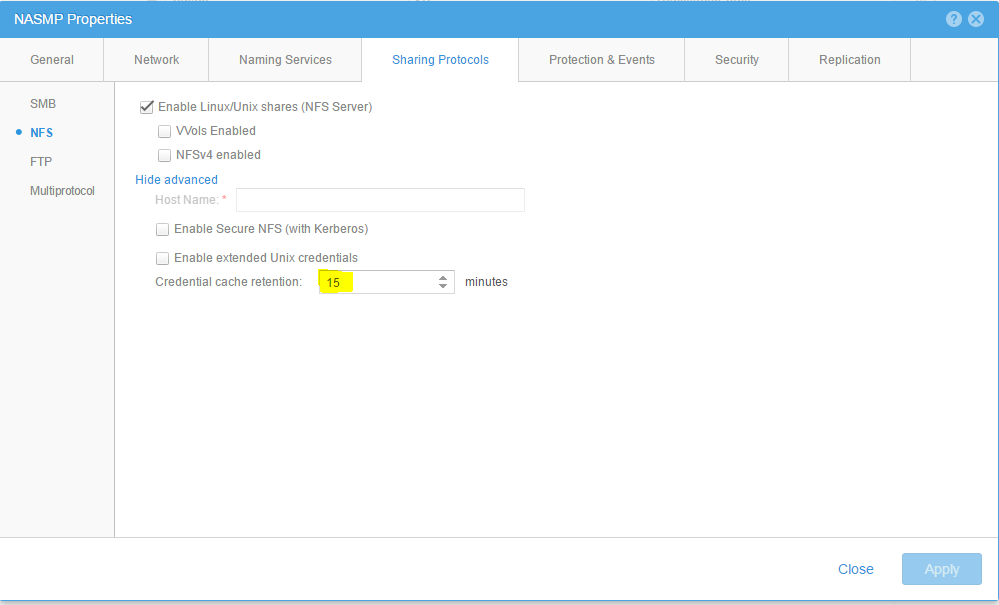
Edit this Accordingly to suit your needs and apply.
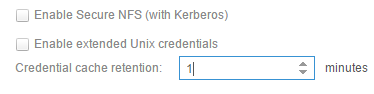
Note: After the password change, the user has to wait for 60 seconds to use the new credentials. Credential cache expires when the "Credential cache Retention" is set to 1 Minute.
Sharing Protocols: CIFS / NFS / FTP Multiprotocol Enabled.
FTP on Dell EMC Unity can use the following Authentication Methods for FTP:
CIFS users username is in the format ftpuser@domain or domain\ftpuser
UNIX users using either local files or NIS
Issue:
XXftp ftp://ftpuser1:nasadmin@ftphost
XXFTP 3.2.5 (Feb 02, 2011) by XXXX XXXXXXX (http://www.XXFTP.com/contact/).
Connecting to ftphost.
Welcome to Shanghai FTP server
Sun Apr 23 03:56:34 2017, 1 user(s) connected
NXXXP FTP server (EMC:upc_Unity_6_7_upcBuilder:92XXXX2) ready.
Logging in...
No directory! Logging in with home=/ftp.
Hello how are you
UNIX User ftpuser1 logged in.
Logged in to ftphost.
Current remote directory is /ftp.
XXFTP 3.2.5 (Feb 02, 2011) by XXXX XXXXXXX (http://www.XXFTP.com/contact/).
Connecting to ftphost.
Welcome to Shanghai FTP server
Sun Apr 23 03:56:34 2017, 1 user(s) connected
NXXXP FTP server (EMC:upc_Unity_6_7_upcBuilder:92XXXX2) ready.
Logging in...
No directory! Logging in with home=/ftp.
Hello how are you
UNIX User ftpuser1 logged in.
Logged in to ftphost.
Current remote directory is /ftp.
Password was changed for a NIS user on the NIS server using similar procedure:
#ypcat passwd.byname|grep ftpuser
ftpuser1:$6$XXXXXXXXXXXXXXXXXXdgLtdR3RDpDXqXTNk74GcCn3I.iNH4y9odOEV/zchLSmkj9IDozUwZR.Tl2dw1sYfJfxOInjiMA81:1001:1002::/home/ftpuser1:/bin/sh
#passwd ftpuser1
Enter new UNIX password:
Retype new UNIX password:
passwd: password updated successfully
#make
make[1]: Entering directory '/var/yp/example.com'
Updating passwd.byname...
Updating passwd.byuid...
Updating netid.byname...
Updating shadow.byname... Ignored -> merged with passwd
make[1]: Leaving directory '/var/yp/example.com'
#ypcat passwd.byname|grep ftpuser
ftpuser1:$6$XXXXXXXXXXXXXXXXXX3eVkkce6JfV2JHN7Df3n25fKRCgH9CxER7Lb0EYJ6dKB/rEAvKcd9VcTQH733cQzbYUFyvvc.8cD/:1001:1002::/home/ftpuser1:/bin/sh
ftpuser1:$6$XXXXXXXXXXXXXXXXXXdgLtdR3RDpDXqXTNk74GcCn3I.iNH4y9odOEV/zchLSmkj9IDozUwZR.Tl2dw1sYfJfxOInjiMA81:1001:1002::/home/ftpuser1:/bin/sh
#passwd ftpuser1
Enter new UNIX password:
Retype new UNIX password:
passwd: password updated successfully
#make
make[1]: Entering directory '/var/yp/example.com'
Updating passwd.byname...
Updating passwd.byuid...
Updating netid.byname...
Updating shadow.byname... Ignored -> merged with passwd
make[1]: Leaving directory '/var/yp/example.com'
#ypcat passwd.byname|grep ftpuser
ftpuser1:$6$XXXXXXXXXXXXXXXXXX3eVkkce6JfV2JHN7Df3n25fKRCgH9CxER7Lb0EYJ6dKB/rEAvKcd9VcTQH733cQzbYUFyvvc.8cD/:1001:1002::/home/ftpuser1:/bin/sh
After Password change:
XXftp ftp://ftpuser1:password@ftphost
XXFTP 3.2.5 (Feb 02, 2011) by XXXX XXXXXXX (http://www.XXFTP.com/contact/).
Connecting to 10.32.XXX.XXX...
Welcome to Shanghai FTP server
Sun Apr 23 04:01:51 2017, 1 user(s) connected
NXXXP FTP server (EMC:upc_Unity_6_7_upcBuilder:92XXXX2) ready.
Login incorrect.
Could not open host ftphost: username and/or password was not accepted for login.
XXFTP 3.2.5 (Feb 02, 2011) by XXXX XXXXXXX (http://www.XXFTP.com/contact/).
Connecting to 10.32.XXX.XXX...
Welcome to Shanghai FTP server
Sun Apr 23 04:01:51 2017, 1 user(s) connected
NXXXP FTP server (EMC:upc_Unity_6_7_upcBuilder:92XXXX2) ready.
Login incorrect.
Could not open host ftphost: username and/or password was not accepted for login.
But Old password work:
XXftp ftp://ftpuser1:nasadmin@ftphost
XXFTP 3.2.5 (Feb 02, 2011) by XXXX XXXXXXX (http://www.XXFTP.com/contact/).
Connecting to 10.32.XXX.XXX...
Welcome to Shanghai FTP server
Sun Apr 23 04:03:03 2017, 1 user(s) connected
NASMP FTP server (EMC:upc_Unity_6_7_upcBuilder:92XXXX2) ready.
Logging in...
No directory! Logging in with home=/ftp.
Hello how are you
UNIX User ftpuser1 logged in.
Logged in to ftphost.
Current remote directory is /ftp.
XXFTP 3.2.5 (Feb 02, 2011) by XXXX XXXXXXX (http://www.XXFTP.com/contact/).
Connecting to 10.32.XXX.XXX...
Welcome to Shanghai FTP server
Sun Apr 23 04:03:03 2017, 1 user(s) connected
NASMP FTP server (EMC:upc_Unity_6_7_upcBuilder:92XXXX2) ready.
Logging in...
No directory! Logging in with home=/ftp.
Hello how are you
UNIX User ftpuser1 logged in.
Logged in to ftphost.
Current remote directory is /ftp.
The reason for the log in not completing is because of the Credential Cache Retention on the Dell EMC Unity. By default, it is set to 15 Minutes which means the UNIX user has to wait for 15 Minutes before he/she can use the new password. This can be reduced to a Minimum Value of 1 Minute.
Edit this Accordingly to suit your needs and apply.
Note: After the password change, the user has to wait for 60 seconds to use the new credentials. Credential cache expires when the "Credential cache Retention" is set to 1 Minute.
Affected Products
Dell EMC Unity FamilyProducts
Dell EMC Unity FamilyArticle Properties
Article Number: 000019208
Article Type: How To
Last Modified: 16 Oct 2025
Version: 3
Find answers to your questions from other Dell users
Support Services
Check if your device is covered by Support Services.