How to enable Java console debugging to troubleshoot NMC log in or NMC GUI launching issue
Summary: This article describes how to set up Java console debugging when troubleshooting NMC login failure or when NMC GUI is not launching
This article applies to
This article does not apply to
This article is not tied to any specific product.
Not all product versions are identified in this article.
Instructions
How to enable Java console debugging to troubleshoot NMC log in or NMC GUI launching issue
Open the Java Control Panel
Clear the Java Cache.

Enable Java Console.
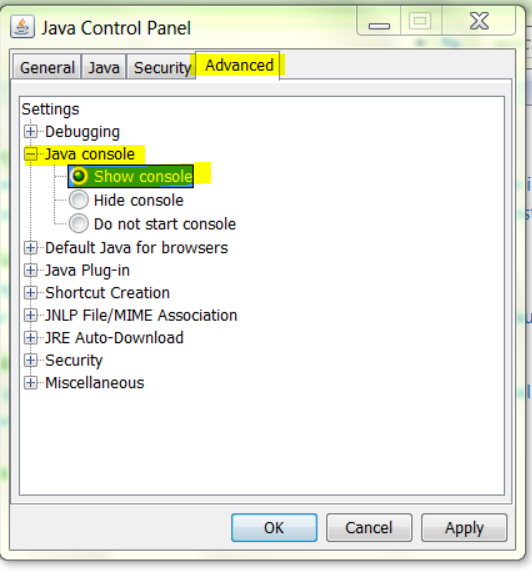
Launch the NMC - http://NMC server:9000
The Java Console opens. Press "5" in the Java Console box to set the trace level to 5. You should see something like this.

Copy the contents of the Java Console window to a text file, for analyis.
Open the Java Control Panel
Clear the Java Cache.
Enable Java Console.
Launch the NMC - http://NMC server:9000
The Java Console opens. Press "5" in the Java Console box to set the trace level to 5. You should see something like this.
Copy the contents of the Java Console window to a text file, for analyis.
Additional Information
Other related KBs
How to enable Java UI debugging to troubleshoot NMC GUI or display issue
https://support.emc.com/kb/533436
How to redirect the NMC Java UI debug log to a file
https://support.emc.com/kb/533564
How to enable Java UI debugging to troubleshoot NMC GUI or display issue
https://support.emc.com/kb/533436
How to redirect the NMC Java UI debug log to a file
https://support.emc.com/kb/533564
Affected Products
NetWorker Management ConsoleProducts
NetWorker Management ConsoleArticle Properties
Article Number: 000019836
Article Type: How To
Last Modified: 26 Aug 2025
Version: 4
Find answers to your questions from other Dell users
Support Services
Check if your device is covered by Support Services.