VxRail:如何为 vCenter 启用 SSH
Summary: 如何在收到错误“An internal error has occurred - Error #1009”时手动启用 SSH
This article applies to
This article does not apply to
This article is not tied to any specific product.
Not all product versions are identified in this article.
Instructions
尝试在 vCenter 中启用 SSH 时,即使使用 administrator@vsphere.local 或 root 帐户,也可能会出现以下错误。
如果显示此消息,请按照以下步骤启用 SSH:
- 打开浏览器并转到 VAMI:
https://<vcenter-ip>:5480 - 使用 root 凭据登录。
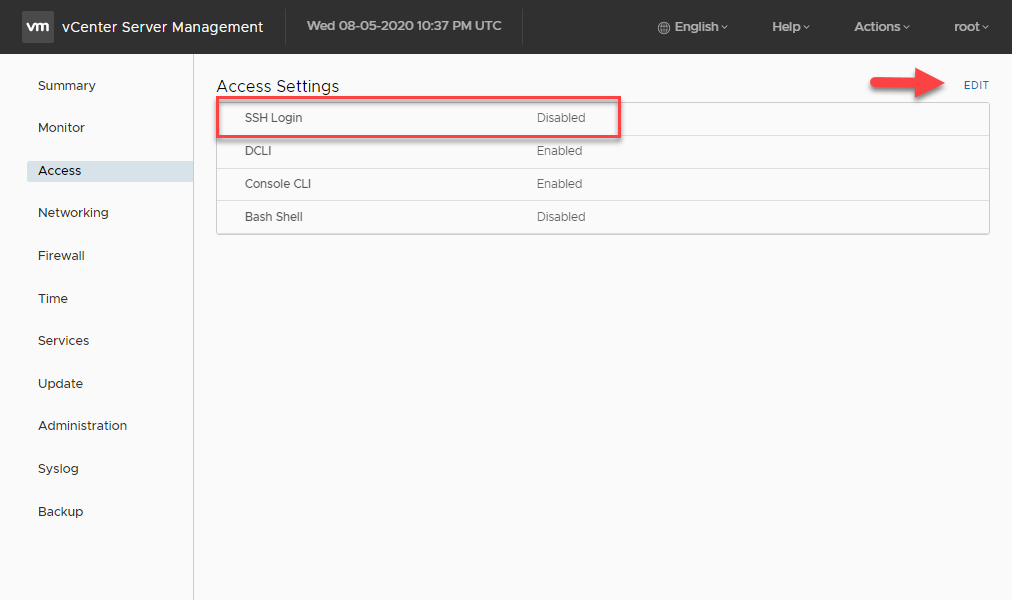
- 在左侧菜单中,单击 Access。
- 单击编辑按钮。
- 启用 SSH 登录选项,然后单击确定以保存更改
Article Properties
Article Number: 000022532
Article Type: How To
Last Modified: 29 Jul 2025
Version: 6
Find answers to your questions from other Dell users
Support Services
Check if your device is covered by Support Services.