Dell EMC Unity: How to Audit SMB file objects access (files deletion) (User Correctable)
Summary: How to audit file object access when files and folders are being deleted
This article applies to
This article does not apply to
This article is not tied to any specific product.
Not all product versions are identified in this article.
Instructions
Using the Unity/VNX/VNXe Management tool ,please refer to the link below to download the tool :
Install and launch the tool (Windows client only), right click and connect to the CIFS(SMB) Unity NAS-SERVER-interface (or DNS name) to manage it directly.
note - do not attempt to connect this tool to the SP management port.
Through the NAS server Audit Policy ,you should enable (Audit Object Access) for both Failure and Success Policies, once (Audit Object Access) is successful, actions is enabled and this will generate events also when files or directories are deleted.
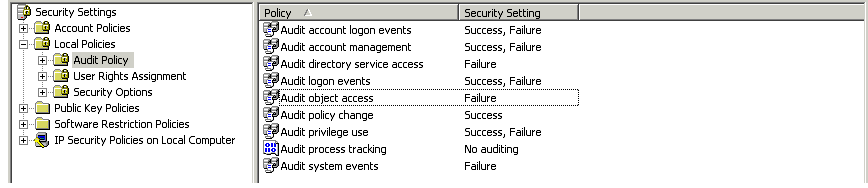
To be able to see successful file or directory deletions events, the NAS Server Auditing Policy must include events of type "Success".
Install and launch the tool (Windows client only), right click and connect to the CIFS(SMB) Unity NAS-SERVER-interface (or DNS name) to manage it directly.
note - do not attempt to connect this tool to the SP management port.
Through the NAS server Audit Policy ,you should enable (Audit Object Access) for both Failure and Success Policies, once (Audit Object Access) is successful, actions is enabled and this will generate events also when files or directories are deleted.
To be able to see successful file or directory deletions events, the NAS Server Auditing Policy must include events of type "Success".
Affected Products
Dell EMC Unity FamilyProducts
Dell EMC Unity FamilyArticle Properties
Article Number: 000022767
Article Type: How To
Last Modified: 16 Oct 2025
Version: 4
Find answers to your questions from other Dell users
Support Services
Check if your device is covered by Support Services.