Data Domain: Troubleshooting SAS Cable Configuration and Connection Issues
Summary: This article helps with troubleshooting possible cable connection issues on SAS links to attached storage shelves and enclosures.
This article applies to
This article does not apply to
This article is not tied to any specific product.
Not all product versions are identified in this article.
Symptoms
SAS Cable Configuration and Testing
If a SAS cable is faulty, the system can experience sluggishness which can lead to the following error conditions in the Autosupport and its alerting mechanism.
PURPOSE:
This article lists steps on how to ensure that:
- Serial Attached SCSI (SAS) cables are configured using the correct topology and that
- The cable connectors are securely fastened and support the necessary data throughput
- Ensure Correct Topology for Storage Configuration
- Ensure that Connectors are Securely Fastened
- Testing Cable Connections and Data Throughput
APPLIES TO:
- Data Domain systems with External Storage
- All Software Releases
Cause
If a SAS cable is faulty, the system can experience sluggishness which can lead to and report the following error conditions in the Autosupport (ASUP) and its alerting mechanism:
- Enclosure multipath path fails back to single path
- Alert:
Duplicate WWN <WWN> found in <HBA/LCC>, Loop back to HBA port <port> Encl <enclosure id> (<enclosure serial #>) Disk <disk id> only has one active connection path and the required number is 2Disk <disk id> is absent and should be replacedDisk <disk id> is failed and should be replacedDisk <disk id> is unknown and should be replaced- In an enclosure, multiple disks can be seen in an absent, failed, unknown state, or even a known state
- Host or EXP N port link speed <24 Gbps on an ES30 or DS60
- Host or EXP N port link speed 0 .0 Gbps (disconnected)
Resolution
- Verify that a SAS cable is connected and working properly.
At the Command Prompt type:
enclosure show topology
Confirm primary and secondary paths to each enclosure to be good without any question marks: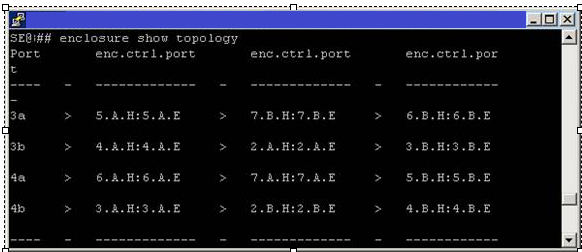
A defective SAS cable shows question marks (???) between paths and the error message stating a problem has been detected:
Port      enc.ctrl.port        enc.ctrl.port       enc.ctrl.port
3a    >   5.A.H:5.A.E   ? ? ?  7.B.H:7.B.E    >    6.B.H:6.B.E
Error message: ? - A possible problem was detected for this shelf controller or the cable connected to it.
- If question marks (?) are seen between paths, physically inspect the SAS cable connectivity between shelves. If all cables are snug and securely fastened, however, the alert has not cleared, further troubleshooting is required. Contact Dell Support and Create a service request.
- If exclamation marks (!) are seen between paths, it indicates that a PHY error has been recorded. Contact Dell Support for help with running diagnostics:
Port      enc.ctrl.port        enc.ctrl.port       enc.ctrl.port
3a    >   5.A.H:5.A.E     !    7.B.H:7.B.E     >   6.B.H:6.B.E
- Causes of a Duplicate WWN alert:
-
Loose or defective cables
-
Connecting an Expansion Port directly to the HBA (SAS Card) port (for example 6.B.E > 4a)
-
Incorrect connections between enclosures in the daisy chain
Check all connections and verify that the cabling is in the Data Domain best practices guide.
A reboot may be required to reset the chain once fixed.
Below is an example of a single DS60 shelf connection with the expected connection speeds:
'SE' commands can ONLY be performed by Dell Tech Support - that said, the output seen below can also be found in a DD system AutoSupport.
se enclosure show detailed-status 2
Encl 2
         Model                   DS60
         Capacity                60 Slots
         WWN                     N/A
         Serial #                xxxxxxxxxx0056
         Number of Controllers   2

         Controller A
                        WWN        50060nnnnn7B07F
                        Firmware   2.10.1
                        Serial #   xxxxxxxxxx0162
                        Status     OK

         Expander   Device       Speed       Description
        ---------   ----------   ---------   -------------------------
                    HOST port    24.0 Gbps  <<< Expected connection speed
                    EXP'N port   0.0 Gbps   <<< 0.0 Gbps will be displayed if there is no physical cable connected
Additional Information
If changing SAS cabling, note the following:
Reference: PowerProtect and Data Domain Hardware Documentation Guide
- For ES30 and FS15 Enclosures: Allow at least 2 minutes between each Cable removal or insertion on the head unit SAS HBA ports.
- For DS60 Enclosures: Allow at least 8 minutes between each Cable removal or insertion on the head unit SAS HBA ports.
This allows the Head unit (DDOS) time to apply any required Firmware updates and device mapping on the attached enclosure components.
Reference: PowerProtect and Data Domain Hardware Documentation Guide
Affected Products
Data DomainProducts
Data Domain, Data Domain Deduplication Storage Systems, DS60, ES30Article Properties
Article Number: 000035680
Article Type: Solution
Last Modified: 20 Jan 2026
Version: 10
Find answers to your questions from other Dell users
Support Services
Check if your device is covered by Support Services.