Avamar: Administrator shows inconsistent size for restorable directory within backup
Summary: Avamar Administrator shows inconsistent size for restorable directory within backup.
This article applies to
This article does not apply to
This article is not tied to any specific product.
Not all product versions are identified in this article.
Symptoms
Whilst browsing the restorable contents of a backup, the Avamar Administrator Backup and Restore interface shows an inaccurate size for the contents of a folder.
For example, the logical size of the backup here is shown to be 52.3 GB.
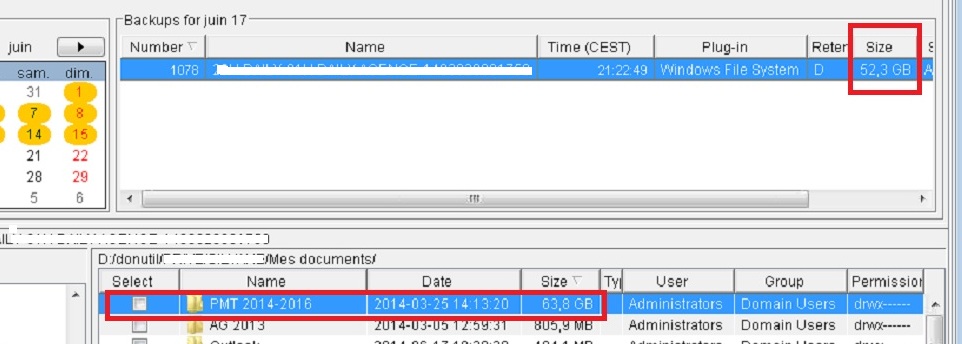
This is also the reported size of the backup within the client log.
avtar Info <5156>: Backup #1078 timestamp 2014-06-17 21:22:49, 52,416 files, 7,220 folders, 52.31 GB (5,262 files, 1.590 GB, 3.04% new)
However, a folder within that backup is reporting to be 63.8 GB in size. This is larger than the backup itself.
If we examine the large folder, we see that the sizes of its contents do not add up to the size of the large folder. There is a discrepancy.
For example, the logical size of the backup here is shown to be 52.3 GB.
This is also the reported size of the backup within the client log.
avtar Info <5156>: Backup #1078 timestamp 2014-06-17 21:22:49, 52,416 files, 7,220 folders, 52.31 GB (5,262 files, 1.590 GB, 3.04% new)
However, a folder within that backup is reporting to be 63.8 GB in size. This is larger than the backup itself.
If we examine the large folder, we see that the sizes of its contents do not add up to the size of the large folder. There is a discrepancy.

Cause
The backup log reports that the backup completed but some files were not backed up. One file, a large, .mpg, did not back up successfully.
Because of these errors, Avamar Administrator was unable to generate accurate statistics for folder sizes within the backup.
Because of these errors, Avamar Administrator was unable to generate accurate statistics for folder sizes within the backup.
avtar Error <5737>: I/O error: Unable to read(3) "D:\donutil\xxxxx\xxxxxxx\Mes documents\PMT 2014-2016\xxxxxxxxxxxxxxxxxxxx.mpg" (code 21: The device is not ready).
avtar Error <5137>: Unable to open "D:\donutil\xxxxx\xxxxxxx\Mes documents\PMT 2014-2016\xxxx.db" for backup (code 3: The system cannot find the path specified).
avtar Error <12516>: Path "D:\donutil\xxxxx\xxxxxxx\Mes documents\PROCEDURES" not found. Verify that path exists on the system
avtar Error <5244>: Unable to open directory "D:\donutil\xxxxx\xxxxxxx\Mes documents\xxxxxxxxxxxxx" (code 3: The system cannot find the path specified).
avtar Info <5314>: Command failed (40 errors, 7 warnings, exit code 10020: completed with errors, client log should be examined)
2014-06-17 21:22:53 avtar Info <5314>: Command failed (40 errors, 7 warnings, exit code 10020: completed with errors, client log should be examined)
Resolution
Investigate the cause of the errors in the backup log and correct them.
Once the backup completes successfully, the folder size statistics should be accurate.
Once the backup completes successfully, the folder size statistics should be accurate.
Additional Information
The logical size of a backup is the space that it would consume when not compressed or deduplicated. In other words, the amount of space which the data would consume on a client if you were to restore the backup to it.
Affected Products
AvamarProducts
AvamarArticle Properties
Article Number: 000038503
Article Type: Solution
Last Modified: 06 Feb 2025
Version: 5
Find answers to your questions from other Dell users
Support Services
Check if your device is covered by Support Services.