NetWorker:nsrauthtrust: 証明書を取得できませんでした: GETがHTTP-ERRORで失敗しました: 404
Summary: このKBは、NetWorker/AUTHCサーバーがLinuxベースのオペレーティング システムである場合に適用されます。NMCへのログインが失敗し、「認証サービスが実行されていることを確認してください」というメッセージが表示されます。
This article applies to
This article does not apply to
This article is not tied to any specific product.
Not all product versions are identified in this article.
Symptoms
- NetWorker/AUTHCサーバーは、LinuxサーバーまたはNVEアプライアンスです。
- NetWorker管理コンソール(NMC)ログインが次のエラーで失敗します。
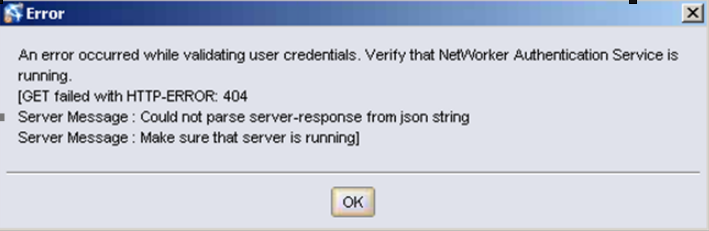
- NetWorkerサーバーでのnsrauthtrustコマンドが失敗し、次のメッセージが表示されます。
# nsrauthtrust -H authc_server_hostname -P 9090
125927:nsrauthtrust: Failed to retrieve certificate: GET failed with HTTP-ERROR: 404
Server Message : Could not parse server-response from json string
- /opt/lgtonmc/gst/logs/gstd.rawに次のエラーがあります。
0 1506905469 2 0 0 3131729664 32427 0 nmc_server_hostname gstd NSR warning 85 Unable to get token for service account of NMC server from authentication service. %s 1 0 145 GET failed with HTTP-ERROR: 404Server Message : Could not parse server-response from json stringServer Message : Make sure that server is running
Cause
/nsr/authc/ディレクトリーの認証データベースに問題があります。この状況では、認証ポート(デフォルト: 9090)が起動していて、接続テストに応答する場合があります: nsrports -t authc_server_hostname -p 9090
しかし、認証に失敗します。
しかし、認証に失敗します。
Resolution
- SSHを使用してNetWorkerサーバーにログインし、rootユーザーに切り替えます。
sudo su -
- authcサーバーでNetWorkerサービスを停止します。
nsr_shutdown
- サービスが停止していることを確認します。
ps -ef | grep nsr
手記:一部のNMC(gst)サービスが実行されている場合がありますが、これらは停止する必要はありません。
手記:一部のNMC(gst)サービスが実行されている場合がありますが、これらは停止する必要はありません。
- authcを再構成するには、次のコマンドを実行します。
/opt/nsr/authc-server/scripts/authc_configure.sh
- NetWorkerサービスの起動:
systemctl start networker
- NetWorker管理者アカウントを使用してNMCにログインします。
Additional Information
以前にADまたはLDAPを統合していた場合は、再度追加する必要があります。これは、NMCの [Setup > Users and Roles > External Authority]から実行できます。この手順を実行する前にADユーザーに適用された権限は削除されません。外部認証機関を authcdb に追加し直す必要があります。KB記事156107:「NetWorker 18および19でAD/LDAP認証をセットアップする方法。
Affected Products
NetWorkerProducts
NetWorker SeriesArticle Properties
Article Number: 000060912
Article Type: Solution
Last Modified: 17 Mar 2025
Version: 5
Find answers to your questions from other Dell users
Support Services
Check if your device is covered by Support Services.