Avamar: integrazione di Data Domain: L'aggiunta di un Data Domain ad Avamar ha esito negativo con l'errore "Failed to configure certificate on Data Domain system"
Summary: Da Avamar 7.3, per aggiungere un sistema Data Domain a un sistema Avamar 7.3 (o versione successiva), è necessario impostare una passphrase su DD. Se la passphrase non è impostata, viene visualizzato l'errore "Failed to configure certificate on Data Domain system". ...
This article applies to
This article does not apply to
This article is not tied to any specific product.
Not all product versions are identified in this article.
Symptoms
L'aggiunta di un Data Domain (DD) ad Avamar non riesce e restituisce l'errore "Failed to configure certificate on Data Domain system":
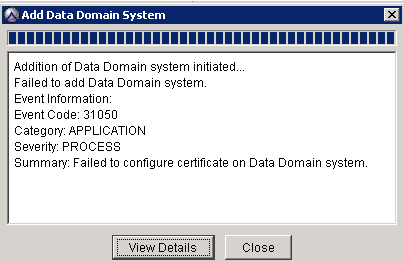
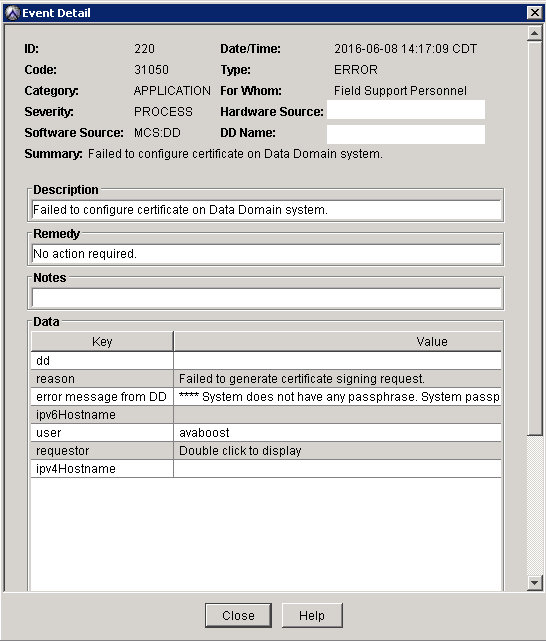
Selezionando "Visualizza dettagli" viene visualizzato il messaggio di errore dettagliato:
Il seguente avviso viene registrato nella mcserver.log.0 (/usr/local/avamar/var/mc/server_log/mcserver.log.0) sull'Avamar Utility Node:
grep -A1 "Failed to generate certificate" /usr/local/avamar/var/mc/server_log/mcserver.log.0
Failed to generate certificate signing request. Error message from DD:
**** System does not have any passphrase. System passphrase needs to be set to proceed.
Cause
Per aggiungere un sistema Data Domain ad Avamar 7.3 o versione successiva, è necessaria una passphrase.
Se una passphrase non è impostata su Data Domain, il processo di aggiunta di DD ha esito negativo con questo errore: "Impossibile configurare il certificato sul sistema Data Domain".
Resolution
Nota: Questo articolo presuppone che non vi siano problemi di connettività tra Avamar e DD e che Avamar possa raggiungere il nome host DD utilizzando le porte 2049, 2052 e 111.
1. Accedere a Data Domain con un account con privilegi di amministratore o root.
2. Impostare la passphrase sul Data Domain utilizzando il seguente comando:
system passphrase set
3. Immettere una passphrase.
Avvertenza: Ricordare questa passphrase. È necessario modificare la passphrase in futuro.
Nota: Se il sistema Data Domain dispone di una passphrase già impostata, viene visualizzato il seguente messaggio:
**** The system passphrase is already set.
4. Tentare di aggiungere Data Domain dopo aver impostato la passphrase.
Se non è possibile aggiungere Data Domain anche dopo aver seguito questi passaggi, contattare il team Professional Services tramite l'Account Manager o il partner Dell Technologies.
Additional Information
Per ulteriori informazioni, consultare la Guida all'integrazione di Avamar e Data Domain relativa alle versioni del software nell'ambiente.
Affected Products
AvamarProducts
Avamar, Avamar Server, Data Domain, Data Domain BoostArticle Properties
Article Number: 000063800
Article Type: Solution
Last Modified: 17 Jun 2025
Version: 6
Find answers to your questions from other Dell users
Support Services
Check if your device is covered by Support Services.