Avamar: NDMP Medium Error due to firewall blocking ports between Accelerator and VNX
Summary: Network Data Management Protocol (NDMP) backup fails with "Medium error" and “NDMP_DATA_HALT_INTERNAL_ERROR". The firewall is blocking Avamar NDMP Accelerator ↔ VNX; open port 10000 and at least 100 more data ports (server_param –f NDMP) to fix. ...
This article applies to
This article does not apply to
This article is not tied to any specific product.
Not all product versions are identified in this article.
Symptoms
NDMP Backup Failure Symptoms
The following symptoms are observed when an Avamar NDMP backup encounters a medium error:
- Backup job aborts with a "Medium error" message.
- Write operation fails on the archive volume.
- NDMP data stream is halted, and reports
NDMP_DATA_HALT_INTERNAL_ERROR. - Data Mover indicates "Data Halted" and waits for the transfer thread to finish.
- Data transfer to
avtarstops unsuccessfully. - The
avtarprocess exits with code 163 (externally canceled). - The backup for the target volume reports errors and is marked as aborted.
- The final summary shows a non‑zero exit code (such as 157).
Sample log excerpts illustrating these symptoms:
2016-08-02 11:34:51 avndmp Info <0000>: [snapup-/root_vdm_1/Corp] NDMP: SnapSure file system creation succeeds
2016-08-02 11:43:54 avndmp Error <0000>: [snapup-/root_vdm_1/Corp] NDMP: Medium error
2016-08-02 11:43:54 avndmp Warning <0000>: [snapup-/root_vdm_1/Corp] NDMP: Write failed on archive volume 1
2016-08-02 11:43:54 avndmp Info <0000>: [snapup-/root_vdm_1/Corp] NDMP: server_archive: emctar vol 1, 110 files, 0 bytes read, 1179648 bytes written
2016-08-02 11:43:54 avndmp Warning <0000>: [snapup-/root_vdm_1/Corp] NDMP Data Halted, reason : NDMP_DATA_HALT_INTERNAL_ERROR
2016-08-02 11:43:54 avndmp Info <0000>: [snapup-/root_vdm_1/Corp] Data mover reports Data Halted.  Waiting for transfer thread to finish feeding stream to avtar...
2016-08-02 11:43:54 avndmp Warning <0000>: [snapup-/root_vdm_1/Corp] Data halted unsuccessfully, stopping data transfer to avtar.
2016-08-02 11:43:54 avndmp Info <0000>: [snapup-/root_vdm_1/Corp] Cancelling avtar
2016-08-02 11:43:58 avndmp Info <6688>: [ctl_spawn] Process 23228 (/usr/local/avamar/bin/avtar) finished (code 163: externally cancelled)
2016-08-02 11:43:58 avndmp Warning <6690>: [ctl_spawn] CTL workorder "MOD-1470162815289#1" non-zero exit status 'code 163: externally cancelled'
2016-08-02 11:43:59 avndmp Info <0000>: [ndmp2avtar-/root_vdm_1/Corp/] NDMP stream bytes read = 2779, bytes written = 2779
2016-08-02 11:44:10 avndmp Info <0000>: [snapup-/root_vdm_1/Corp] Waiting for data transfer thread to exit
2016-08-02 11:44:10 avndmp Info <0000>: [snapup-/root_vdm_1/Corp] Waiting for volume /root_vdm_1/Corp snapshot to be removed.  Will stop waiting after 300 seconds.
2016-08-02 11:44:15 avndmp Info <0000>: [snapup-/root_vdm_1/Corp] Snapshot for volume /root_vdm_1/Corp was removed after 5 seconds.
2016-08-02 11:44:15 avndmp Error <0000>: [snapup-/root_vdm_1/Corp] Backup for target /root_vdm_1/Corp had errors.
2016-08-02 11:44:15 avndmp Info <0000>: [snapup-/root_vdm_1/Corp] Backup of '/root_vdm_1/Corp' aborted. Error in NDMP session.
2016-08-02 11:44:15 avndmp Info <0000>: [avndmp_assist] Thread exited with errors: /root_vdm_1/Corp
2016-08-02 11:44:15 avndmp Info <0000>: [avndmp_assist] Active threads:
2016-08-02 11:44:15 avndmp Info <0000>: [avndmp_ctl_sup] Threads successfully completed 0, canceled/aborted 0, failed 1
2016-08-02 11:44:15 avndmp Info <7271>: [avndmp_ctl_sup] Final summary generated subwork 1, cancelled/aborted 0, snapview 0, exitcode 157
Cause
Network communication blockage between Avamar NDMP Accelerator and VNX
The NDMP backup fails because the firewall restricts traffic between the Avamar NDMP Accelerator node and the VNX storage system. Only TCP port 10000 was opened, while the NDMP Accelerator requires a range of additional ports for data transfer. This restriction causes the NDMP session to encounter a "Medium error" and an internal data‑halt condition.
Evidence from system logs
2016-08-02 14:12:31: 13156679683: network error (../NdmpdMover.cxx: 1226)
2016-08-02 14:12:31: 13156679680: Session 033 (thread nasw00) NdmpdSession::ndmpdApiWrite fails in local or remote wirte msg, moverAddressType=1, mp=0x01005ed840
2016-08-02 14:12:31: 13156679680: Thread bkup058 Medium error
- Log entry shows a network error originating from
NdmpdMover.cxx, indicating a failure in the NDMP Data Mover. - The subsequent
"NdmpdApiWrite fails"message confirms that the NDMP session could not write data to the remote endpoint. - The final "Medium error" aligns with the NDMP backup abort reported in the Avamar logs.
Root cause details
- Insufficient firewall rules: Only port 10000 was permitted, while the NDMP Accelerator requires a contiguous range of ports (typically 10000‑10099) for data streams.
- Blocked data ports prevent the NDMP mover from establishing a reliable connection, leading to internal NDMP errors such as
NDMP_DATA_HALT_INTERNAL_ERROR. - The lack of required ports triggers the Avamar NDMP process to cancel the backup, resulting in exit code 163 ("externally canceled").
Resolution
Open Required Firewall Ports for Avamar NDMP Accelerator
Step‑by‑Step Procedure
- Identify the IP address of the Avamar NDMP Accelerator node and the VNX storage system.
- Log in to the firewall that controls traffic between these two devices.
- Confirm that TCP port 10000 is already allowed. If not, create a rule to permit inbound and outbound traffic on this port.
- Open a contiguous range of at least 100 ports for NDMP data traffic (for example,
10000‑10100). Apply the rule to both directions between the Avamar NDMP Accelerator node and the VNX system. - Save and apply the firewall configuration.
Validate Port Configuration on the VNX System
Display current NDMP port settings:
server_param server_2 -f NDMP -l
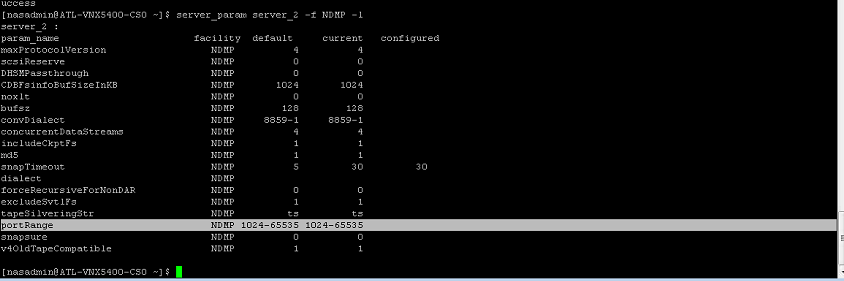
If the output does not show the newly added range, add it with the following command (replace and with the chosen range):
Add port range
Add a new NDMP port range:
server_param server_2 -f NDMP -l "-"
Run a test backup.
Initiate an NDMP backup for a test volume:
avtar -c -s -d
After the backup completes, review the Avamar NDMP logs for any error messages.
Review NDMP logs
View recent NDMP log entries:
grep -i "NDMP" /var/log/avndmp.log | tail -20
The log should show successful completion messages without "Medium error" or "Data halted" entries.
CAUTION: Incorrect firewall changes may disrupt other services. Verify existing rules before modification.
CAUTION: Opening a large port range can increase exposure to unauthorized traffic. Limit the rule to the specific source and destination IP addresses of the Avamar NDMP Accelerator node and the VNX system only.
NOTE: If the backup still fails after applying the port changes, collect the latest log excerpts and contact Dell Support with the logs and your firewall rules.
Affected Products
AvamarProducts
Avamar, Avamar Plug-in for NDMPArticle Properties
Article Number: 000064052
Article Type: Solution
Last Modified: 23 Oct 2025
Version: 4
Find answers to your questions from other Dell users
Support Services
Check if your device is covered by Support Services.