PowerEdge: Why Do Hard Disks Fail
Summary: This article explains the different reasons hard drives can fail in detail.
This article applies to
This article does not apply to
This article is not tied to any specific product.
Not all product versions are identified in this article.
Instructions
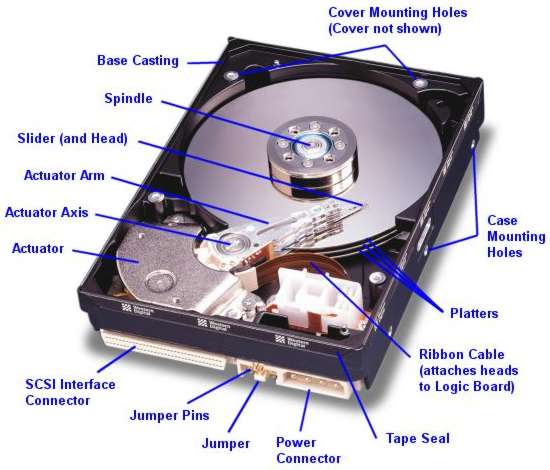
Table of Content
- Firmware Corruption and Damage to the firmware zone
- Electronic Failure
- Mechanical Failure
- Logical Failure
- Media errors
- SCSI/SAS Environment
- Cautions for PowerEdge Disk Failures
Firmware Corruption and Damage to the firmware zone
When the firmware of a hard disk becomes corrupted or unreadable, the computer is often unable to correctly interact with the hard disk.
Electronic Failure
Electronic failure usually relates to problems on the controller board of the hard disk. The server may suffer a power spike or electrical surge that knocks out the controller board on the hard disk making it undetectable to the BIOS.
Mechanical Failure
Mechanical failure can often (especially if not acted on early) lead to a partial and sometimes total loss of data. Mechanical failure comes in various guises such as read/write head failure and motor problems. One of the most common mechanical failures is a head crash. Varying in severity, a head crash occurs when the read/write heads of the hard disk come into contact, momentarily or continuously, with the platters of the hard disk.
A range of reasons can cause a head crash including physical shock (such as dropping the disk on the floor), movement of the computer, static electricity, power surges and mechanical read/write head failure.
Logical Failure
Logical errors are often the easiest and the most difficult problems to deal with. Logical errors can range from simple things such as an invalid entry in a file allocation table to truly horrific problems such as the corruption and loss of the file system on a severely fragmented drive.
Logical errors are different to the electrical and mechanical problems above as there is usually nothing 'physically' wrong with the disk but the information bits on it.
Media Errors
Bad sectors are areas of the hard disk that become unreadable. All hard disk drives develop bad sectors eventually. The hard disk marks the sectors that go bad and these are not used any further. But if you have data that reside on sectors that become bad sectors, you cannot access your data or files correctly. Harsh operating conditions (such as High temperatures, vibration, and so on) can cause hard disks to develop many bad sectors quickly. Every type of hard disk is prone to develop bad sectors 'naturally', but this is not always the case.
SCSI/SAS Environment
SCSI hard disks are often regarded as the high-performance drives. They spin faster than their IDE/SATA counterparts, and so, data transfer speeds are often quicker. Because of this, SCSI drives are often found in servers that have to provide a lot of data throughputs. However this performance often comes at a price as mechanical failures are more likely on these drives.
The most common cause of multiple disk failures in this environment is poor signal quality across the SCSI Bus. Poor signal quality may result in SCSI protocol overhead as it tries to recover from these problems(timeouts and bus resets). As the system becomes busier and demand for data increases, the corrective actions of the SCSI protocol increase and the SCSI bus become closer to saturation. This overhead eventually limits the normal device communications bandwidths. If left uncleared, one or more SCSI devices may not be able to respond to the RAID controller in a timely manner resulting in the RAID controller marking the hard disk drive as offline. Improper installation of the RAID controller in a PCI slot, poor cable connections, poor seating of the disks against the SCSI backplane, improper installation or seating of backplane daughtercards, and improper SCSI bus termination can cause these types of signal problems.
Combinations of these failure types are also possible.
All technicians and customers should read and understand the maintenance best practices in order to maximize uptime and help prevent data loss as a result of hard disk failure.
Cautions for PowerEdge Disk Failures
When dealing with disk failures in PowerEdge servers, it is essential to take the following precautions:
- Backup Data: Always perform a backup of critical data before acting on the disks. This ensures data safety if there are further issues.
- Monitor Alerts: Pay attention to predictive drive failure alerts (error code
PDR6) and Other disk-related error codes (likePDR1001andPDR3). These alerts indicate potential issues that need immediate attention. - Firmware updates: Before replacing any hardware, ensure that the firmware for the RAID controller and drives is up to date. This Can help prevent false alerts and improve overall system stability.
- Handle Drives Carefully: When removing, installing, or reseating hard drives, avoid using excessive force. This can flex the backplane and potentially cause neighboring drives to fail or lose connectivity.
- Check Connections: If a drive is reported as failed, reseat the drive to rule out connection issues. Verify that all connections are secure.
- Review System Logs: Regularly check iDRAC logs and system logs for any related alerts or thermal events that could indicate underlying issues.
- Contact Support: If multiple drives report errors or if issues persist after taking the above actions, contact Dell Support for further assistance.
Affected Products
OEMR R240, OEMR R250, OEMR XE R250, OEMR R260, OEMR XE R260, OEMR R340, OEMR R350, OEMR XE R350, OEMR R360, OEMR XE R360, OEMR R440, PowerEdge XR2, OEMR R450, OEMR R540, OEMR R550, OEMR R5500, OEMR R640, OEMR XL R640, OEMR R6415, OEMR R650
, OEMR R650xs, OEMR R6515, OEMR R6525, OEMR R660, OEMR XL R660, OEMR R660xs, OEMR R6615, OEMR R6625, OEMR R740, OEMR XL R740, OEMR R740xd, OEMR XL R740xd, OEMR R740xd2, OEMR R7415, OEMR R7425, OEMR R750, OEMR R750xa, OEMR R750xs, OEMR R7515, OEMR R7525, OEMR R760, OEMR R760xa, OEMR R760XD2, OEMR XL R760, OEMR R760xs, OEMR R7615, OEMR R7625, OEMR R840, OEMR R860, OEMR R940, OEMR R940xa, OEMR R960, OEMR T140, OEMR T150, OEMR T340, OEMR T350, OEMR T360, OEMR T440, OEMR T550, OEMR T560, OEMR T640, OEMR XL T640, OEMR XL R240, OEMR XL R340, OEMR XL R660xs, OEMR XL R6615, OEMR XL R6625, OEMR XL R760xs, OEMR XL R7615, OEMR XL R7625, OEMR XR11, OEMR XR12, OEMR XR5610, OEMR XR7620, Poweredge C4140, PowerEdge C6420, PowerEdge C6520, PowerEdge C6525, PowerEdge C6615, PowerEdge C6620, PowerEdge FC640, PowerEdge HS5610, PowerEdge HS5620, PowerEdge M640, PowerEdge M640 (for PE VRTX), PowerEdge MX740C, PowerEdge MX750c, PowerEdge MX760c, PowerEdge MX840C, PowerEdge R240, PowerEdge R250, PowerEdge R260, PowerEdge R340, PowerEdge R350, PowerEdge R360, PowerEdge R440, PowerEdge R450, PowerEdge R540, PowerEdge R550, PowerEdge R640, PowerEdge R6415, PowerEdge R650, PowerEdge R650xs, PowerEdge R6515, PowerEdge R6525, PowerEdge R660, PowerEdge R660xs, PowerEdge R6615, PowerEdge R6625, PowerEdge R740, PowerEdge R740XD, PowerEdge R740XD2, PowerEdge R7415, PowerEdge R7425, PowerEdge R750, PowerEdge R750XA, PowerEdge R750xs, PowerEdge R7515, PowerEdge R7525, PowerEdge R760, PowerEdge R760XA, PowerEdge R760xd2, PowerEdge R760xs, PowerEdge R7615, PowerEdge R7625, PowerEdge R840, PowerEdge R860, PowerEdge R940, PowerEdge R940xa, PowerEdge R960, PowerEdge T140, PowerEdge T150, PowerEdge T160, PowerEdge T340, PowerEdge T350, PowerEdge T360, PowerEdge T440, PowerEdge T550, PowerEdge T560, PowerEdge T640, PowerEdge XE2420, PowerEdge XE7100, PowerEdge XE7420, PowerEdge XE7440, PowerEdge XE8545, PowerEdge XE8640, PowerEdge XE9640, PowerEdge XE9680, PowerEdge XR11, PowerEdge XR12, PowerEdge XR5610, PowerEdge XR7620, PowerFlex appliance R650, PowerFlex appliance R6525, PowerFlex appliance R660, PowerFlex appliance R6625, Powerflex appliance R750, PowerFlex appliance R760, PowerFlex appliance R7625, PowerFlex custom node, PowerFlex custom node R650, PowerFlex custom node R6525, PowerFlex custom node R660, PowerFlex custom node R6625, PowerFlex custom node R750, PowerFlex custom node R760, PowerFlex custom node R7625, PowerFlex custom node R860, PowerFlex appliance R640, PowerFlex appliance R740XD, PowerFlex appliance R7525, PowerFlex appliance R840
...
Article Properties
Article Number: 000064317
Article Type: How To
Last Modified: 01 May 2026
Version: 7
Find answers to your questions from other Dell users
Support Services
Check if your device is covered by Support Services.