VxRail: Resetting the Root Password for Dell VxRail Manager
Summary: Guided instructions for an administrator to reset the VxRail Manager root password.
This article applies to
This article does not apply to
This article is not tied to any specific product.
Not all product versions are identified in this article.
Symptoms
An administrator may reset the VxRail Manager root password if the password is lost.
Cause
The root password may have been lost.
Resolution
Follow these steps to reset the root password:
- Restart Guest (Do NOT RESET) for VxRail Manager virtual machine (VM) from vCenter, then Press E at the below screen (Figure 1).
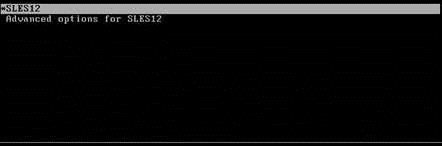
Figure 1: Restarting guest
- Add
init=/bin/bashas shown in the screen below (shown in a red square in Figure 2), then pressF10 or Control+X.

- Change the password by typing
passwdand then Update the new password. You may see the following error (Figure 3):

Figure 3: Changing password
If you see the "Authentication token lock busy," error, type:
mount -o remount rw -t ext3 /
chmod -v 4711 /usr/bin/passwd

Figure 4: Correcting Authentication token lock busy message
- Change the password again by typing
passwdand then Update the new password.
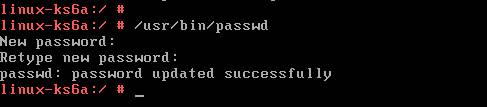
Figure 5: Correcting Authentication token lock busy message
- Exit from the VxRail Manager Console, then either click Restart Guest or Power Off and then Power On on the VxRail Manager VM from vCenter.
Important Note: If you selected "Reset" from the VM Power options instead of Restart Guest or Power Off, the changes you made in GRUB are reverted. You must go through the steps again and use the correct VM Power option.
Note:
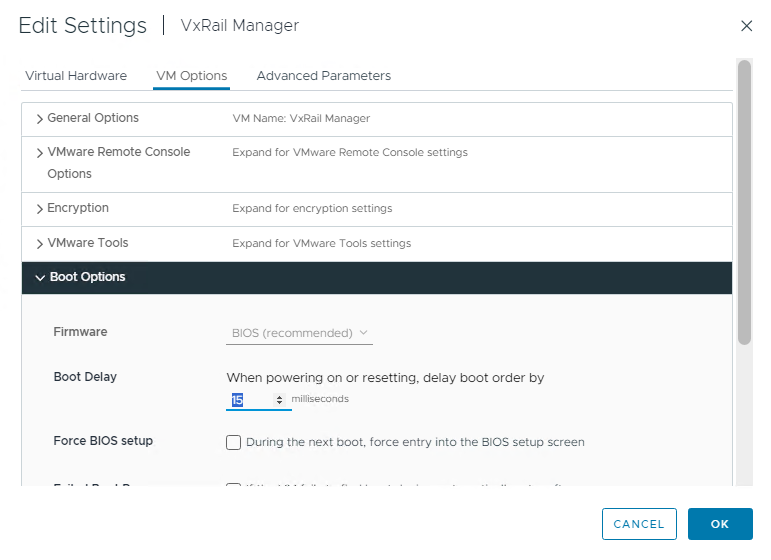
To delay boot order, you can right click to the VxRail manager VM, then click Edit Settings.
On the "VM Options" tab, navigate to the Boot Options section and setup a Boot Delay (revert back to 0 once activity is completed):
Additional Information
Watch this video:
You can also view this video on YouTube.

Affected Products
VxRail, VxRail SoftwareProducts
VxRail Appliance Family, VxRail Appliance SeriesArticle Properties
Article Number: 000064579
Article Type: Solution
Last Modified: 19 May 2025
Version: 18
Find answers to your questions from other Dell users
Support Services
Check if your device is covered by Support Services.