DPA: PostgreSQL collection requests failing with error: no credentials provided to connect to "postgres" database for auto-discover on server
Summary: DPA: PostgreSQL collection requests failing with error: no credentials provided to connect to "postgres" database for auto-discover on server
This article applies to
This article does not apply to
This article is not tied to any specific product.
Not all product versions are identified in this article.
Symptoms
DPA PostgreSQL collection requests for the DPA Datastore database is failing with the following error:
no credentials provided to connect to "postgres" database for auto-discover on server
Reviewing the PostgreSQL Database Configuration and Status Requests, both are failing with the following error:
no credentials provided to connect to "postgres" database for auto-discover on server
Within the Agent log the following error is seen:
ERR 1592.2584 20170601:051205 agent.mod.pgsqldb - status(): no credentials provided to connect to "postgres" database for autodiscover on server
Cause
The DPA Agent on the Datastore server are configured with the postgresdb Config and Status Requests, but may not have credentials assigned.
The error from the log is indicating there are no credentials assigned.
The error from the log is indicating there are no credentials assigned.
Resolution
From the DPA UI> Inventory> Object Library> Applications> Select DPA Datastore server> Data Collection tab>
Edit the 2 requests for the DPA DataStore node and assign the Default Postgres Credential to them. If this credential does not exist, you can create it so it looks like below (password is blank):
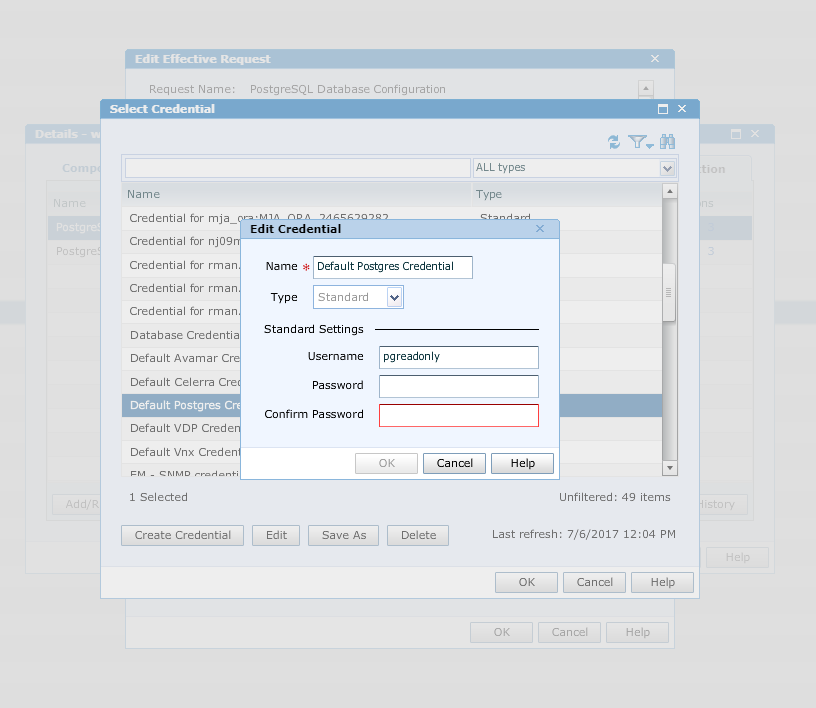
Also make sure the Request options show the following:
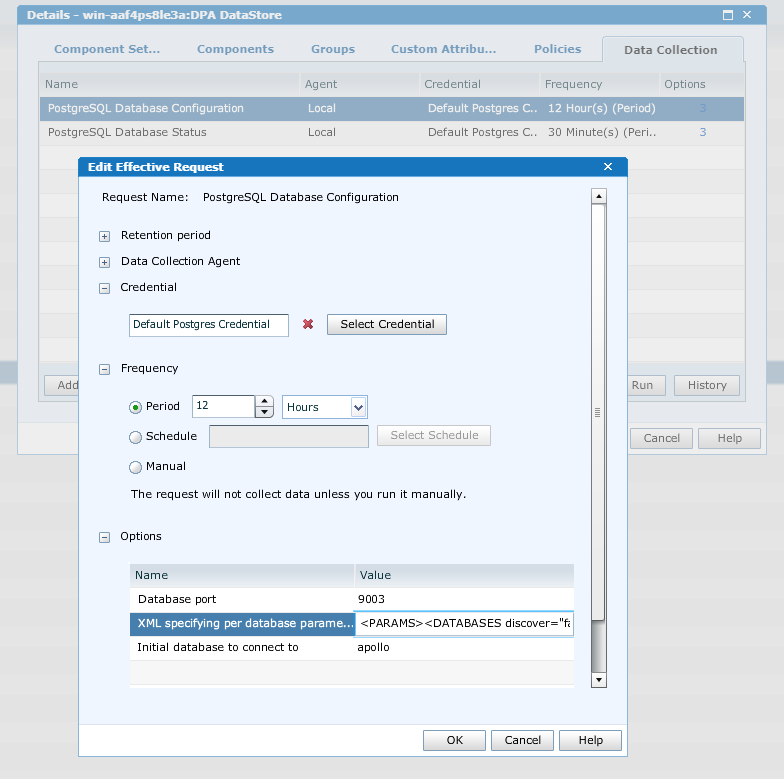
The XML specifying per database parameters/credentials request option is set to:
<PARAMS><DATABASES discover="false"><DB use="include"><NAME>apollo</NAME></DB></DATABASES></PARAMS>
Click OK > Click Apply
The error should no longer show in the Agent log and data collection should now function normally.
Edit the 2 requests for the DPA DataStore node and assign the Default Postgres Credential to them. If this credential does not exist, you can create it so it looks like below (password is blank):
Also make sure the Request options show the following:
The XML specifying per database parameters/credentials request option is set to:
<PARAMS><DATABASES discover="false"><DB use="include"><NAME>apollo</NAME></DB></DATABASES></PARAMS>
Click OK > Click Apply
The error should no longer show in the Agent log and data collection should now function normally.
Affected Products
Data Protection AdvisorProducts
Data Protection AdvisorArticle Properties
Article Number: 000065494
Article Type: Solution
Last Modified: 08 Sep 2025
Version: 4
Find answers to your questions from other Dell users
Support Services
Check if your device is covered by Support Services.