PowerEdge: PERC H330 & 14G - L2/L3 Cache Error detected on the RAID controller during boot.
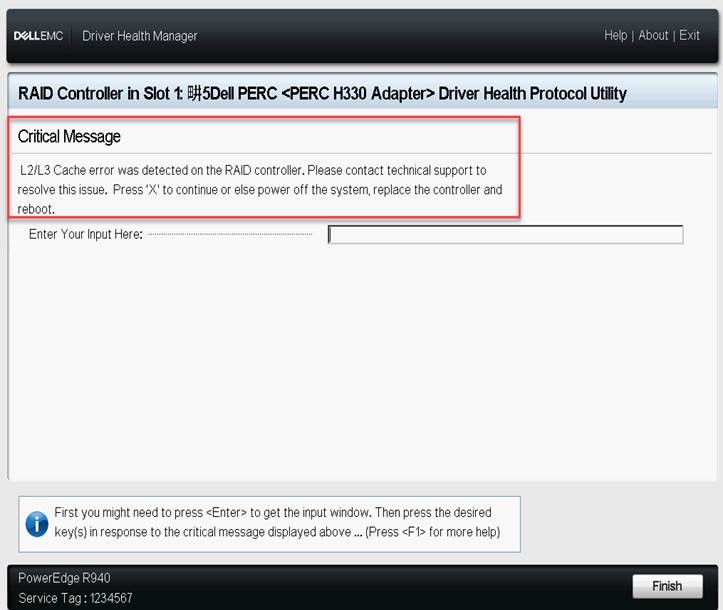
Summary: This article explains the solution of when "L2/L3 cache error was detected on the RAID Controller" occurs during POST on the PE with PERC H330 installed.
This article applies to
This article does not apply to
This article is not tied to any specific product.
Not all product versions are identified in this article.
Symptoms
The controller can encounter an L2/L3 cache error condition during boot. If the system BIOS is in boot mode, simply press "X" and it resumes booting ok.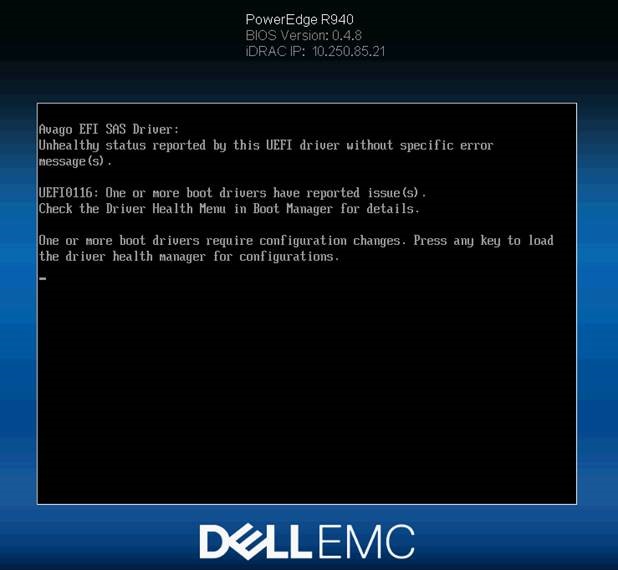

Cause
When this condition occurs and the system BIOS is set to UEFI mode, PERC H330 passes an invalid response to the critical message handling acknowledgment request. This results in the controller being stuck in this state
Resolution
Do Not Replace Hardware!
PERC firmware version 25.5.3.0005 fixes the issue.
PowerEdge: How to Update Firmware Remotely Using the iDRAC Web Interface
Dell PERC H330 Mini/Adapter RAID Controllers firmware version 25.5.3.0005
-Fixed an issue where the server could get stuck in a UEFI pre-boot loop in after pressing an L2 L3 cache error and Press X would not clear the error.
-Fixed an issue where false L2/L3 cache errors are seen during boot.
Updating the firmware can prevent recurrence, but UEFI boot firmware cannot be updated as it fails POST. Resolving this requires additional effort.
For UEFI boot
Step 1: Clear NVRAM
Clearing the NVRAM clears the incorrect flag that causes L2/L3 cache error.
- Shut down the server, move the NVRAM_CLR jumper on the PLN and start the server.
For the mounting position of the jumper, please see the User Guide of each model. - Once the server boots return the NVRAM_CLR jumper to the original position and update the firmware of PERC H330.
NOTE: Be aware that BIOS settings are cleared.
Step 2: Change settings temporarily to BIOS boot.
If the issue repeats after clearing the NVRAM, follow the steps below to update the firmware.
Since it does not pass through the POST and is not able to enter the BIOS if the H330 is installed, the H330 must be removed once.
*If clears the NVRAM on Step 1, step 1 to 3 below is not required since UEFI supposed to change to BIOS boot.
- Shut down the server and remove PERC H330.
- Enter the F2 BIOS and change UEFI boot to BIOS boot.
- Install PERC H330 and start the server.
- Once the L2/L3 Cache error occurs, press the "
X" key to pass through the POST. - Update PERC H330 firmware from LCC.
- Enter the F2 BIOS and return the setting to UEFI boot.
For BIOS boot
Follow the error message and press the "X" key to pass through the POST.
Once the server boots suggests updating the firmware to customers.
Even if the error message repeats after restarting, the firmware can be updated since it passes through the POST.
Affected Products
PowerEdge RAID Controller H330Article Properties
Article Number: 000067945
Article Type: Solution
Last Modified: 22 Apr 2025
Version: 5
Find answers to your questions from other Dell users
Support Services
Check if your device is covered by Support Services.