NetWorker: Docker container NetWorker client backup fails with error savefs: fail
Summary: NetWorker: Docker container NetWorker client backup fails with error savefs: fail
This article applies to
This article does not apply to
This article is not tied to any specific product.
Not all product versions are identified in this article.
Symptoms
The NetWorker client software is installed inside a docker container.
The client-based backup of the docker client fails with the following error:
<client name>:savefs failed.
<client name>:savefs See the file '/nsr/logs/policy/<policy>/<workflow/backup_<jobid>_logs/<jobid>.log' for command output.
Stopped processing of the save set <cleint name>:<save set> because the savefs job job terminated with an error.
Job <jobid> host: <client name> savepoint: <save set> had ERROR indication(s) at completion
<client name>:<save set> abandoned.
Client '<client name>' is being skipped because no savesets of this client have been backed up as part of the backup action.
Action backup traditional 'backup' with job id <job id> is exiting with status 'failed', exit code 1
Cause
NetWorker clients running inside Docker containers are not officially supported in current releases. Docker uses an overlay file system and does not rely on a traditional disk layout, so paths such as /etc/fstab are not present.
Resolution
There is currently no supported method for backing up docker containers as NetWorker clients. If you would like for this functionality to exist in NetWorker, contact your Dell account or sales representative regarding a Request For Enhancement (RFE).
To prevent a NetWorker client from backing up Docker data, you must use skip directives on the NetWorker client for the Docker file/folder structure.
Example (modify the paths and processes as per your system and Docker configuration):
<< /var/lib/docker >>
skip: *
<< /var/lib/containers >>
skip: *
<< /run >>
skip: docker docker.sock containers podman crun
More information about NetWorker directives is in the NetWorker Administration Guide. NetWorker documentation is available through: Support for NetWorker | Manuals & Documents
To backup docker container data, use one of the following workarounds:
Workaround One:
- Access the docker host over SSH.
- From the SSH session, connect to the docker container. The exact syntax used depends on the container platform:
- Docker:
docker exec -it CONTAINER_NAME sh - Podman:
podman exec -it CONTAINER_NAME sh
- Create a
fstabfile using themtabfile:cp /etc/mtab /etc/fstab - Exit the container:
exit - Backup the container client from NetWorker.
Workaround Two:
Create "archives" of the docker container data on the docker host, backup the data as a file system save set from the docker host. This approach may require some scripting and the usage of cron jobs.
WARNING: NetWorker support does not provide scripting support or support for OS script-related issues. The below example is for proof of concept only. The script offers general tuning capabilities and may meet your needs, but use it only when you fully understand its behavior. You must coordinate with the system administrator of the docker host to see if they accept this approach. Work with the system and Docker administrator to formulate an appropriate script for your needs using the general procedure overview outlined here. NetWorker support can only assist with general NetWorker backup/restore issues of the "archive" tarballs backed up by NetWorker.
- Create a bash script that performs the following operations:
- Stop the docker container temporarily. This is to ensure database consistency in the docker container.
- Zip the docker container's folder contents.
- Start the docker container
- (optional) cleanup archives older than X days.
#!/usr/bin/env bash
set -euo pipefail
# ===== Config (tunable) =====
CONTAINER_TOOL="podman"                  # container platform (podman or docker)
CONTAINER_NAME="npm"                     # the container name to verify after restart
COMPOSE_DIR="/root/docker/nginx"         # directory containing docker-compose.yaml/podman-compose.yaml
BACKUP_ROOT="/root/docker/backups"       # where backups are stored on the host
RETENTION_DAYS=3                         # delete archives older than N days
TIMESTAMP="$(date +%F_%H%M%S)"
ARCHIVE="${BACKUP_ROOT}/${CONTAINER_NAME}-backup-${TIMESTAMP}.tar.gz"
LOCK_FILE="/var/lock/${CONTAINER_NAME}_backup.lock"
# ========================================
mkdir -p "$BACKUP_ROOT" /var/lock
# --- Handle stale lock files (if previous run crashed) ---
if [[ -f "$LOCK_FILE" ]]; then
  # Try to find an owning process; if none, remove the stale lock
  LOCK_FD_OWNER="$(lsof -t -- "$LOCK_FILE" 2>/dev/null || true)"
  if [[ -z "$LOCK_FD_OWNER" || ! -d "/proc/$LOCK_FD_OWNER" ]]; then
    echo "[INFO] Removing stale lock file: $LOCK_FILE"
    rm -f "$LOCK_FILE"
  fi
fi
# --- Simple lock to avoid overlapping runs ---
exec 9>"$LOCK_FILE"
if ! flock -n 9; then
  echo "[INFO] Another backup is running. Exiting."
  exit 0
fi
# --- Safety checks ---
if [[ ! -d "$COMPOSE_DIR" ]]; then
  echo "[ERROR] Compose directory not found: $COMPOSE_DIR" >&2
  exit 1
fi
if [[ ! -f "${COMPOSE_DIR}/docker-compose.yaml" && ! -f "${COMPOSE_DIR}/podman-compose.yaml" ]]; then
  echo "[ERROR] No compose file found in ${COMPOSE_DIR}" >&2
  exit 1
fi
# --- Functions ---
prune_backups() {
  local root="$1" days="$2"
  echo "[INFO] Pruning backups older than ${days} days in ${root}..."
  find "$root" -maxdepth 1 -type f -name "${CONTAINER_NAME}-backup-*.tar.gz" -mtime +"$days" -print -delete || true
}
verify_running() {
  # Expect container named "${CONTAINER_NAME}" to be running again
  if ${CONTAINER_TOOL} ps --format '{{.Names}}' | grep -qx "${CONTAINER_NAME}"; then
    echo "[INFO] Container '${CONTAINER_NAME}' is running."
  else
    echo "[WARN] Container '${CONTAINER_NAME}' not found in '${CONTAINER_TOOL} ps'. Check '${CONTAINER_TOOL} ps -a' and logs."
  fi
}
# --- Stop stack cleanly using *-compose in its directory ---
echo "[INFO] Bringing down stack (${CONTAINER_TOOL}-compose down) in ${COMPOSE_DIR}..."
(
  cd "$COMPOSE_DIR"
  # Do NOT pass -p; let the project default to the directory name
  ${CONTAINER_TOOL}-compose down || {
    echo "[WARN] ${CONTAINER_TOOL}-compose down returned non-zero. Continuing (stack may not have been up)."
  }
)
# --- Create archive (compose dir: data, letsencrypt, compose file, etc.) ---
echo "[INFO] Archiving ${COMPOSE_DIR} to ${ARCHIVE}..."
# Preserve SELinux/xattrs and ownership; exclude the backups dir if it's under same parent
tar -C "$(dirname "$COMPOSE_DIR")" \
  --xattrs --selinux --same-owner --numeric-owner \
  --exclude "$(basename "$BACKUP_ROOT")" \
  -czf "$ARCHIVE" "$(basename "$COMPOSE_DIR")"
# Optional integrity checksum
sha256sum "$ARCHIVE" > "${ARCHIVE}.sha256"
# --- Start stack back up ---
echo "[INFO] Starting stack (${CONTAINER_TOOL}-compose up -d)..."
(
  cd "$COMPOSE_DIR"
  ${CONTAINER_TOOL}-compose up -d
)
# --- Verify expected container is running ---
verify_running
# --- Prune according to retention ---
prune_backups "$BACKUP_ROOT" "$RETENTION_DAYS"
echo "[OK] Backup completed: ${ARCHIVE}"
Example script usage:
[root@rhel-client01 scripts]# ./backup_npm.sh
[INFO] Removing stale lock file: /var/lock/npm_backup.lock
[INFO] Bringing down stack (podman-compose down) in /root/docker/nginx...
npm
npm
14dc3c3871a7a9716142a1011f1039258d330be1ddb49543eb7a8e257256239a
nginx_default
[INFO] Archiving /root/docker/nginx to /root/docker/backups/npm-backup-2026-02-10_155107.tar.gz...
[INFO] Starting stack (podman-compose up -d)...
be491bf43aa17f1a767075ed8b2cd55d93cdf4581ad04abe66a58f3bce0b5e74
e677dbedd5fdd92a440896dc4cae22165cb34ce704ec3ed8f7620ce243183585
npm
[INFO] Container 'npm' is running.
[INFO] Pruning backups older than 3 days in /root/docker/backups...
[OK] Backup completed: /root/docker/backups/npm-backup-2026-02-10_155107.tar.gz
[root@rhel-client01 scripts]#
[root@rhel-client01 scripts]# ls -ltr /root/docker/backups/
total 8
-rw-r--r--. 1 root root 638 Feb 10 15:51 npm-backup-2026-02-10_155107.tar.gz
-rw-r--r--. 1 root root 123 Feb 10 15:51 npm-backup-2026-02-10_155107.tar.gz.sha256
Alternatively create a cron job for the script to run daily, weekly, and so forth (as per your discretion),
[root@rhel-client01 scripts]# ln -s /root/scripts/backup_npm.sh /etc/cron.daily/backup_npm
[root@rhel-client01 scripts]#
NOTE: Since the script stops the docker container, it is important to schedule the archive script during a time frame that is acceptable for momentary downtime. This must be coordinated with the system and docker administrators.
- Create a NetWorker client for the system hosting the docker containers. The "Save set" is the directory used to directory which contains the docker tarball archives:
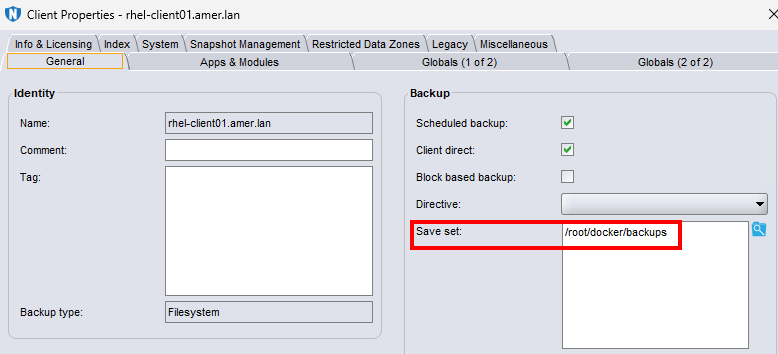
- Perform backups of the client. The NetWorker Administration Guide provides more information about creating backup policies and scheduling. NetWorker documentation is available through: Support for NetWorker | Manuals & Documents
The client backup contains the docker archive-tarball data:
[root@nsr ~]# mminfo -avot -q client=rhel-client01.amer.lan -r "nsavetime,savetime(20),name,sumflags,ssretent"
  save time    date     time   name                           fl  retent
...
 1770757763    02/10/2026 16:09 /root/docker/backups          cb 03/10/2026

[root@nsr ~]# nsrinfo -t 1770757763 rhel-client01.amer.lan
scanning client `rhel-client01.amer.lan' for savetime 1770757763(Tue 10 Feb 2026 04:09:23 PM EST) from the backup namespace
/root/docker/backups/npm-backup-2026-02-10_155107.tar.gz
/root/docker/backups/npm-backup-2026-02-10_155107.tar.gz.sha256
/root/docker/backups/
/root/docker/
/root/
/
6 objects found
The data is retained as per the retention period set in the backup action.
A NetWorker client restore is used to recover the tarball back to the existing (or alternate) NetWorker client. The system and docker administrator must perform the subsequent steps to reconfigure the docker container using the recovered data.
A NetWorker client restore is used to recover the tarball back to the existing (or alternate) NetWorker client. The system and docker administrator must perform the subsequent steps to reconfigure the docker container using the recovered data.
Affected Products
NetWorkerProducts
NetWorkerArticle Properties
Article Number: 000071581
Article Type: Solution
Last Modified: 18 Apr 2026
Version: 8
Find answers to your questions from other Dell users
Support Services
Check if your device is covered by Support Services.