Premier: Standard Configurations
Summary: Standard Configurations are personalized product bundles created by your Dell Sales Representative, so your organization can repeatedly purchase online at your negotiated price.
This article applies to
This article does not apply to
This article is not tied to any specific product.
Not all product versions are identified in this article.
Instructions
Learn more about the simple, intuitive Standard Configuration page, and its main features by watching the Standard Configurations video.
Duration: 00:02:52 (hh:mm:ss)
When available, closed caption (subtitles) language settings can be chosen using the Settings or CC icon on this video player.
Access Standard Configurations
1. To access your standard configurations, click the "Shop" category and select "Standard Configurations" located within the secondary navigation to view your list of customized configurations. For a faster navigation, Premier user can access the standard configurations from the Dashboard on the Premier home page. (Figure 1: Access Standard Configurations) 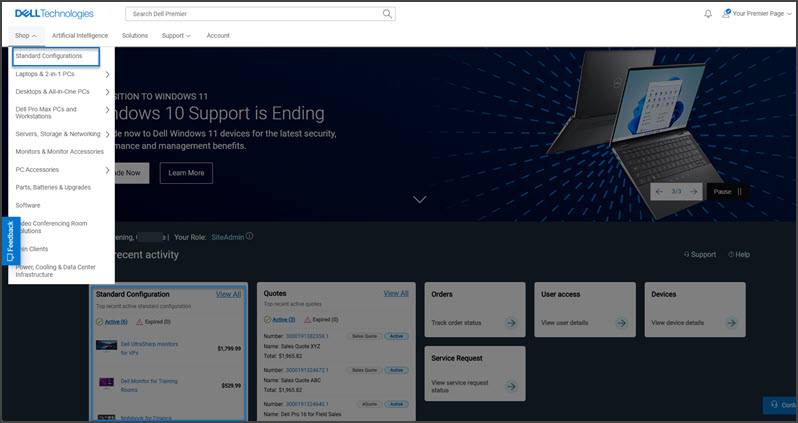
Figure 1: Access Standard Configurations
2. There are multiple ways to quickly find a standard configuration: You can filter by category, sort by name, subtitle, created by, product, price, or use the dynamic search box. To review the exact list of included components and services, users can click the name of the configuration or the product image. Once ready, you can add to a cart or customize.
For product transitions, you can see notifications when a standard configuration is about to be retired. For configurations with a defined end of marketing life, Dell Technologies recommends possible replacements so you can start having a discussion with your account team*. (Figure 2: Premier Standard Configurations) 
Figure 2: Premier Standard Configurations
Back to Top of Page
Shop Standard Configurations
1. Locate the Standard Configuration of your choice by using one of the filtering or search options.
2. Click the name or the image of the configuration to view the exact list of included components and services. Select "Customize & Buy."
3. Within the configuration page, view/select the component options wanted.
4. Click "Review" to view your customized configuration.
5. If you want to change your selection, click "Edit" next to the corresponding component.
6. Click "Add to Cart."
* Availability may vary by country or region. Contact your account team for more information.
If you have questions or need assistance, engage the Premier Support Teams.
Article Properties
Article Number: 000106488
Article Type: How To
Last Modified: 30 Jun 2025
Version: 21
Find answers to your questions from other Dell users
Support Services
Check if your device is covered by Support Services.