Chromebook에서 오디오 음소거를 해제하는 방법
Summary: 이 문서에서는 Chromebook에서 오디오 음소거를 해제하는 방법에 대한 정보를 제공합니다.
This article applies to
This article does not apply to
This article is not tied to any specific product.
Not all product versions are identified in this article.
Instructions
오디오 음소거 해제
Chromebook에서 오디오 음소거를 해제하는 프로세스는 다른 노트북과 다릅니다.
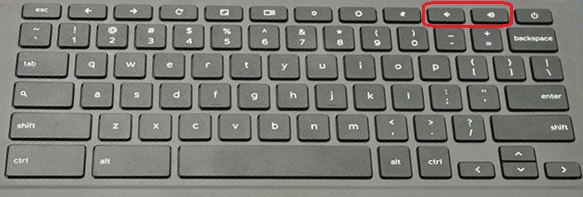
Chromebook 키보드에는 전용 음소거 키가 있지만 음소거 해제 키는 포함되어 있지 않습니다. 누락된 키는 의도적으로 설계된 것입니다.
오디오의 음소거를 해제하려면 볼륨 높이기 또는 볼륨 낮추기 키를 누릅니다.
Affected Products
ChromebookArticle Properties
Article Number: 000117811
Article Type: How To
Last Modified: 02 Jun 2025
Version: 6
Find answers to your questions from other Dell users
Support Services
Check if your device is covered by Support Services.