Dell Networking X-series switch How to disable telnet and HTTP
Summary: How to disable telnet and HTTP on the Dell Networking X-series switch.
This article applies to
This article does not apply to
This article is not tied to any specific product.
Not all product versions are identified in this article.
Instructions
Article Summary: This article explains how to disable telnet and HTTP on a Dell Networking X-series switch.
Steps to disable Telnet and HTTP
1. Log in to the web UI of the Dell Networking X-series switch.
2. Click Switch Management > Management Security > Access Profiles and Rules > Edit > Add

3. Here we are creating a profile to disable Telnet and HTTP access on Dell Networking X-series switch.
4. Under the Add Access Profiles and Rules window, choose a profile name (Test).
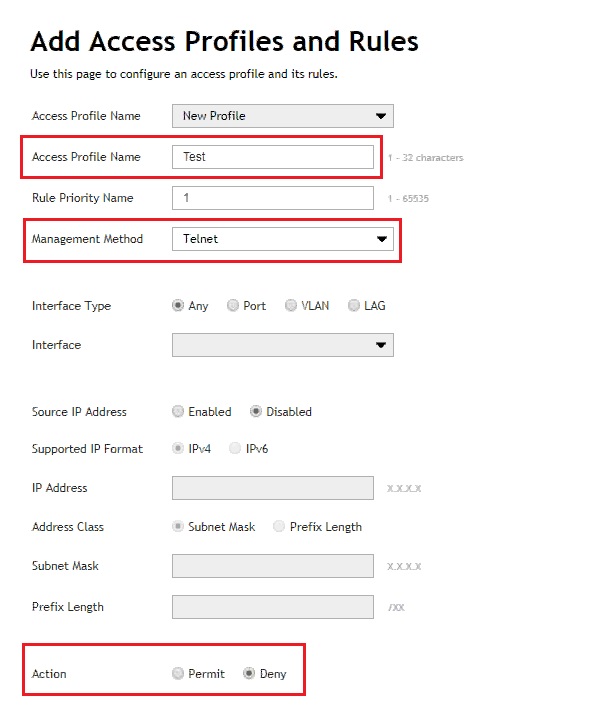
5. Choose drop down at the bottom of the page: Apply to: Running and Startup Configuration. Then click OK to save the configuration change.

6. Choose drop down at the bottom of the page: Apply to: Running and Startup Configuration. Then click OK to save the configuration change.
7. Here we are allowing all other management access.
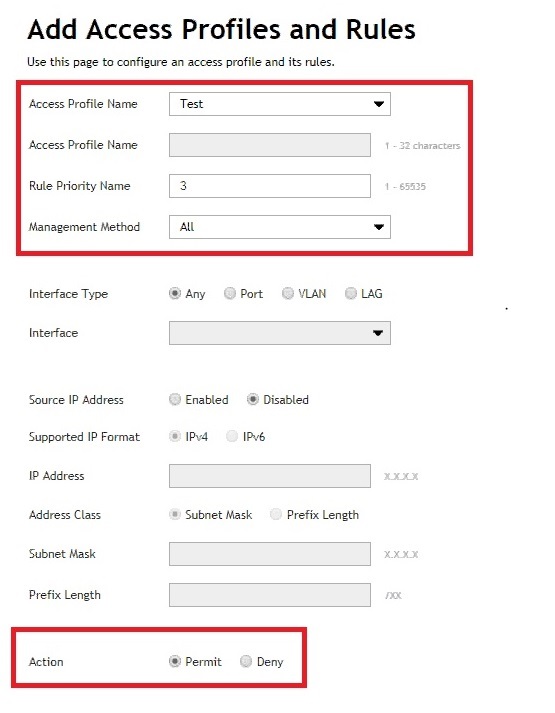
8. Choose drop down at the bottom of the page: Apply to: Running and Startup Configuration. Then click OK to save the configuration change.
9. Click the gear icon on the far right under Edit Access Profiles and Rules.
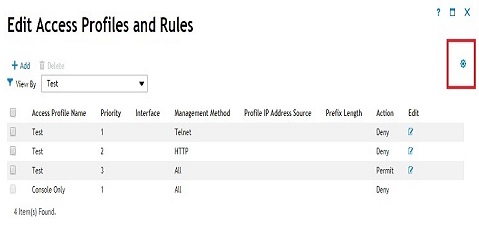
10. Choose the created Access profile (Test) under the Access Profiles Settings window.
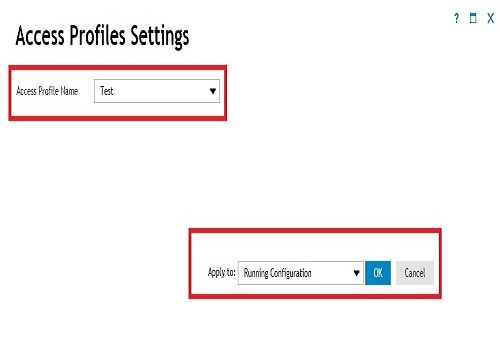
11. Choose drop down at the bottom of the page: Apply to: Running and Startup Configuration. Then click OK to save the configuration change.
How to save from the web management UI page
1. Click the Gear icon in the upper right-hand corner of the screen.
2. Click Save to Startup Configuration.
Affected Products
Dell Networking X1000 Series, Dell Networking X4000 SeriesArticle Properties
Article Number: 000120103
Article Type: How To
Last Modified: 03 Mar 2025
Version: 4
Find answers to your questions from other Dell users
Support Services
Check if your device is covered by Support Services.