NVP vProxy: VM backups failing with "Unable to fetch data from vCenter: HTTP Error"
Summary: M backups failing with "Unable to fetch data from vCenter: HTTP/1.1 503 Service Unavailable" when VPXD service is not running on the vCenter server.
This article applies to
This article does not apply to
This article is not tied to any specific product.
Not all product versions are identified in this article.
Symptoms
The NetWorker VMware Protection (NVP) integration is configured with the vProxy Appliance. The VMware backup action fails immediately, indicating the vCenter service is unavailable. The NetWorker Management Console (NMC) or backup action log shows:
MM/DD/YYYY HH:MM:SS Action backup vmware-vproxy 'backup' has initialized as 'vproxysave job' with job id 164248
MM/DD/YYYY HH:MM:SS Unable to fetch data from vCenter: HTTP/1.1 503 Service Unavailable (Failed to connect to endpoint: [N7Vmacore4Http16LocalServiceSpecE:0x00007f9bac06dbb0] _serverNamespace = /sdk action = Allow _port = 8085)
Or:
MM/DD/YYYY HH:MM:SS Failed to run nsrvim, error: Unable to fetch data from vCenter: HTTP Error. Error detail: no healthy upstream.
MM/DD/YYYY HH:MM:SS Unable to fetch data from vCenter: HTTP Error. Error detail: no healthy upstream
The NetWorker Management Console's (NMC) VMware View refresh also generates the following error:

Or:
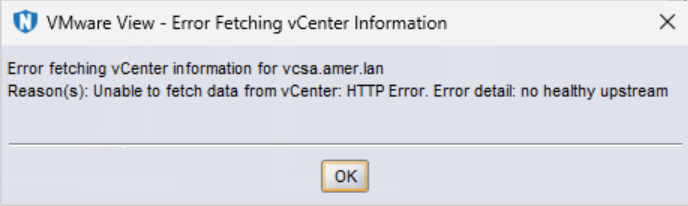
NOTE: The errors reported may differ depending on the vCenter server version.
Cause
The vCenter Server service (VPXD) is not running or responding on the vCenter server. The NetWorker VMware Protection solution requires communication to the VPXD service when initiating the backup workflow or updating the NMC VMware View.
Resolution
The VPXD service should be started or re-started on the vCenter server. See:
If there are problems starting the service or it is still unresponsive, VMware Support should be engaged to resolve the VPXD service symptom.

If there are problems starting the service or it is still unresponsive, VMware Support should be engaged to resolve the VPXD service symptom.
Additional Information
Issues are also observed when accessing the vCenter's vSphere interface. Either vSphere is inaccessible, or after logging into vSphere, no inventory is shown.
Affected Products
NetWorkerProducts
NetWorkerArticle Properties
Article Number: 000120620
Article Type: Solution
Last Modified: 10 Jun 2025
Version: 4
Find answers to your questions from other Dell users
Support Services
Check if your device is covered by Support Services.