PowerEdge: PowerShell을 사용하여 Windows Server 백업을 설치하는 방법
Summary: Windows Server용 PowerShell을 사용하여 Windows Server 백업을 설치하는 방법 서버 백업을 효율적으로 설치하고 관리하려면 다음 단계를 따르십시오.
This article applies to
This article does not apply to
This article is not tied to any specific product.
Not all product versions are identified in this article.
Instructions
- Windows PowerShell을 시작하려면 명령 프롬프트 창에 다음을 입력합니다.
Start PowerShell - Windows Server 백업 유형을 설치하려면 다음을 입력합니다.
Install-WindowsFeature Windows-Server-Backup
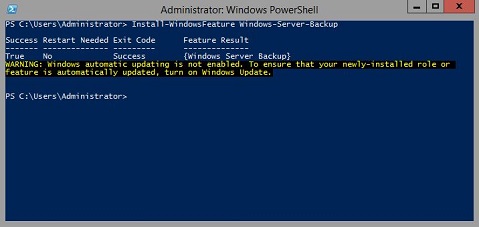
추가 정보:
Windows Server 백업https://learn.microsoft.com/en-us/previous-versions/windows/it-pro/windows-server-2012-r2-and-2012/jj614621(v=ws.11)

Windows Server 백업 Windows PowerShell Cmdlethttps://learn.microsoft.com/en-us/powershell/module/windowsserverbackup/?view=windowsserver2022-ps
Affected Products
Microsoft Windows 2012 Server, Microsoft Windows 2012 Server R2Products
C Series, HS Series, Modular Infrastructure, Rack Servers, Tower Servers, XE Servers, XR Servers, OEM Server Solutions, Microsoft Windows Server 2016, Microsoft Windows Server 2019, Microsoft Windows Server 2022, Microsoft Windows 2008 Server R2
, Microsoft Windows 2008 Server Service Pack 2, Microsoft Windows 2012 Server, Microsoft Windows 2012 Server R2
...
Article Properties
Article Number: 000122393
Article Type: How To
Last Modified: 05 Sep 2025
Version: 9
Find answers to your questions from other Dell users
Support Services
Check if your device is covered by Support Services.