藍牙省電設定導致連線問題
Summary: 本文說明如何在 Windows 11 和 Windows 10 中故障診斷藍牙裝置間歇性失去連線。
This article applies to
This article does not apply to
This article is not tied to any specific product.
Not all product versions are identified in this article.
Symptoms
Cause
如果您的藍牙裝置會隨機與 Windows 電腦中斷連線,可能是因為 Windows 電力管理儲存功能所導致。
關閉 Windows 電力管理儲存功能可能可以解決問題。
視電腦上安裝的作業系統而定,請執行下列其中一項:
請參閱在 Windows 11 中變更藍牙電源管理設定 一節,瞭解協助解決問題的步驟。
或
請參閱在 Windows 10 中變更藍牙電源管理設定 一節,瞭解協助解決問題的步驟。
Resolution
在 Windows 11 中變更藍牙電源管理設定
下列步驟顯示如何在 Windows 11 中停用此選項。
- 開啟裝置管理員:如何存取裝置管理員
- 按一下 藍牙 左側的箭頭以開啟區段。
- 以滑鼠右鍵按一下藍牙介面卡,然後選取內容 (圖 1)。

圖 1:藍牙裝置視窗 - 藍牙介面卡視窗 (圖 2) 隨即開啟。前往 電力管理 標籤,然後確定已 取消勾選在「允許電腦關閉此裝置以節省電源」旁的核取方塊。
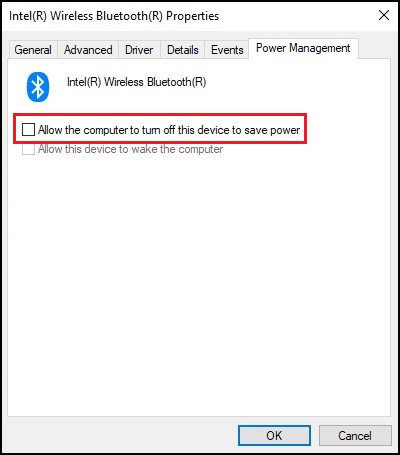
圖 2:藍牙裝置內容視窗 - 按一下「確定」。
如果您的藍牙裝置持續發生連線問題,請使用下列文章中的資訊:藍牙故障診斷與使用指南
在 Windows 10 中變更藍牙電源管理設定
自 Windows 10 組建 2004 及更新版本起,藍牙裝置的「電力管理」選項已移除,以防止藍牙裝置進入省電模式。
下列步驟提供在 Windows 10 中解決此問題的可能解決方案。
- 開啟裝置管理員:如何存取裝置管理員
- 按兩下 人機介面設備 左側的箭頭以打開該部分。
- 以滑鼠右鍵按一下任何 與藍牙相關的 裝置清單,然後選取 內容 (圖 3)。

圖 3:人機介面裝置視窗 - 藍牙裝置視窗 (圖 4) 隨即開啟。前往 電力管理 標籤,然後確定已 取消勾選在「允許電腦關閉此裝置以節省電源」旁的核取方塊。

圖 4:藍牙裝置內容視窗 - 對所列的任何其他 藍牙相關 裝置重複上述步驟。
- 按一下「確定」。
注意:若電腦上有安裝指紋辨識器的驅動程式,也可能是造成此問題。如果有,請執行下列步驟。
- 仍在設備管理器中,按兩下 生物識別設備 左側的箭頭以打開該部分(如果可用)。
- 以滑鼠右鍵按一下任何 與指紋辨識器相關的 裝置清單,然後選取 內容。
- 隨即會開啟指紋辨識器視窗。前往 電力管理 標籤,然後確定已 取消勾選在「允許電腦關閉此裝置以節省電源」旁的核取方塊。
- 按一下「確定」。
如果您的藍牙裝置持續發生連線問題,請使用下列文章中的資訊:藍牙故障診斷與使用指南
Additional Information
Affected Products
Alienware, Dell All-in-One, Dell Pro All-in-One, Dell Pro Max Micro, Dell Pro Max Slim, Dell Pro Max Tower, Dell Pro Micro, Dell Pro Slim, Dell Pro Tower, Dell Slim, Dell Tower, Inspiron, Legacy Desktop Models, OptiPlex, Vostro, XPS, G Series
, G Series, Alienware, Dell Plus, Dell Pro, Dell Pro Max, Dell Pro Plus, Dell Pro Premium, Inspiron, Latitude, Dell Pro Rugged, Vostro, XPS, Legacy Laptop Models, Fixed Workstations, Mobile Workstations, Dell Pro Max Micro XE FCM2250, Dell Pro Max Slim XE FCS1250, Dell Pro Max Tower T2 XE FCT2250, Dell Pro Micro Plus XE QBM1250, Dell Pro Slim Plus XE5 QBS1250, Dell Pro Tower Plus XE5 QBT1250
...
Article Properties
Article Number: 000122996
Article Type: Solution
Last Modified: 18 Jun 2025
Version: 13
Find answers to your questions from other Dell users
Support Services
Check if your device is covered by Support Services.