戴尔 Latitude 15 3570 键盘指南
Summary: 本文提供了戴尔 Latitude 15 3570 上的键盘快捷键功能指南。
This article applies to
This article does not apply to
This article is not tied to any specific product.
Not all product versions are identified in this article.
Instructions
键盘快捷键功能
下表列出了 Latitude 15 3570 上的组合快捷键功能。
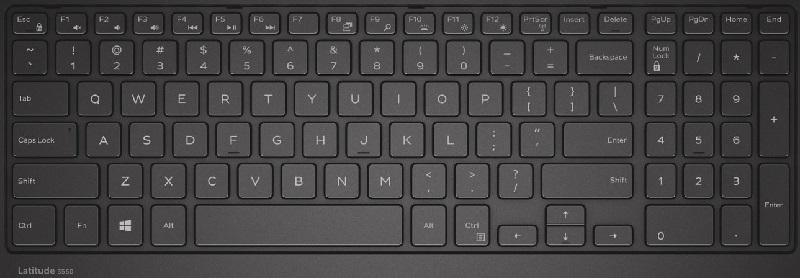
提醒:通过将 Fn + Esc 键、功能锁定切换为 开,您无需使用 Fn 键激活各种功能键作。
| Esc 键 | Fn + Esc 激活功能键锁定。 |
| F1 | Fn + F1 静音 |
| F2 | Fn + F2 降低音量。 |
| F3 | Fn + F3 增加音量。 |
| F4 | Fn + F4 后退 Media Track |
| F5 | Fn + F5 播放或暂停媒体轨道 |
| F6 | Fn + F6 向前跳过媒体轨道 |
| F8 | Fn + F8在外部显示屏和/或内部液晶显示屏之间切换 |
| F9 | Fn + F9搜索(Windows 8及更高版本) |
| F10 | Fn + F10 改变键盘照明级别(可选) |
| F11 | Fn + F11 降低液晶屏亮度。 |
| F12 | Fn + F12 增加液晶屏亮度。 |
| PrtScr | Fn + PrtScr 打开或关闭无线 (Wi-Fi) |
键盘类型 - 按地区。
(这不会影响上面的功能表)
- 101(美国和加拿大)
- 102(欧洲)
- 104(巴西)
- 105(日本)
提醒:如果您的键盘出现问题,请按照下面的故障处理链接进行作:
Affected Products
Latitude 3570Article Properties
Article Number: 000125221
Article Type: How To
Last Modified: 25 Jun 2025
Version: 5
Find answers to your questions from other Dell users
Support Services
Check if your device is covered by Support Services.