Dell CinemaColor Not Responding on Inspiron or Vostro Platforms
Summary: This article discusses how to resolve Dell CinemaColor stops responding on select Inspiron or Vostro platforms.
This article applies to
This article does not apply to
This article is not tied to any specific product.
Not all product versions are identified in this article.
Symptoms
Affected Products:
Dell CinemaColor
Affected Platforms:
Inspiron 13 5310
Inspiron 14 5410
Inspiron 14 5410 2in1
Inspiron 14 5418
Inspiron 15 3580
Inspiron 15 5510
Inspiron 15 5518
Inspiron 15 7510
Inspiron 16 7610
Inspiron 17 3780
Inspiron 3280 AIO
Inspiron 3480
Inspiron 3583
Inspiron 3482
Inspiron 3582
Inspiron 3782
Inspiron 5301
Inspiron 5400 AIO
Inspiron 5401 AIO
Inspiron 5402
Inspiron 5406 2in1
Inspiron 5409
Inspiron 5491 2N1
Inspiron 5502
Inspiron 5509
Inspiron 5591 2N1
Inspiron 7700 AIO
Inspiron 7300
Inspiron 7400
Inspiron 7706 2in1
Vostro 15 5510
Vostro 14 5410
Dell CinemaColor may experience:
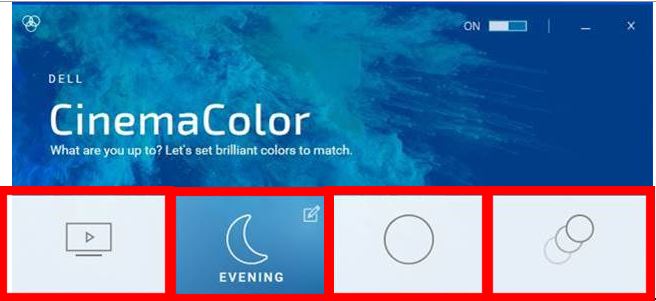
- No response while switching modes in the Dell CinemaColor main user interface
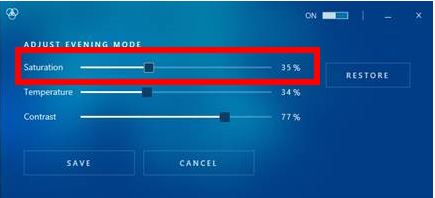
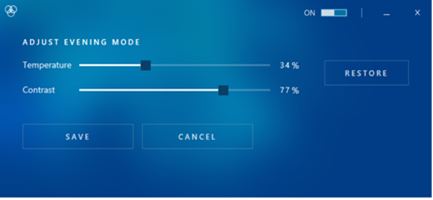
- Saturation Bar is missing in setting menu.
There is no response while switching four different modes using Dell CinemaColor main screen and the Saturation bar is missing in setting screen.
|
|
|
|
|
|
Cause
No cause information
Resolution
To resolve:
- Verify Dell CinemaColor System Requirements
- Go to Dell Support
- Enter your Service Tag and then press Search.
- Click Drivers & Downloads.
- Click Manually find a specific driver.
- Download one of the following drivers:
- Intel UHD Graphics Driver
- Intel UHS/Iris Xe Graphics Driver
- Intel HD Graphics Driver
Note: Your Inspiron or Vostro model only has one of the listed drivers.
- Install the driver.
- Reboot the computer.
Affected Products
Inspiron 5301, Inspiron 13 5310, Inspiron 7300, Inspiron 3480, Inspiron 3482, Inspiron 5400 2-in-1, Inspiron 5401/5408, Inspiron 5402/5409, Inspiron 5406 2-in-1, Inspiron 14 5410 2-in-1, Inspiron 14 5410/5418, Inspiron 5490, Inspiron 5491 2-in-1
, Inspiron 7400, Inspiron 3580, Inspiron 3582, Inspiron 3583, Inspiron 5502/5509, Inspiron 15 5510/5518, Inspiron 5591 2-in-1, Inspiron 15 7510, Inspiron 16 7610, Inspiron 3780, Inspiron 3782, Inspiron 7706 2-in-1, Inspiron 3280 AIO, Inspiron 3480 AIO, Inspiron 5400 AIO, Inspiron 5401 AIO, Inspiron 5491 AIO, Inspiron 7700 AIO, Vostro 14 5410, Vostro 15 5510
...
Products
Inspiron, Vostro, Inspiron, Vostro, Inspiron 7700 AIOArticle Properties
Article Number: 000126003
Article Type: Solution
Last Modified: 18 Apr 2025
Version: 11
Find answers to your questions from other Dell users
Support Services
Check if your device is covered by Support Services.