Dell Latitude 전원 버튼 LED 표시등 문제 해결 및 솔루션
Summary: Dell Latitude 노트북의 전원 버튼 LED가 켜지지 않습니까? 이 문제의 원인과 문제 해결 방법을 알아봅니다.
This article applies to
This article does not apply to
This article is not tied to any specific product.
Not all product versions are identified in this article.
Instructions
목차:
1. 전원 단추가 더 이상 전원 상태를 나타내는 데 사용되지 않음
특정 Dell Latitude 시스템에서는 전원 버튼이 더 이상 시스템의 전원 상태를 표시하는 데 사용되지 않으므로 누를 때 불이 들어오지 않습니다. 별도의 전원 표시등이 사용됩니다.
이 변경 사항이 적용되는 시스템:
3000 시리즈
- Latitude 14 - 3460 및 3470
- Latitude 15 - 3560 및 3570
자세한 내용은 아래 섹션과 온라인 사용자 설명서를 참조하십시오.
2. Latitude 3000 시리즈
다음 모델에서는 전원 버튼이 키보드의 오른쪽 상단 옆에 있습니다.
Latitude 3460/3560/3470/3570
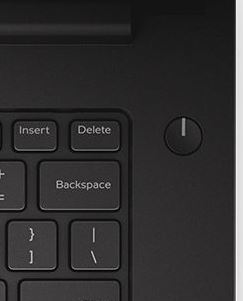
(그림 1: 전원 버튼의 위치)

(그림 2: 상태 LED의 위치)
| 1 | 전원 표시등 - 컴퓨터 전원 관리 표시등. |
| 2 | 하드 드라이브 작동 표시등 - 하드 드라이브 작동 표시등 |
| 3 | 배터리 표시등 - 배터리 전원 관리 표시등 |
Affected Products
Latitude 3460, Latitude 3470, Latitude 3560, Latitude 3570Article Properties
Article Number: 000128552
Article Type: How To
Last Modified: 14 Nov 2025
Version: 6
Find answers to your questions from other Dell users
Support Services
Check if your device is covered by Support Services.