Dell Latitude 电源按钮 LED 指示灯问题故障处理和解决方案
Summary: 戴尔 Latitude 笔记本电脑的电源按钮 LED 指示灯是否不亮?找出此问题背后的原因,以及如何进行故障处理和解决。
This article applies to
This article does not apply to
This article is not tied to any specific product.
Not all product versions are identified in this article.
Instructions
目录:
1.电源按钮不再用于指示电源状态
在某些戴尔 Latitude 系统上,电源按钮不再用于指示系统的电源状态,因此在按下时不会亮起。使用单独的电源指示灯。
受此更改影响的系统
3000系列
- Latitude 14 - 3460和3470
- Latitude 15 - 3560和3570
有关更多详细信息,请参阅以下部分以及在线 用户手册 。
2.Latitude 3000系列
在以下型号上,电源按钮位于键盘右上角的旁边。
Latitude 3460/3560/3470/3570
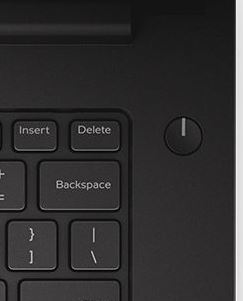
(图 1:电源按钮的位置)

(图 2:状态 LED 指示灯的位置)
| 1 | 电源指示灯 - 计算机电源管理指示灯。 |
| 2 | 硬盘活动指示灯 — 硬盘活动指示灯 |
| 3 | 电池指示灯 - 电池电源管理指示灯 |
Affected Products
Latitude 3460, Latitude 3470, Latitude 3560, Latitude 3570Article Properties
Article Number: 000128552
Article Type: How To
Last Modified: 14 Nov 2025
Version: 6
Find answers to your questions from other Dell users
Support Services
Check if your device is covered by Support Services.