Errors Accessing Compliance Reporter in Dell Data Protection Enterprise Edition
Summary: This article provides information when users receive a certificate error, 'The security certificate presented by this website was issued for a different website’s address', when accessing the Compliance Reporter. ...
This article applies to
This article does not apply to
This article is not tied to any specific product.
Not all product versions are identified in this article.
Symptoms
Affected Products:
- Dell Security Management Server
- Dell Data Protection | Enterprise Edition
Cause
Compliance Reporter is an Apache tomcat service that, by default, listens on HTTPS using port 8084.
Since this service is Java-based it leverages a java keystore file, typically called cacerts, to store the certificate that is used to establish the secure connection.
If the hostname used when establishing the secure connection to Compliance Reporter is not present in the configured certificate, then the user’s browser indicates a certificate error similar to the figure below.
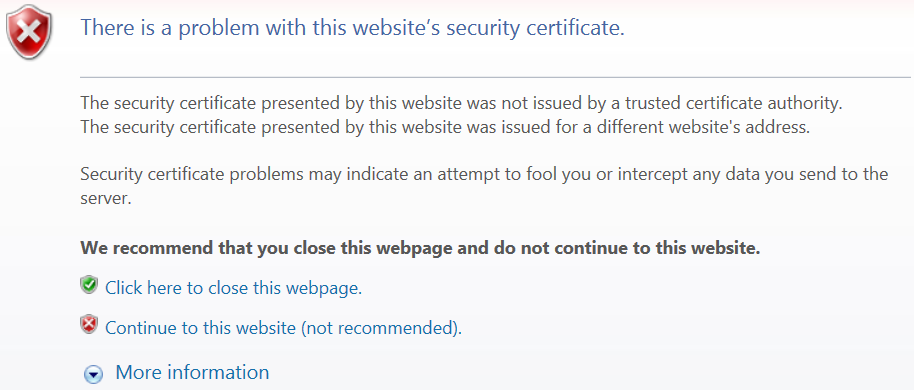
Figure 1: (English Only) There is a problem with this website's security certificate
Resolution
To prevent the error, Dell Security Management Server (formerly Dell Data Protection | Enterprise Edition) configuration files and the certificate in the java keystore file must match. Depending on the current state of the server, this could involve generating a new java keystore with a different certificate, updating the server configuration files to use a different hostname, or both.
Note: This behavior is expected when using self-signed certificates even when the certificate and configuration is synchronized. The only way to prevent the user from seeing the error it to install the certificate in the Microsoft Keystore’s Trusted Root Certification Authorities folder.
For information about updating the Java Keystore, reference How to update the certificate for Dell Encryption \ Dell Data Protection Encryption services using an existing certificate in the Microsoft keystore.
The application.properties file must be modified to modify the hostname that is used when accessing the compliance reporter. The path to the file listed below is the default location and may not accurately reflect the file location in a customized environment.
- Stop the Security Server Service.
- Modify the settings in the file below.
| File Name | Settings |
|---|---|
| C:\Program Files\Dell\Enterprise Edition\Security Server\conf\application.properties | reporter.server.url=https://TESTSERVER2.testlab.com:8084/reporter |
- Once we have set the location, we can restart the Security Server Service and test.
For information about updating the Java Keystore, reference How to update the certificate for Dell Encryption \ Dell Data Protection Encryption services using an existing certificate in the Microsoft keystore.
Multiple configuration files must be modified, to modify the hostname that is used when accessing the compliance reporter. The paths to the files listed below are the default locations and may not accurately reflect the file locations in a customized environment.
- Stop all services and IIS.
- Modify the settings in the files listed below.
| File Name | Settings |
|---|---|
| C:\inetpub\wwwroot\console\web.config | <add key="ReporterHost" value="TESTSERVER.organization.domain" /> |
| C:\Program Files\Dell\Enterprise Edition\Compliance Reporter\conf\eserver.properties | eserver.default.host=TESTSERVER.organization.domain |
| C:\Program Files\Dell\Enterprise Edition\Console\Credant.Console.exe.xml | <Setting Name="ReporterHost" Type="System.String"> <Value>TESTSERVER.organization.domain</Value> </Setting> |
| C:\Program Files\Dell\Enterprise Edition\Console\Credant.Console.exe.Config | <add key="ReporterHost" value="TESTSERVER.organization.domain" /> |
| C:\Program Files\Dell\Enterprise Edition\Security Server\conf\application.properties | reporter.server.url=https://TESTSERVER2.testlab.com:8084/reporter |
- Once we have set the location that we want, we can restart all services and test.
To contact support, reference Dell Data Security International Support Phone Numbers.
Go to TechDirect to generate a technical support request online.
For additional insights and resources, join the Dell Security Community Forum.
Affected Products
Dell EncryptionArticle Properties
Article Number: 000130909
Article Type: Solution
Last Modified: 05 Jan 2024
Version: 10
Find answers to your questions from other Dell users
Support Services
Check if your device is covered by Support Services.