Auto-rotate on Windows 10 fails to function if Turn off sensors is enabled in Group Policy settings
Summary: Configure Group Policy for Turn off sensors to ensure auto-rotate feature works correctly in Windows 10.
This article applies to
This article does not apply to
This article is not tied to any specific product.
Not all product versions are identified in this article.
Symptoms
Enabling the Group Policy within Windows 10 to Turn off sensors may result in the auto-rotate feature not working correctly. Follow the steps in this article to ensure that this Group Policy is configured to allow for auto-rotate functionality.
Auto-rotate feature not working in Windows 10
If the Group Policy which controls the Location and Sensors / Turn off sensors within Windows 10 is set to Enabled (Figure 1), then the auto-rotate feature within Windows 10 does not function correctly. This issue has been reported on the Dell Latitude 5285 but may affect other Windows 10 tablets or laptops using the auto-rotate feature.
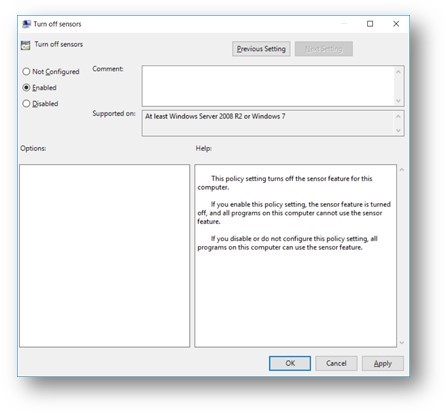
Figure 1: Windows 10 Turn off sensors Group Policy Enabled
Cause
Not Applicable
Resolution
To ensure that this Group Policy is configured correctly within Windows 10 for the auto-rotate feature, follow the steps below:
- Type gpedit.msc in the search box and click the gpedit.msc in the search results to open the Local Group Policy Editor.
- Go to the following folder location: Local Computer Policy > Administrative Templates > Windows Components > Location and Sensors
- Double-click Turn off sensors from the list of settings that appears.
- Select the default Not Configured setting and click Apply to save the changes.
- Reboot the computer and test the auto-rotate functionality within Windows 10.
Affected Products
Latitude 5285 2-in-1Article Properties
Article Number: 000135529
Article Type: Solution
Last Modified: 01 Oct 2025
Version: 5
Find answers to your questions from other Dell users
Support Services
Check if your device is covered by Support Services.